# How To Let Users Request Short-lived Access With BetterShield Ultra?
Allow selected roles to ask for extra access for 1 to 8 hours, approve or deny it, and track expiry.
With **[BetterShield Ultra](/ultra/)**, allow selected roles to ask for extra access for 1 to 8 hours, approve or deny it, and track expiry.
_**Note:** These controls require the paid [BetterShield Ultra](/ultra/) add-on alongside the free BetterShield plugin._
## What it does
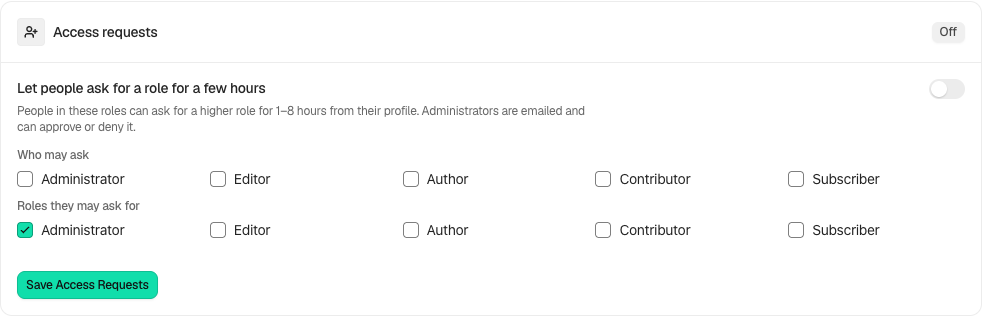
Open **BetterShield › Ultra › Temporary access**. **Access requests** lets selected roles ask for a higher role from their profile. Administrators receive the request and can approve or deny it. Approved access ends automatically. Requests with no answer expire after 24 hours, and the requester is emailed when that happens.
## Step 1: Open Let people ask for a role for a few hours
Enable **Let people ask for a role for a few hours**. It starts off.
Review the state and choices shown on your own site before applying a change.
## Step 2: Let users request short-lived access
- Select **Who may ask** and **Roles they may ask for**, then select **Save Access Requests**.
- The requester selects a role and duration from 1 to 8 hours in their profile.
- Read the request and choose **Approve** or **Deny**.
- Review the active grant above; end it early when it is no longer needed.
## Recommended settings
Our advice: allow only the roles that have an operational reason to request access, and use the shortest duration that covers the task.
## What it can break and how to undo
An approved role can change the site while the grant lasts. End the grant early to restore the prior roles. Changing request settings can cancel pending requests; check their displayed result instead of answering an outdated request.
## Final Outcome
The request moves from waiting to its actual result and shows who answered. After approval, verify both the role and automatic expiry; after no answer, verify the expiry notification.
Example Access requests view. Check the saved values and status on your own site.
## Related
- [Ultra overview](/docs/ultra-overview/)
- [Activity log](/docs/activity-log/)
- [Temporary access](/docs/temporary-access/)
- [Your profile](/docs/your-profile/)
This is how you can let users request short-lived access with BetterShield Ultra.
Getting Stuck? Feel free to contact our [Dedicated Support Team](/support/).