# How To Schedule and Complete Access Reviews With BetterShield Ultra?
Choose a reviewer, review privileged access and save a receipt of what was kept, suspended, ended or revoked.
With **[BetterShield Ultra](/ultra/)**, choose a reviewer, review privileged access and save a receipt of what was kept, suspended, ended or revoked.
_**Note:** These controls require the paid [BetterShield Ultra](/ultra/) add-on alongside the free BetterShield plugin._
## What it does
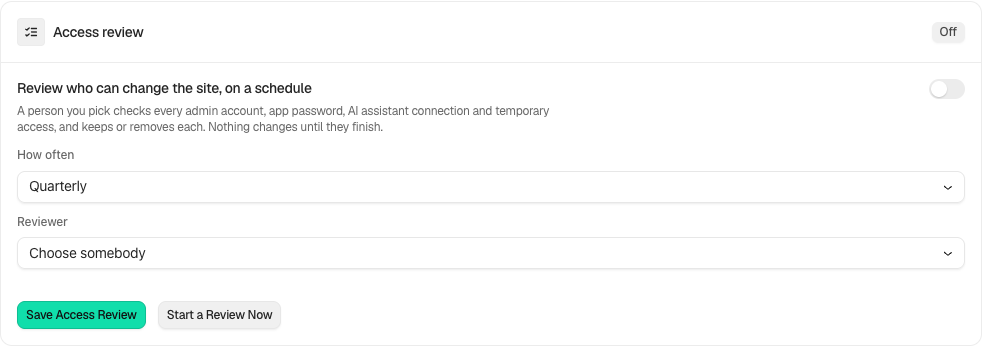
Open **BetterShield › Ultra › Administrator accounts**. **Access review** lists administrator accounts, application passwords, assistant connections and temporary grants for a named reviewer. Nothing changes until the review is completed. It starts off; the default schedule when configured is quarterly.
## Step 1: Open How often
Choose **How often**: **Monthly**, **Quarterly** or **Yearly**.
Review the state and choices shown on your own site before applying a change.
## Step 2: Schedule and complete access reviews
- Choose a permanent administrator as reviewer and select **Save Access Review**. A temporary administrator cannot be the reviewer.
- Use **Start a Review Now**, or open the scheduled review.
- Decide **Keep** or **Remove** for every listed item. Read the effects, then choose **Complete the Review**.
- Save a JSON, CSV or printed receipt from **Past reviews**.
## Recommended settings
Our advice: confirm each access item with its owner before taking it away. Keep the receipt with your client records.
## What it can break and how to undo
Removing an account blocks its sign-in and can be reversed through **Allow Sign-In Again**. Revoking an application password or assistant connection, or ending a grant, cannot recover that credential or grant. A receipt reports partial failures; do not assume every requested removal succeeded.
## Final Outcome
The completed receipt names decisions and outcomes, including anything that could not be taken away. Accounts suspended by the review have a separate way to allow sign-in again.
In the activity log, a review row says what the review held instead of showing an id. An opened review reads like **3 accounts and ways in to review**. A completed one reads like **2 kept, 1 taken away**, with **could not be taken away** added when something failed.
Example Access reviews view. Check the saved values and status on your own site.
## Related
- [Ultra overview](/docs/ultra-overview/)
- [Activity log](/docs/activity-log/)
- [Assistant connections](/docs/assistant-connections/)
- [Temporary access](/docs/temporary-access/)
This is how you can schedule and complete access reviews with BetterShield Ultra.
Getting Stuck? Feel free to contact our [Dedicated Support Team](/support/).