# How To Review Administrator Access With BetterShield Ultra?
Choose an emergency account, handle unused administrators and review who still needs privileged access.
With **[BetterShield Ultra](/ultra/)**, choose an emergency account, handle unused administrators and review who still needs privileged access.
_**Note:** These controls require the paid [BetterShield Ultra](/ultra/) add-on alongside the free BetterShield plugin._
## What it does
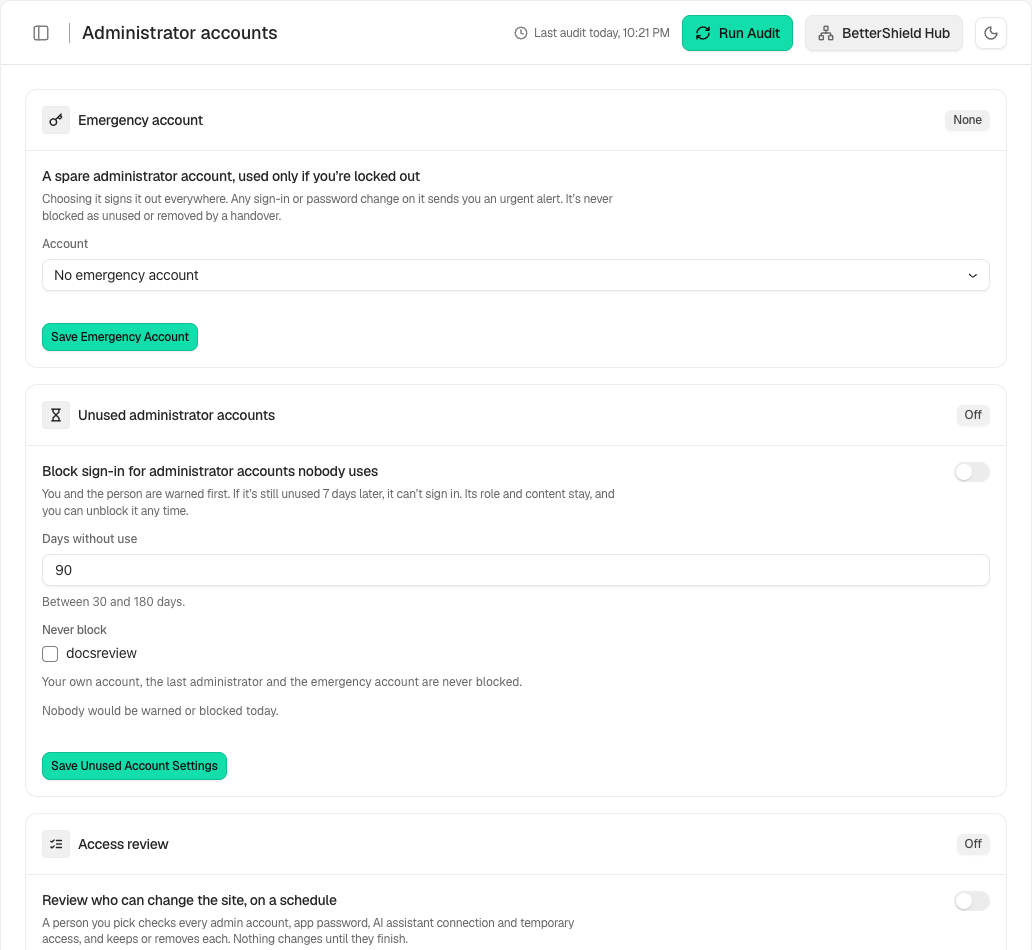
Open **BetterShield › Ultra › Administrator accounts**. This screen groups three separate controls: an emergency administrator, unused administrator accounts and scheduled access reviews. Each has its own save and safeguards. It does not automatically remove every old administrator.
## Step 1: Open the feature
Review the [emergency account](/docs/emergency-account/) and choose a permanent administrator kept for recovery.
Review the state and choices shown on your own site before applying a change.
## Step 2: Review administrator access with Ultra
- Configure [unused administrator handling](/docs/unused-administrators/) only after checking the warning preview.
- Choose a reviewer and schedule for [access reviews](/docs/access-reviews/).
## Recommended settings
Our advice: keep at least one client-owned permanent administrator and a tested way back in. Review application passwords and assistant connections as well as people.
## What it can break and how to undo
A suspension stops sign-in while preserving the account’s role and content. Use **Allow Sign-In Again** where offered. Revoking a credential or ending temporary access is a different action and cannot recover the old secret.
## Final Outcome
Read each saved card and the access-review receipt. The emergency account must remain excluded from handover and unused-account handling.
Example Administrator accounts view. Check the saved values and status on your own site.
## Related
- [Ultra overview](/docs/ultra-overview/)
- [Activity log](/docs/activity-log/)
- [Emergency account](/docs/emergency-account/)
- [Unused administrators](/docs/unused-administrators/)
- [Access reviews](/docs/access-reviews/)
This is how you can review administrator access with BetterShield Ultra.
Getting Stuck? Feel free to contact our [Dedicated Support Team](/support/).