# How To Give an Assistant Read Access With BetterShield?
Turn on BetterShield's read opt-in so connected assistants can discover and read registered security abilities.
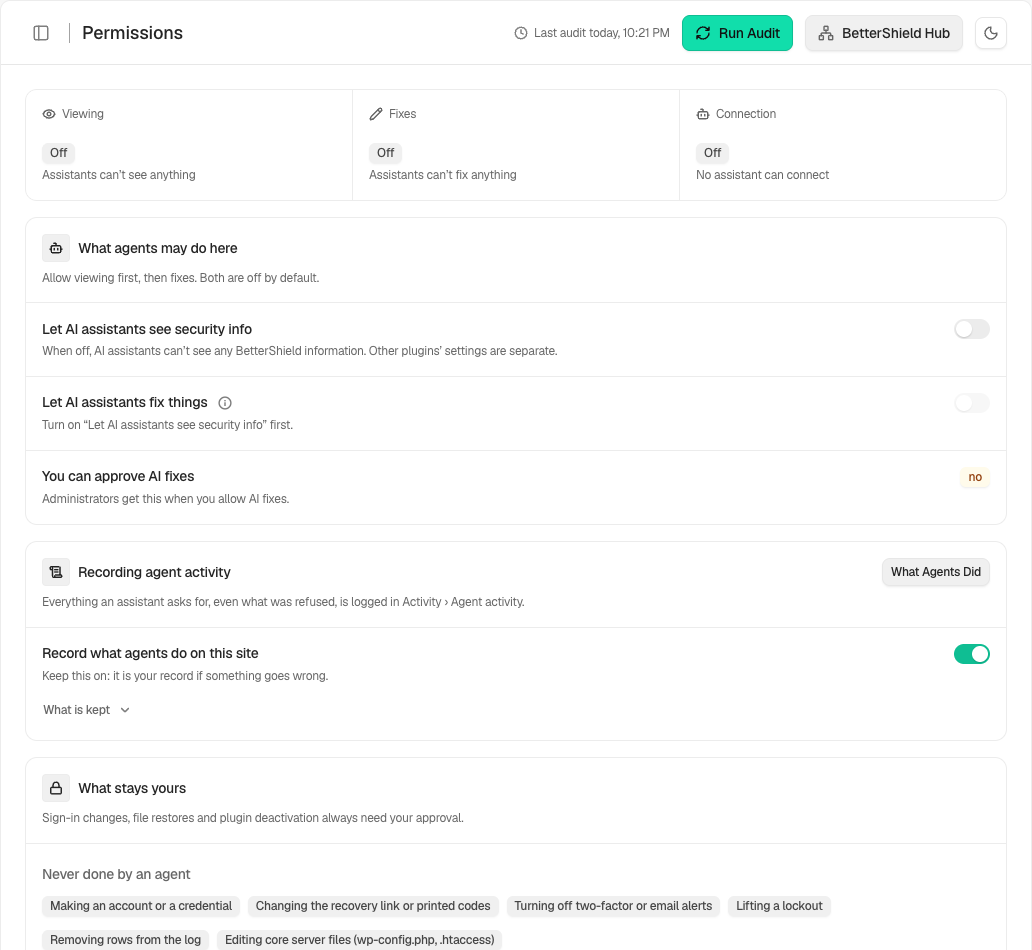
In **[BetterShield](/)**, the root permission is **Let AI assistants see security info** under **BetterShield › Agents › Permissions**. The **Connect** tab shows whether it is on.
## What it does
Turning it on registers BetterShield's readable abilities. These can report scores, findings, protections, selected settings, activity, incidents, file-check status, versions, connection state, and related security information. Sensitive values such as credentials, connector keys, file contents, named alert recipients, and usernames in lockout data are not returned by these abilities.
## Step 1: Give an Assistant Read Access
Open **Agents › Permissions** and turn on **Let AI assistants see security info**. This is off by default. A connection still needs its own key or browser approval. Turning on **Allow AI assistant connections** on **Connect** turns this on as well.
With read access off, nothing is registered for an assistant to discover.
## Recommended settings
Start with read access only. Confirm what appears under **Agents › Agent surface** before allowing changes.
## What it can break and how to undo
Read abilities do not change the site, but they expose security posture to authorized connections. Turn the switch off to unregister them. Turning it off also turns agent change access off.
## Final Outcome
The **AI assistant access** strip at the top of the Agents screens should show reading as on, and **Registered abilities** on **Surface** should list BetterShield abilities. Test a connection with a read call.
Example Agent read access view. Check the saved values and status on your own site.
## On multisite
Access is configured per site. A super administrator can read the limited network ability where available.
## Current read tools
The Free 1.1.4 read surface includes 28 bounded read-only abilities. **get-security-overview** combines score, history, findings with available fixes and recovery readiness. One more read, new in 1.1.4, lists the fix options on a finding, so an assistant can look before it proposes a fix. Ultra can add its own reads, including its feature overview, the scheduled work board and a comparison of a log checkpoint you hold against the site. The actual list also depends on the app’s saved tool selection and enabled permissions.
## Related
- [Review abilities registered on this site](/docs/registered-agent-abilities/)
- [Create, test and end assistant connections](/docs/assistant-connections/)
- [Let an AI assistant apply approved changes](/docs/agent-change-access/)
This is how you can give an assistant read access with BetterShield.
Getting Stuck? Feel free to contact our [Dedicated Support Team](/support/).