# How To Run BetterShield Alongside Another Security Plugin?
How BetterShield finds another security plugin, how Quick Setup splits the shared jobs, what stands down, and when to switch over fully.
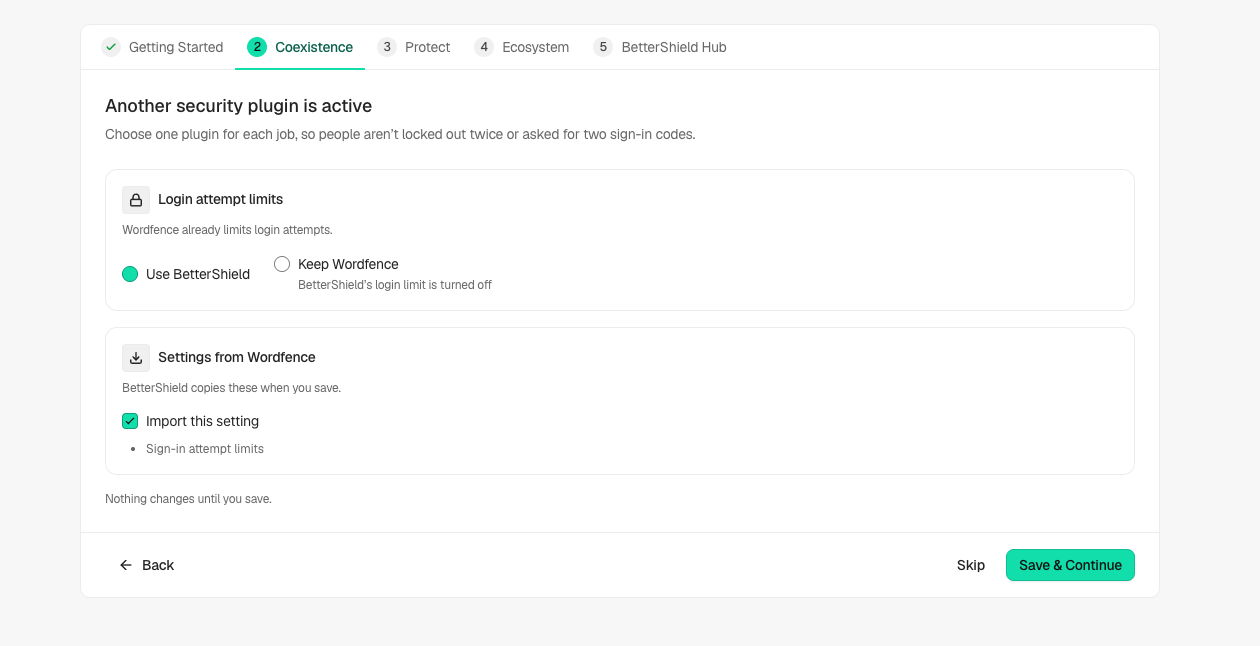
[BetterShield](/) recognizes shared security jobs and asks which plugin should handle each one. **Quick Setup › Coexistence** is shown when an active plugin shares a recognized job. Review the proposed choices before saving; they now start with **Use BetterShield**.
## What it does
For sign-in attempt limits and two-factor, choose **Use BetterShield** or **Keep** the named plugin. If you keep the other plugin’s sign-in limiter, BetterShield’s own limiter stands down. If you keep its two-factor, BetterShield does not set up its own enrollment in the wizard.
Other rows can explain existing login-address, HTTPS, vulnerability-protection or firewall behavior. These statements are not proof that every possible overlap was detected. Optional vulnerability checks in BetterShield report advisories; they do not automatically replace the other plugin’s blocking features.
## Step 1: Keep Recovery Ready
Save a recovery link or recovery codes outside the site.
Example Coexistence preview. Review the settings and choices detected on your own site before saving.
## Step 2: Run BetterShield alongside another security plugin
- Open the Coexistence step and review the settings it can copy from the previous plugin.
- Select one plugin for each shared sign-in job, then read the main button and its explanation. When all shared jobs move to BetterShield, it reads **Migrate & Deactivate**, with the number of plugins when needed. A mixed choice uses **Save & Continue**.
- Read what each deactivation stops, including features BetterShield does not replace. Review which accounts keep their authenticator app and which must set up two-factor again. The summary offers **Turn It Back On** for a plugin switched off in setup.
- Where your permissions or a network-wide activation prevent deactivation here, use the indicated Plugins screen or ask the network administrator.
Supported migration sources now include Wordfence, Kadence Security, All-In-One Security, Really Simple Security, Limit Login Attempts Reloaded, Loginizer, Security Optimizer and Login Lockdown. The preview lists the supported settings and anything left behind.
Quick Setup recognizes more sign-in and two-factor plugins in 1.1.6. Recognition means it can explain a shared job; only the supported settings listed in your preview are copied.
## Recommended settings
Our advice is to let one plugin handle sign-in limiting and one handle two-factor. Test the replacement before ending your current session. Authenticator apps can move from Two Factor, WP 2FA, Wordfence and Wordfence Login Security when two-factor is handed to BetterShield and the source is deactivated. Other methods or unreadable setups need enrollment again. Backup codes never move. Follow [Move existing two-factor accounts](/docs/migrate-two-factor/).
## What it can break and how to undo
Deactivation stops every feature of the named plugin, including features BetterShield may not replace. Its settings stay saved, so reactivate it through Plugins if needed. Undo supported copied settings through BetterShield’s recorded changes; that does not reactivate a plugin. For a partial import, read the receipt before deciding the switch is complete.
## Final Outcome
Check the saved job choices, actual active plugins, proxy handling and a normal sign-in. Read overlap warnings on individual hardening fixes as well as the setup summary.
Example Coexistence preview. Review the settings and choices detected on your own site before saving.
## Related
- [Install and set up](/docs/install-and-set-up/)
- [Move settings between sites](/docs/move-settings-between-sites/)
- [Security plugin roles](/docs/security-plugin-roles/)
- [Set up recovery](/docs/set-up-recovery/)
This is how you can run BetterShield alongside another Security plugin.
Getting Stuck? Feel free to contact our [Dedicated Support Team](/support/).