# How To Block Automated Form Submissions With BetterShield?
How BetterShield's hidden bot check works on sign-in, registration and comment forms, what a refused submission sees, and when it gets in the way.
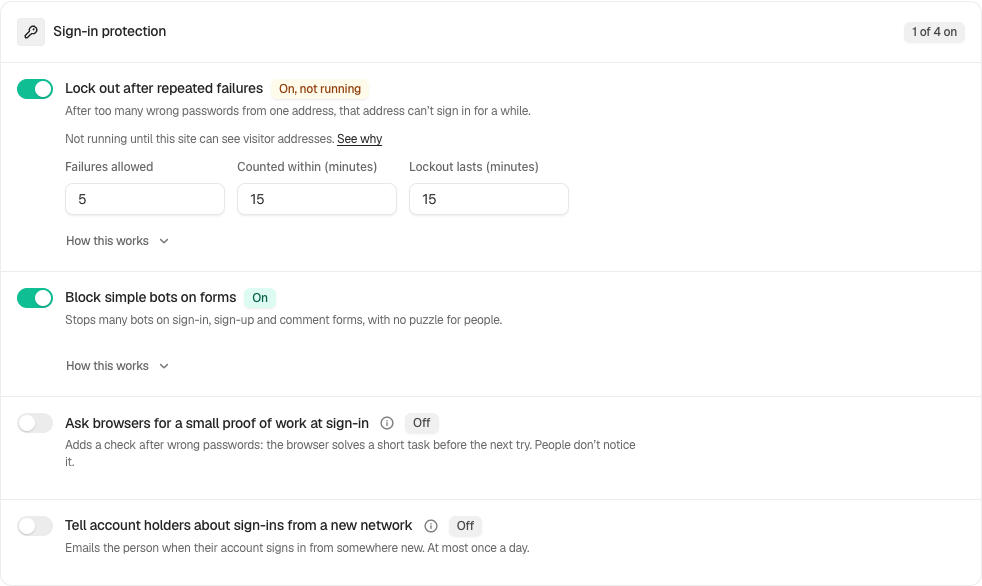
In **[BetterShield](/)**, **Block simple bots on forms** is a hidden check on the sign-in, registration and comment forms that turns away simple scripts. People see nothing and solve nothing. In the screen's own words, it cuts bot noise; it does not stop a targeted attacker. It is on by default, under **Sign-in protection** on **BetterShield › Protection › Login & Access**.
## What it does
It adds two things to each form it covers: a text field labelled "Leave this field empty" that people never see (hidden where it stands, out of the tab order and hidden from screen readers), and a signed timestamp. It needs no JavaScript and no outside service.
A submission is refused when:
- the hidden field comes back filled in, as scripts that fill every field do;
- the timestamp is empty, altered or not signed by this site (a submission with no timestamp field at all is treated as a form BetterShield did not draw, and is not checked);
- it arrives less than two seconds after the form was drawn.
An old timestamp is fine: a cached page, or a tab left open for an hour, still works.
| Form | When it checks | What a refused submission sees |
|---|---|---|
| WordPress sign-in, and the WooCommerce My Account sign-in form | Only when the password was right. A wrong password fails the usual way. | "That was sent a moment after the page opened, which is quicker than this site lets a sign-in through. Wait a second, then sign in again." when it only came too fast; otherwise "That did not go through. Please try signing in again." |
| WordPress registration, and the WooCommerce My Account registration form | Every submission | "That did not go through. Please try again." |
| Comment form | Signed-out commenters only | A page titled "Comment not posted": "That did not go through. Please go back and try again." |
It is never added to the WooCommerce cart or checkout, and it does not check accounts created there.
A form BetterShield did not draw carries no hidden field and is never checked: a sign-in form drawn by a theme or page builder rather than the WordPress sign-in page or WooCommerce's My Account, XML-RPC, application passwords and the REST API. Sign-in pauses still cover those.
A refusal never counts toward a sign-in pause. The check applies to every visitor, addresses on **Always allowed** included.
## Step 1: Open BetterShield › Protection › Login & Access
Open **BetterShield › Protection › Login & Access**.
Sign-in protection includes the hidden bot check and sign-in puzzle controls.
## Step 2: Refuse automated sign-ins, sign-ups and comments
- Under **Sign-in protection**, turn **Block simple bots on forms** on or off.
- Press **Save**.
| Option | What it does | Default |
|---|---|---|
| **Block simple bots on forms** | Adds the hidden field and clock to the sign-in, registration and comment forms, and refuses submissions that fail them. | On |
## Recommended settings
Keep it on. It costs people nothing, and it takes the simplest scripts off your sign-in and comment forms before they reach anything else. Pair it with [sign-in lockouts](/docs/sign-in-lockouts/) and [public form limits](/docs/form-limits/), which handle the scripts it does not catch.
On a store, keep it on too: the cart and checkout are left alone.
## What it can break, and how to undo
- **Instant auto-submit.** A password manager or browser extension that fills the sign-in form and submits it within two seconds of the page loading is refused, and the form says it was sent too soon and to wait a second. Pressing sign in again a moment later works. Turning off auto-submit in that tool stops it happening.
- **Forms it cannot see.** A custom form is not checked rather than refused, so nothing breaks there, but nothing is caught either.
- **Turning it off.** Switch it off and press **Save**. With **Ask for my password before removing a protection** on, that asks for your password. Safe mode also pauses it while it lasts.
## Final Outcome
**The form itself.** View the source of your sign-in page or a post with comments open and look for "Leave this field empty".
- **The activity log.** Refusals are recorded as "Automated submission refused" (in a flood of more than 500 an hour, the rest of that hour are counted rather than listed one by one).
- **The switch.** The row under **Sign-in protection** reads **On**, and the count in the **Sign-in protection** card's header, such as "2 of 4 on", includes it.
Sign-in protection includes the hidden bot check and sign-in puzzle controls.
## Related
- [Login & Access](/docs/login-and-access/)
- [Sign-in lockouts](/docs/sign-in-lockouts/)
- [Public form limits](/docs/form-limits/)
- [Activity log](/docs/activity-log/)
This is how you can block automated form submissions with BetterShield.
Getting Stuck? Feel free to contact our [Dedicated Support Team](/support/).