# How To Set a Decoy URL With BetterShield?
Choose an unused path that returns the normal 404 page and raises an urgent alert when requested.
In **[BetterShield](/)**, configure the path under **BetterShield › Agents › Agent surface › Decoy URL**.
## What it does
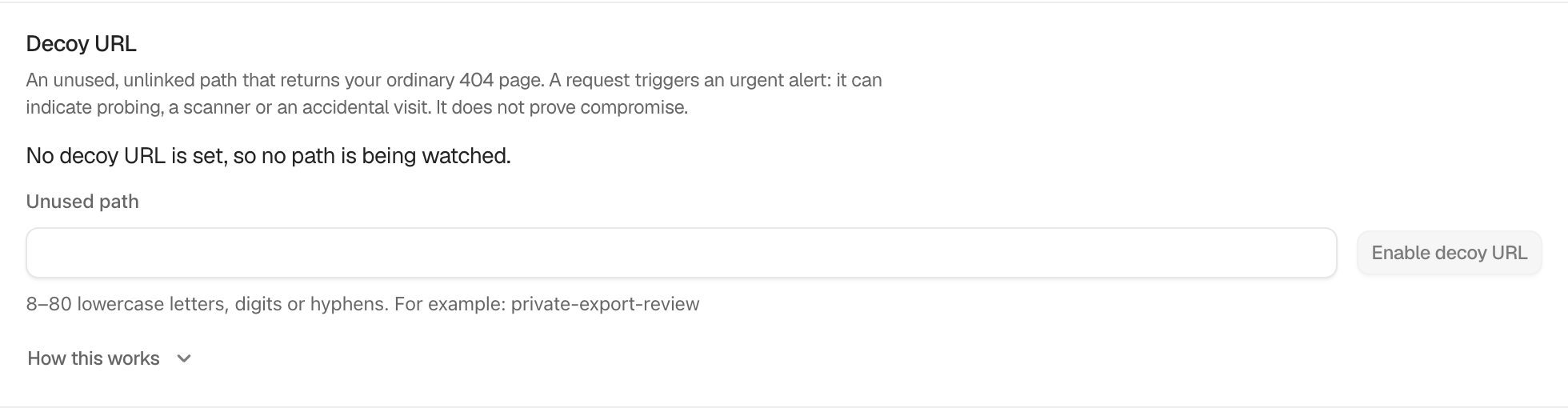
The decoy returns the site's ordinary 404 page. A request is recorded and sent through the urgent alert path. It can indicate a scanner, probing, or an accidental visit. It does not prove that the site was compromised.
The **Unused path** must contain 8 to 80 lowercase letters, digits, or hyphens and start with a letter. WordPress and BetterShield paths are reserved. The default is off with no path.
## Step 1: Set a Decoy URL
Enter an unused value such as `private-export-review`, select **Enable decoy URL**, and keep the resulting URL out of menus, sitemaps, analytics tests, and monitoring.
The path must be unused, unlinked, and valid before it can be enabled.
## Recommended settings
Choose a path that no legitimate plugin, page, redirect, or sign-in route uses. Record its purpose in private operational notes without sharing the URL broadly.
## What it can break and how to undo
If content or the sign-in address later takes this path, the decoy stands down there and the screen says why. Accidental requests create urgent alerts. Select **Disable decoy URL** and choose another unused path.
## Final Outcome
Use **Test matcher without alerting** when shown. Do not browse to the live path as a routine test because that creates the real event.
Example Decoy URL view. Check the saved values and status on your own site.
## Related
- [Keep a decoy credential](/docs/decoy-credential/)
- [Send important security alerts straight away](/docs/instant-security-alerts/)
- [Filter and search site activity](/docs/filter-activity-log/)
This is how you can set a decoy URL with BetterShield.
Getting Stuck? Feel free to contact our [Dedicated Support Team](/support/).