# How To Delay Automatic Plugin and Theme Updates With BetterShield Ultra?
Hold ordinary automatic updates for 1 to 7 days while letting security fixes and manual updates install immediately.
With **[BetterShield Ultra](/ultra/)**, hold ordinary automatic updates for 1 to 7 days while letting security fixes and manual updates install immediately.
## What it does
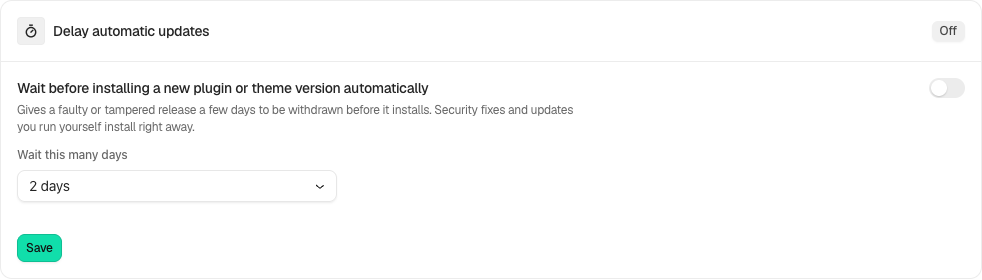
Open **BetterShield › Ultra › Automatic response**. **Delay automatic updates** gives an ordinary plugin or theme release time before it installs automatically. It starts off, with an initial wait of 2 days. Security fixes and updates you start yourself bypass the delay. This control is separate from any vulnerability-driven automatic response.
## Step 1: Open Wait before installing a new plugin or theme version automatically
Find **Wait before installing a new plugin or theme version automatically**.
Review the state and choices shown on your own site before applying a change.
## Step 2: Delay automatic plugin and theme updates
- Choose **Wait this many days**, from 1 to 7, and enable the delay.
- Select **Save**.
- Review **Updates waiting** and its installation times. **Install Now** permits a selected update early.
- On multisite, a network administrator configures the delay from the main site for the network.
## Recommended settings
Our advice: keep reliable security-update handling and review waiting releases regularly. A delay is not proof that an update is safe after the waiting period.
## What it can break and how to undo
Ordinary fixes or features arrive later. Turn the delay off to allow waiting updates at the next automatic run, or install one manually. This does not roll back a version already installed.
## Final Outcome
Confirm the saved delay and pending list. Updates run when WordPress’s scheduled updater runs, so a displayed release time is not a promise of installation at that exact second.
Example Delay automatic updates view. Check the saved values and status on your own site.
## Related
- [Ultra overview](/docs/ultra-overview/)
- [Activity log](/docs/activity-log/)
- [Scheduled tasks](/docs/schedules/)
- [Automatic response](/docs/automatic-response/)
This is how you can delay automatic plugin and theme updates with BetterShield Ultra.
Getting Stuck? Feel free to contact our [Dedicated Support Team](/support/).