# How To Delete your BetterShield Hub Account?
Delete your BetterShield Hub account after leaving or handing over workspaces and confirming the permanent effects.
In **[BetterShield Hub](/bettershield-hub/)**, **Delete your account** on **Settings › Account** permanently removes the Hub account after its workspace responsibilities are resolved.
_**Note:** Sign in to your free [BetterShield Hub](/bettershield-hub/) account. Your workspace role and site permissions determine which information and actions you can use._
## What it does
The deletion flow explains what happens to memberships, personal security methods and account data. Hub can require a recent sign-in, passkey, authenticator code or emailed code before completing it.
## Step 1: Open the feature
Transfer any workspace you own or delete it deliberately.
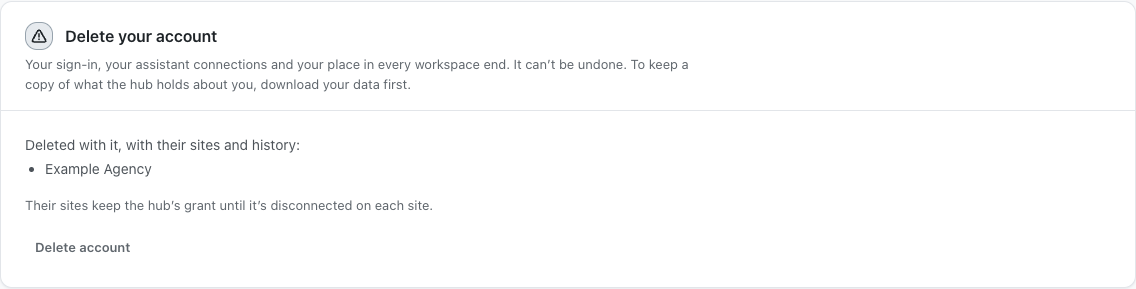
The Delete account card explains the account removal and ownership requirements.
## Step 2: Delete your BetterShield Hub account
- Leave workspaces you no longer need.
- Export data you are authorized to keep.
- Open **Settings › Account** and select **Delete your account**.
- Read the confirmation, provide the requested proof and confirm deletion.
Account deletion is off until you start and confirm it.
## Recommended settings
Our advice:
- Use **Leave this workspace** when only one membership should end.
- Confirm another owner has ongoing work before deletion.
- Disconnect personal assistant connections first.
## What it can break and how to undo
Deletion ends your Hub access and cannot be undone. A new account does not restore the deleted account's memberships, passkeys or history.
Stop before the final confirmation if any workspace ownership or record is unresolved.
## Final Outcome
Hub refuses deletion while an ownership requirement remains.
- Successful deletion signs the account out.
- The deleted sign-in no longer opens the old account.
The Delete account card explains the account removal and ownership requirements.
## Related
- [Leave a Hub workspace](/docs/leave-hub-workspace/)
- [Transfer a Hub workspace](/docs/transfer-hub-workspace/)
- [Export your Hub account data](/docs/hub-data-export/)
This is how you can delete your BetterShield Hub account.
Getting Stuck? Feel free to contact our [Dedicated Support Team](/support/).