# How To Turn Off XML-RPC With BetterShield?
See whether anything uses XML-RPC, watch real requests with Monitor first, turn it off, and know what stops working and how to put it back.
With **[BetterShield](/)**, see whether anything uses XML-RPC, watch real requests with Monitor first, turn it off, and know what stops working and how to put it back.
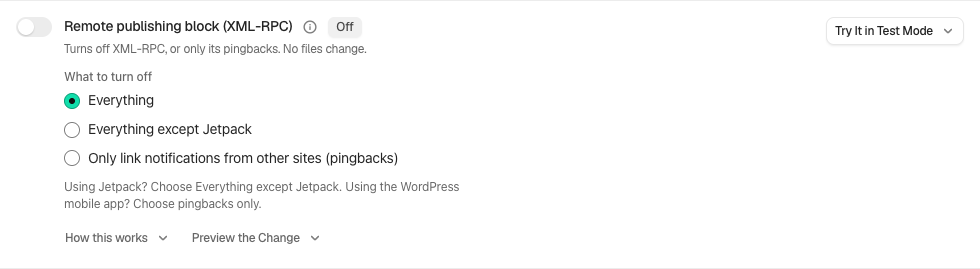
Its one option, **What to turn off**, is **All of XML-RPC** (the default, described below) or **Pingbacks only**, which removes the two pingback methods and the X-Pingback header and leaves every other method, xmlrpc.php and its discovery link working, so Jetpack and the mobile apps keep working.
## What it does
In **[BetterShield](/)**, **Remote publishing block (XML-RPC)** turns off the older remote-publishing API that WordPress answers at xmlrpc.php. It writes no files, and turning the switch off brings XML-RPC straight back. It is under **Code and settings changes** on **BetterShield › Protection › Hardening**, and it starts off. Whether your site still needs XML-RPC is covered in [Should you disable XML-RPC in WordPress?](/blog/disable-xml-rpc-wordpress/); this page is the reference for the switch.
- **xmlrpc.php answers 403 Forbidden** to every request, with the line "XML-RPC is disabled on this site.", before WordPress handles it.
- **The XML-RPC methods are removed**, pingbacks included, and methods that sign in are refused as well.
- **The endpoint is no longer advertised**: the X-Pingback header and the RSD discovery link go, and a pingback link printed with `bloginfo()` is left empty. Some themes print it another way and still show the address, which then answers 403.
- **Trackbacks and the REST API are untouched**, so the block editor, and application passwords over the REST API, carry on.
It runs inside WordPress, so it works on any web server. Safe mode pauses it, and so does deactivating BetterShield.
## Step 1: Open BetterShield › Protection › Hardening
Open **BetterShield › Protection › Hardening** and find **Remote publishing block (XML-RPC)** under **Code and settings changes**.
Review the state and choices shown on your own site before applying a change.
## Step 2: Turn off XML-RPC
- Under **What to turn off**, choose **All of XML-RPC** or **Pingbacks only**.
- Press **Preview the change**. Nothing changes. Its first line answers from your activity log, as "Nothing has used this in the last 30 days, which is as far back as this site's log goes." or "Something used this on 5 separate hours in the last 30 days, most recently 2 hours ago. Switching this off will stop it."
- If it finds use you cannot explain, run **Monitor first** (below).
- Turn the switch on. The row shows **On since** and **Undo never expires**, and with **Pingbacks only** it adds "Pingbacks only. Every other XML-RPC method still answers."
That usage line counts hours, not requests: "XML-RPC used" is logged at most once an hour when an XML-RPC method actually runs: a call that signed in successfully, a pingback, or one of the few methods that need no sign-in. Failed sign-in attempts are not counted, so password guessing over XML-RPC does not show up in this line. It looks back as far as the log goes (30 days, or 90 with Ultra) but not before BetterShield was activated, and says nothing in the first day.
Other ways to apply it:
- **Apply Fix** on the finding, on **BetterShield › Findings** or under **Worth doing first** on the Overview. It applies at once, without the preview.
- **Block Pingbacks Only** on the finding **Other sites can still send pingbacks to yours**. Press **Fix** on it, confirm, and it blocks the pingbacks and leaves the rest of XML-RPC working. **Undo** brings them back.
- `wp bettershield harden xmlrpc --dry-run` prints the preview, usage line included, and `wp bettershield harden xmlrpc --user=` applies it; add `--scope=pingbacks` for **Pingbacks only**. See [WP-CLI commands](/docs/wp-cli-commands/).
- A connected AI assistant allowed to make changes can apply it directly. See [Connect an AI assistant](/docs/connect-an-ai-assistant/).
### Monitor first
**Monitor first**, at the end of the row, watches real XML-RPC requests without blocking any. It is offered while the fix is off.
| Option | What it does | Default |
|---|---|---|
| **New observation window** | How long to watch: **1 hour**, **24 hours** or **7 days**. | **24 hours** |
- Choose the window and press **Start monitoring with the fields above**. The panel reads **Monitoring**.
- It counts what arrives, as "12 requests observed; 12 matched this rule." For **All of XML-RPC** the two numbers are always equal: every request to xmlrpc.php is one this fix would refuse. For **Pingbacks only**, only pingback calls are matched.
- When the window ends, or after **End monitoring now**, press **Enforce reviewed settings**. It needs a usable recovery link or printed recovery codes, and safe mode off. Undo works as usual afterwards.
Automated sign-in attempts count too, so a number above zero does not prove you rely on XML-RPC. Requests your host refuses before WordPress are not counted, so zero proves nothing either: read it with the preview's usage line. Counts are kept for at least a week after the window ends; once they expire, start a fresh window before enforcing. Starting, ending and enforcing a watch are logged as "Setting changed".
## Recommended settings
We recommend turning it on for most sites, after reading the preview. If you publish from the WordPress mobile app, use Jetpack features that need XML-RPC, or the preview shows an outside tool you rely on, choose **Pingbacks only**. **Old remote publishing (XML-RPC) is turned on** then stays open at a lower weight (1 point, Low) and is retitled **Pingbacks are blocked, and the rest of XML-RPC is still on**, with "Pingbacks are blocked. The rest of XML-RPC, sign-ins included, still answers." Blocked pingbacks are credited in your score. Mark it **Not applicable** on Findings if you have decided to keep the rest, so it stops counting against your score.
While XML-RPC stays on, wrong passwords sent through it still count toward [sign-in lockouts](/docs/sign-in-lockouts/), and accounts with two-factor must use an application password there.
| Site | What we recommend |
|---|---|
| Agency or many sites | Run `wp bettershield harden xmlrpc --dry-run` on each site, and apply it where the usage line says nothing has used it. |
## What it can break, and how to undo
- **Publishing apps and Jetpack.** The finding's note: "Could break: the WordPress mobile app and Jetpack, if you publish through them." With Jetpack active, the row adds: "Jetpack is active and some of its features use XML-RPC. Check your Jetpack connection after applying." With **Pingbacks only**, they keep working.
- **Tools that sign in over XML-RPC** stop with **All of XML-RPC**, whether they send the account password or an application password.
- **Incoming pingbacks** from sites that link to yours stop. Trackbacks still work.
To undo, turn the switch off. XML-RPC answers again at once. That needs a signed-in browser session (not an application password), and your password if **Ask for my password before removing a protection** is on under **Settings › General**. From the terminal: `wp bettershield harden xmlrpc --undo --user=`. An AI assistant can only take it off through a plan you agree to.
## Final Outcome
**The address.** Open yoursite.com/xmlrpc.php. With **All of XML-RPC**: 403 and "XML-RPC is disabled on this site." With **Pingbacks only**, or with XML-RPC on, WordPress answers as it does without the fix: "XML-RPC server accepts POST requests only."
- **Findings.** **Old remote publishing (XML-RPC) is turned on** (Medium) moves to **Fixed** with **All of XML-RPC**; with **Pingbacks only** it stays open as Low and says why, and **Other sites can still send pingbacks to yours** moves to **Fixed**. An audit during safe mode shows it open again, set to applied with nothing enforcing it.
- **The row.** **On since** and **Undo never expires**, with "This one has no effect a page view can check, so it is reported from your settings."
- **The activity log.** "Hardening applied" and "Hardening undone". While the fix is on, no new "XML-RPC used" entries appear.
Example XML-RPC view. Check the saved values and status on your own site.
## Good to know
- The finding asks WordPress whether XML-RPC is on, and also asks xmlrpc.php itself: another plugin turning it off inside WordPress clears it, and so does a block your host puts in front of WordPress, when BetterShield can confirm that block. If it cannot tell, the finding stays.
- If Patchstack already turns XML-RPC off, a note beside the switch says so and suggests leaving the job to one of them.
## On multisite
Each site has its own switch, and turning it on refuses XML-RPC at that site's address only.
## Related
- [Hardening](/docs/hardening/)
- [Refuse app passwords](/docs/refuse-application-passwords/)
- [Sign-in lockouts](/docs/sign-in-lockouts/)
- [Disable the file editor](/docs/disable-file-editor/)
- [Connect an AI assistant](/docs/connect-an-ai-assistant/)
- [Should you disable XML-RPC?](/blog/disable-xml-rpc-wordpress/)
This is how you can turn off XML-RPC with BetterShield.
Getting Stuck? Feel free to contact our [Dedicated Support Team](/support/).