# How To Read the Evidence Behind a Finding With BetterShield?
Open a finding to see why it matters, what to consider first, its score effect, and the evidence BetterShield checked.
In **[BetterShield](/)**, each row on **BetterShield › Findings** has **Explain**, which opens the facts behind that result.
## What it does
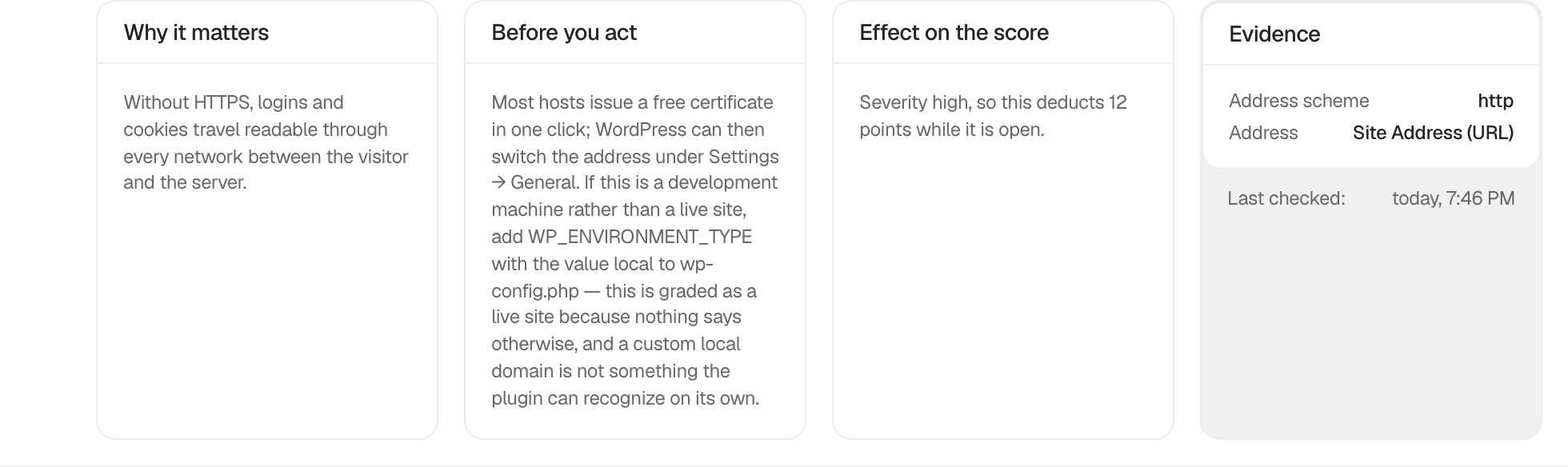
The expanded row contains:
- **Why it matters**, which explains the practical concern.
- **What to know first**, which identifies likely compatibility or operational effects.
- **Effect on the score**, which names the severity and points.
- **Evidence**, which shows the values used by the check.
- **Last checked**, which tells you how current that evidence is.
A finding's link, such as **Open Login & Access**, opens the setting that answers it and brings that setting into view. **Check Again** reads the check again and, if the finding is still open, says what it still sees.
## Step 1: Read the Evidence Behind a Finding
Select **Explain** on any finding. No setting is required. If a connected WordPress AI provider is available, **Explain This in Plain Language** can rewrite the recorded evidence without changing the finding.
The explanation keeps the reason, tradeoff, score effect, and evidence separate.
## Recommended settings
Read **What to know first** before using a correction or changing WordPress by hand. Findings update on their own after a fix or a settings change in BetterShield. If **Last checked** predates a change made outside BetterShield, press **Check Again**.
## What it can break and how to undo
Opening the explanation is read-only. Actions beside it can change the site and have their own reversal steps.
## Final Outcome
Confirm that all four panels open and that **Evidence** contains values rather than a pass/fail claim alone.
Example Finding evidence view. Check the saved values and status on your own site.
## Related
- [Apply a fix from a finding](/docs/apply-finding-fixes/)
- [Ask for a plain-language audit explanation](/docs/explain-an-audit/)
- [Run and monitor scheduled audits](/docs/scheduled-audits/)
This is how you can read the evidence behind a finding with BetterShield.
Getting Stuck? Feel free to contact our [Dedicated Support Team](/support/).