# How To Hand a Site Back from an Agency With BetterShield Ultra?
Preview and end an agency's temporary access, assistant connections, application passwords and account sessions.
With **[BetterShield Ultra](/ultra/)**, preview and end an agency's temporary access, assistant connections, application passwords and account sessions.
_**Note:** These controls require the paid [BetterShield Ultra](/ultra/) add-on alongside the free BetterShield plugin._
## What it does
**Handover** gathers the access an agency's accounts still hold, lets the client review each item, then performs the selected steps in one confirmed action. It can end temporary access, revoke assistant connections and application passwords, suspend accounts, sign them out and send a client report receipt.
Run it from the client's own account. The account performing the handover is never offered in the agency account list.
## Step 1: Open BetterShield › Ultra › Agency handover
Open **BetterShield › Ultra › Agency handover**.
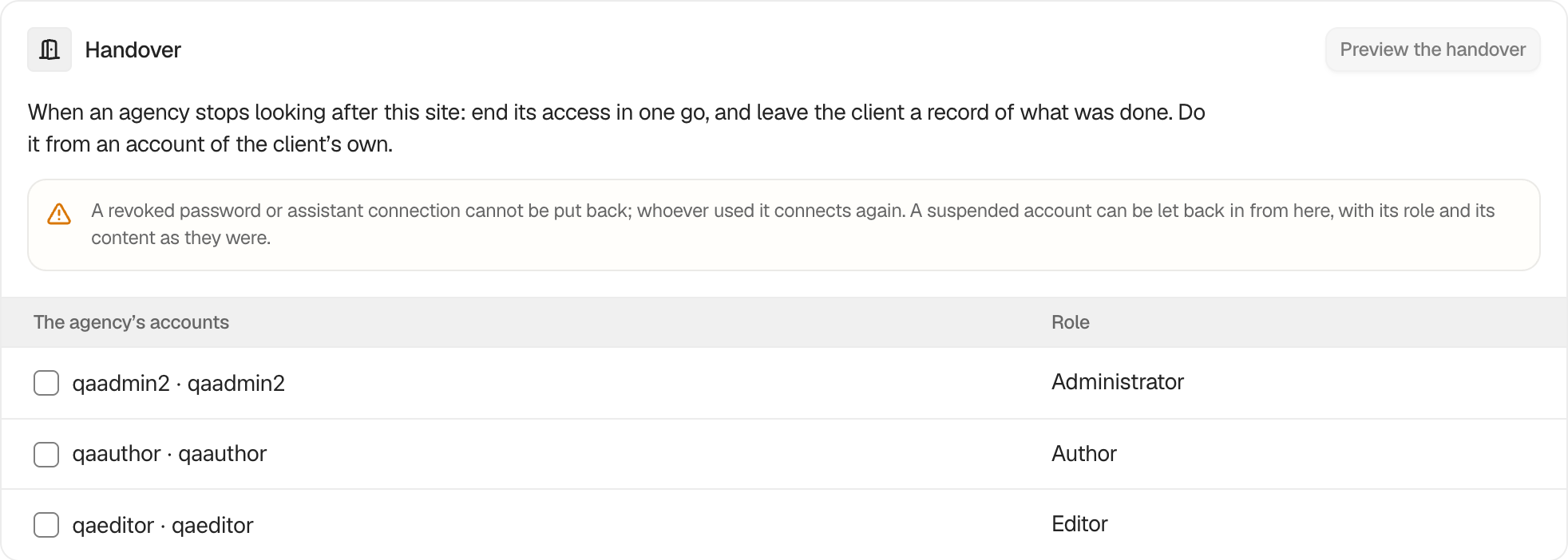 ## Step 2: Hand a site back from an agency
- Under **The agency’s accounts**, select up to 20 accounts.
- Press **Preview the handover**. Nothing changes yet.
- Review each step and change its ticks if needed.
- Press **Hand over**, read the action count, then press **Yes, do it**.
| Step | What it covers | Selected by default |
|---|---|---|
| **1. Download first** | Downloads the settings and, when allowed, the activity record. | No action to select |
| **2. Temporary access** | Grants the chosen accounts hold or granted to someone else. | Yes |
| **3. Assistant connections** | Connections approved by those accounts. A separate hub connection option can also appear. | Assistant connections yes, hub no |
| **4. Application passwords** | Passwords on the chosen accounts and administrator accounts. | Agency passwords yes, client passwords no |
| **5. The accounts** | Suspends and signs out each selected account while keeping its role and content. | Yes |
| **6. The client report** | Sends a report with a receipt of the selected steps. | Yes when the report has recipients |
## Recommended settings
Download the settings and activity record before confirming. Keep the client's own application passwords unticked unless you know the agency used them. Suspend agency accounts instead of deleting them so their content remains attributed.
## What it can break and how to undo
Revoked application passwords and assistant connections cannot be restored. Whoever used one must create a new password or connect again. Ending the hub connection also requires a new connection.
A suspended account can be restored with **Let back in** from the receipt. Its role and content remain. A temporary role ended by the handover must be granted again if it is still needed.
If the preview changes before confirmation, Ultra stops and asks you to preview again.
## Final Outcome
The card says **Handed over. The receipt is below.** The receipt lists each completed or refused step. The activity log records the changes, and the optional client report contains counts without naming the accounts.
## On multisite
A suspension applies to this site only, and a super administrator cannot be suspended. Because an application password works across the network, only a network administrator can revoke one here.
## Emergency account safeguard
The marked emergency administrator is excluded from handover. Use a permanent client-owned account to run the handover, read the preview, and review the result of each action. A temporary administrator cannot be selected as the emergency account.
## Related
- [Temporary access](/docs/temporary-access/)
- [Client report](/docs/client-report/)
- [Connect an AI assistant](/docs/connect-an-ai-assistant/)
- [Connect to BetterShield Hub](/docs/connect-to-bettershield-hub/)
This is how you can hand a site back from an agency with BetterShield Ultra.
Getting Stuck? Feel free to contact our [Dedicated Support Team](/support/).