# How To Let your Host Handle Routine Alerts With BetterShield?
Use WP-CLI to hold routine security email for the weekly summary while important account and code changes can still send immediately.
With **[BetterShield](/)**, use WP-CLI to hold routine security email for the weekly summary while important account and code changes can still send immediately.
## What it does
Free 1.1.5 adds a host-managed alert mode. Routine events wait for the weekly summary. With instant alerts enabled, these events can still send immediately:
- A new administrator account.
- An account promoted to administrator.
- Use of the trap password.
- A changed or added code file.
The mode does not enable email. On a new install, turn on the instant-alert and weekly-summary switches in Quick Setup or **Settings › Email alerts** if you want both kinds of message. Existing sites keep their saved choices. Recipient preferences, mute and delivery settings still apply.
## Step 1: Let your Host Handle Routine Alerts
Run this as an account allowed to manage BetterShield:
```sh
wp bettershield alerts host-managed on --user=admin
```
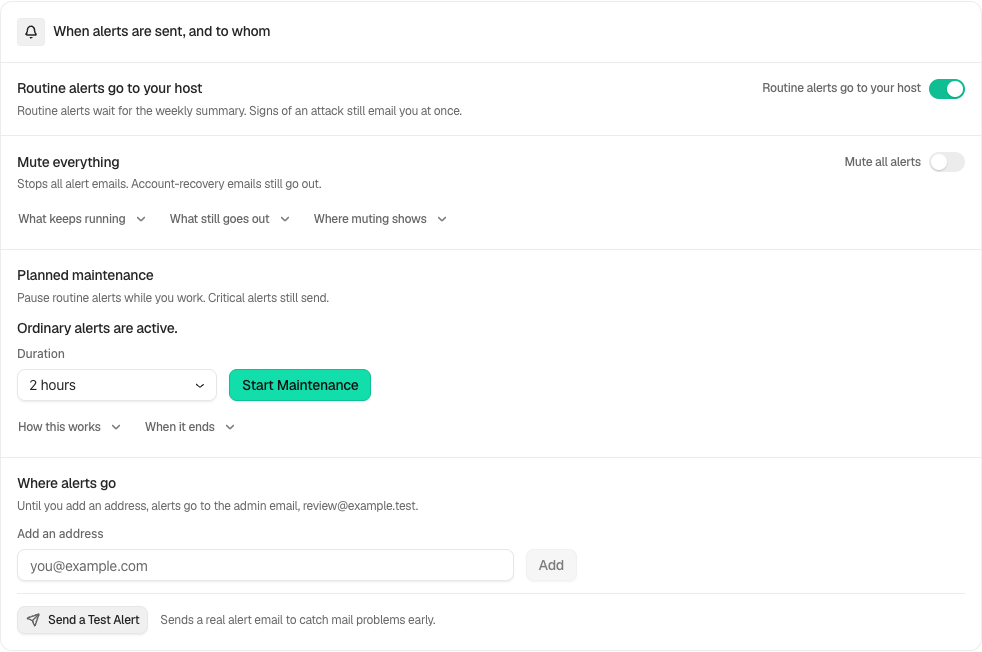
The change is recorded in the activity log. While the mode is on, **Settings › Email alerts** shows **Routine alerts go to your host**. The owner can switch it off there; enabling the mode is a WP-CLI action.
The host enables this mode through WP-CLI. The owner can turn it off here.
## Recommended settings
Use this mode when a host or agency already reviews routine changes. Keep the weekly summary enabled so those events still reach someone. Check the recipient list with:
```sh
wp bettershield alerts recipients list
```
For planned work, also [record known host deployments](/docs/record-host-file-changes/) rather than accepting unexplained file changes.
## What it can break and how to undo
Routine high or critical events outside the list above wait for the summary. If the summary is off, they are not emailed through that route. Activity logging and protection enforcement continue.
Switch off **Routine alerts go to your host** in Settings, or return to the ordinary alert policy with:
```sh
wp bettershield alerts host-managed off --user=admin
```
## Final Outcome
Confirm the activity log records the setting change. During the next known routine change, check that it is logged and appears in the enabled weekly summary. A test email checks delivery, rather than which event types the policy sends.
Example Host-managed alerts view. Check the saved values and status on your own site.
## Events that still email with instant alerts off
Use of the trap password emails even when instant alerts are off. With BetterShield 1.1.6 and Ultra 1.0.7 or newer, **Emergency account used** emails even when instant alerts are off. **Mute all alerts** still silences it. Check the card’s delivery warning and configure an email recipient before relying on it. See [Emergency account](/docs/emergency-account/).
## Related
- [Email alerts](/docs/email-alerts/)
- [Instant security alerts](/docs/instant-security-alerts/)
- [Weekly security summary](/docs/weekly-security-summary/)
- [WP-CLI commands](/docs/wp-cli-commands/)
This is how you can let your host handle routine alerts with BetterShield.
Getting Stuck? Feel free to contact our [Dedicated Support Team](/support/).