# How To Set your BetterShield Hub Alert Preferences?
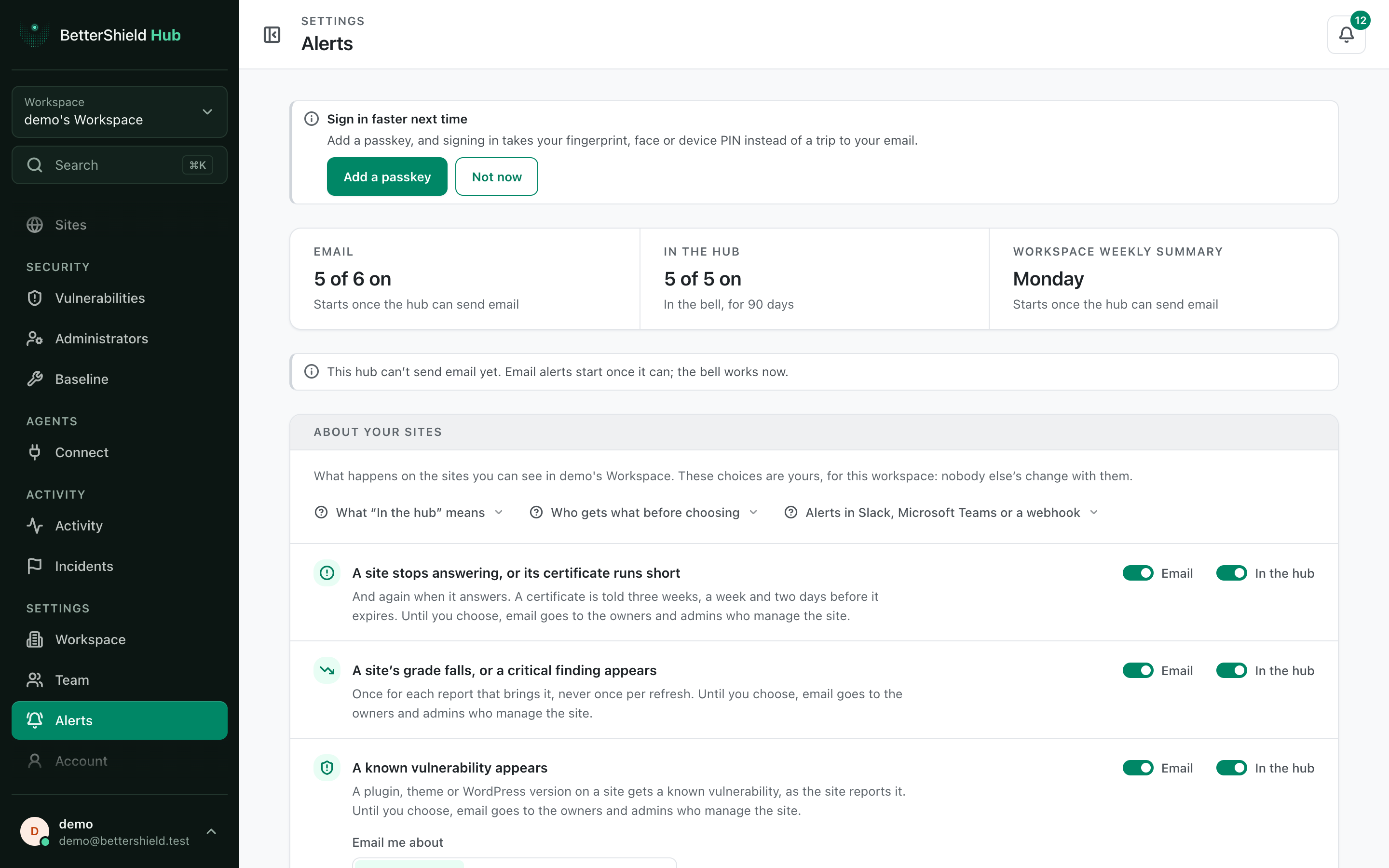
Choose which site, change and weekly alerts reach your email or Hub bell, including the vulnerability email severity.
In **[BetterShield Hub](/bettershield-hub/)**, **Settings › Alerts** holds your own alert choices for the current workspace. Nobody else's choices change with yours.
_**Note:** Sign in to your free [BetterShield Hub](/bettershield-hub/) account. Your workspace role and site permissions determine which information and actions you can use._
## What it does
Choices cover a site stopping or its certificate running short, a grade fall or critical finding, a known vulnerability, an incident, site changes and the workspace weekly summary.
**In the hub** means the bell. It keeps notifications for 90 days while you can still see the site.
## Step 1: Open Settings › Alerts
Open **Settings › Alerts**.
Email and Hub-bell choices are separate for each alert type.
## Step 2: Set your BetterShield Hub alert preferences
- For each row, set **Email** and **In the hub**.
- When vulnerability email is on, choose **Every severity** (default), **High and critical** or **Critical only**.
- Set **Workspace weekly summary** email. It arrives on Mondays from 08:00 UTC.
Before you choose, owners and admins who manage a site receive the four site alert types by email, everyone who can see it receives those and changes in Hub, and the weekly summary is on by email for everyone.
## Recommended settings
Our advice:
- Keep the Hub bell on for all site events you are responsible for.
- Use email for events that need attention away from Hub.
- Reduce vulnerability email severity only if another workflow covers the lower levels.
## What it can break and how to undo
Turning a route off can make an event less visible to you. Turn it on again at any time.
These choices do not change WordPress site emails or workspace Slack, Teams and webhook destinations. Free 1.1.5 starts new site installations with instant email and the site weekly summary off; that change does not alter Hub’s alert defaults.
## Final Outcome
**Your alerts at a glance** matches the switches.
- A relevant test or real event reaches the selected route.
- Snoozed sites are listed above the choices with their end time.
Example Hub alert preferences view. Check the saved values and status on your own site.
## Related
- [Send Hub alerts to workspace destinations](/docs/hub-alert-destinations/)
- [Review a site's email alerts in Hub](/docs/hub-site-email-alerts/)
- [Email alerts](/docs/email-alerts/)
This is how you can set your BetterShield Hub alert preferences.
Getting Stuck? Feel free to contact our [Dedicated Support Team](/support/).