# How To Review your BetterShield Hub Sessions?
See where your Hub account is signed in and sign out other sessions from the Account screen.
In **[BetterShield Hub](/bettershield-hub/)**, **Where you’re signed in** on **Settings › Account** lists the active Hub sessions for your account.
_**Note:** Sign in to your free [BetterShield Hub](/bettershield-hub/) account. Your workspace role and site permissions determine which information and actions you can use._
## What it does
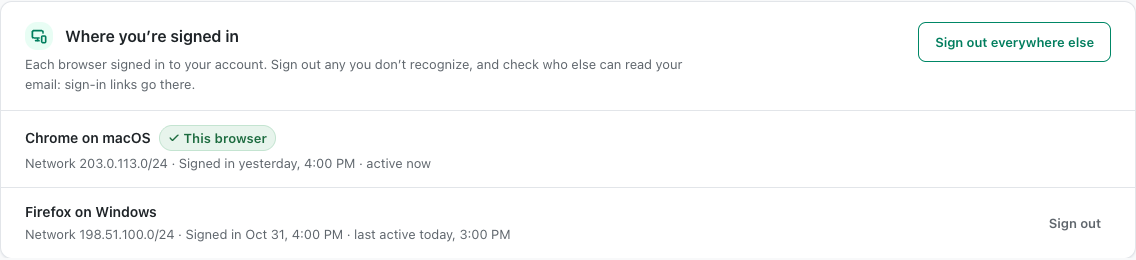
The card identifies your current and other sessions with their browser, device or recent-use information. **Sign out everywhere else** ends the other Hub sessions while keeping the current one.
## Step 1: Review your BetterShield Hub Sessions
There is nothing to enable. Open **Settings › Account**, find **Where you’re signed in**, review the rows and use **Sign out everywhere else** when needed. The default is to keep all active sessions.
Where you’re signed in lists example Hub sessions and their sign-out controls.
## Recommended settings
Our advice:
- Review the list after travel or use of a shared computer.
- Sign out elsewhere after a device is lost.
- Change the sign-in email or factors if an unknown session appears.
## What it can break and how to undo
Signing out other sessions interrupts Hub work in those browsers. They must sign in again.
There is no undo for ending a session, but a legitimate person can authenticate again.
## Final Outcome
The current session is identified.
- Other sessions disappear after **Sign out everywhere else**.
- Those browsers ask for sign-in on their next Hub request.
Where you’re signed in lists example Hub sessions and their sign-out controls.
## Related
- [Secure your Hub account](/docs/hub-account-security/)
- [Manage your Hub account](/docs/hub-account/)
- [Review administrators across Hub sites](/docs/hub-administrators/)
This is how you can review your BetterShield Hub sessions.
Getting Stuck? Feel free to contact our [Dedicated Support Team](/support/).