# How To Check Site Recovery Readiness in BetterShield Hub?
See whether a connected site has recovery methods ready and ask it to run a recovery check from BetterShield Hub.
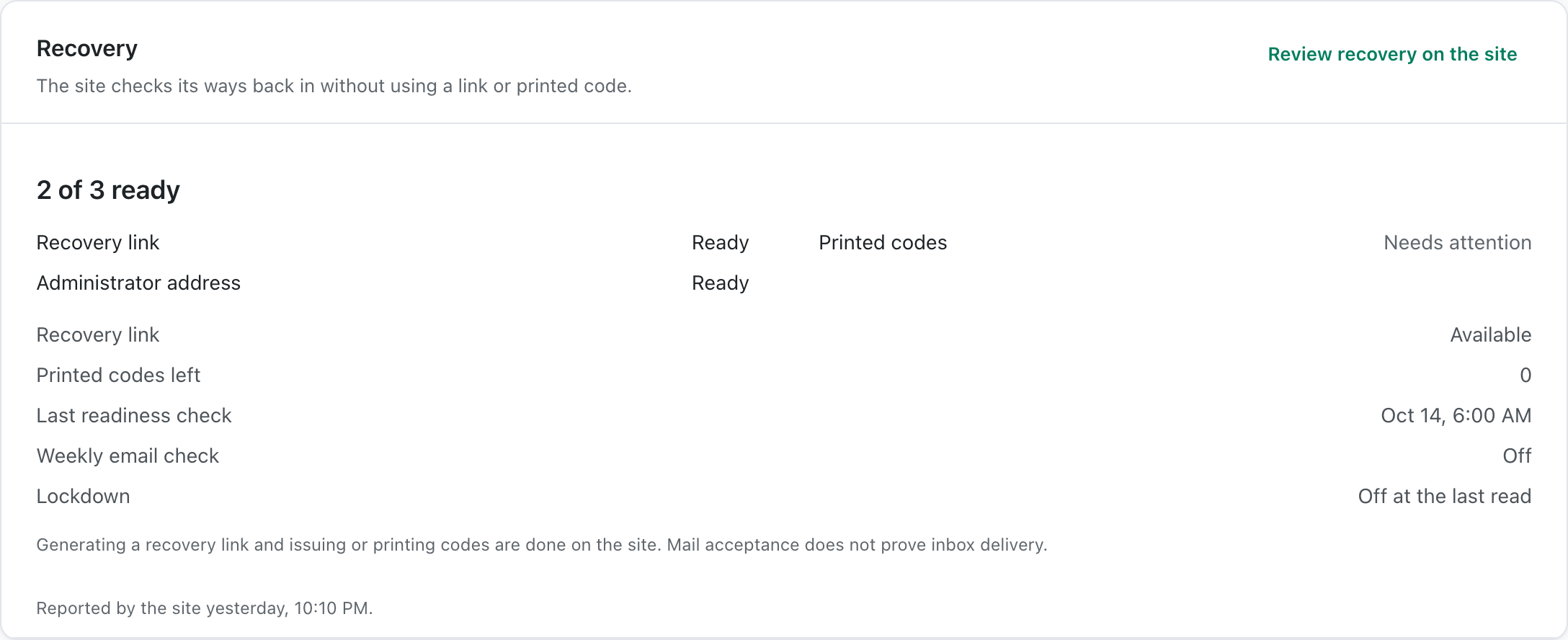
The site's **Recovery** card shows the recovery methods its [BetterShield](/) installation reports and whether they are ready.
_**Note:** Sign in to your free [BetterShield Hub](/bettershield-hub/) account. Your workspace role and site permissions determine which information and actions you can use._
## What it does
Hub summarizes the site's recovery link, printed recovery codes and other reported recovery checks. It does not display a recovery secret.
**Check readiness now** asks the site to test its current readiness again when the connection offers that check.
## Step 1: Open the feature
Set up recovery on the WordPress site under BetterShield.
Recovery readiness is read from the site, where the recovery methods are kept.
## Step 2: Check site recovery readiness
- Connect the site to Hub.
- Open the site and find **Recovery**.
- Select **Check readiness now** when you need fresh results.
There is no Hub default. The card reflects what the site has configured.
## Recommended settings
Our advice:
- Keep at least one recovery method somewhere outside the WordPress site.
- Recheck after moving the site or changing its domain.
- Test recovery before applying access restrictions.
## What it can break and how to undo
Reading or running the check changes no recovery setting. A failed result means the recovery method should be corrected on the site.
Do not copy recovery links or codes into Hub notes.
## Final Outcome
The card shows a ready count and the individual methods.
- A new check updates the result and time.
- No recovery secret appears in Hub.
Example Hub site recovery view. Check the saved values and status on your own site.
## Related
- [Set up recovery](/docs/set-up-recovery/)
- [Locked out](/docs/locked-out/)
- [Run a check across sites](/docs/hub-run-checks/)
This is how you can check site recovery readiness in BetterShield Hub.
Getting Stuck? Feel free to contact our [Dedicated Support Team](/support/).