# How To Manage the BetterShield Hub Workspace?
Rename a Hub workspace and find its tags, alert destinations, brand, status pages and client reports.
**Settings › Workspace** holds settings shared by the current [BetterShield Hub](/bettershield-hub/) workspace.
_**Note:** Sign in to your free [BetterShield Hub](/bettershield-hub/) account. Your workspace role and site permissions determine which information and actions you can use._
## What it does
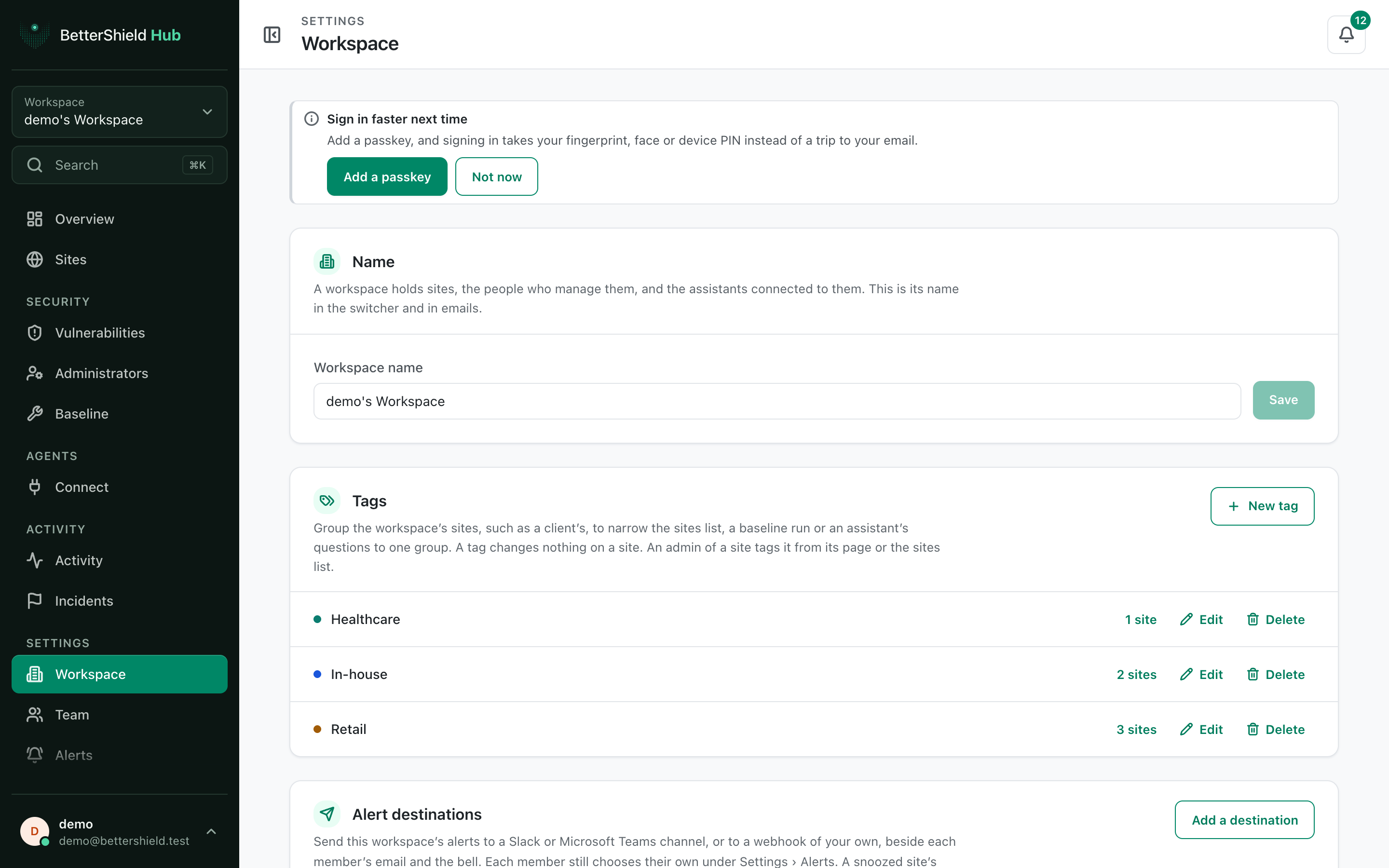
The screen holds the workspace **Name**, tags, **Alert destinations**, **Brand**, **Status pages** and **Client reports**. Owners can also delete the workspace.
Permissions differ by card. A member can see the workspace, while owner or administrator access is required for shared changes.
## Step 1: Open Settings › Workspace
Open **Settings › Workspace**.
Workspace settings belong to the selected workspace, not to every workspace in your account.
## Step 2: Manage the BetterShield Hub workspace
- Under **Name**, edit the name and select **Save**. The existing name is the default.
- Create or edit tags for groups of sites. No tag is created automatically.
- Continue to the focused card for destinations, brand, status pages or reports.
## Recommended settings
Our advice:
- Use a name that distinguishes the agency, client or operating team.
- Keep tags few and consistent.
- Give shared alert and report settings a named owner.
## What it can break and how to undo
Renaming changes the workspace switcher and Hub email wording. Rename it again to restore the old name.
**Delete this workspace** removes the workspace and its Hub records. Treat it as permanent and read its confirmation carefully.
## Final Outcome
The saved name appears in the workspace switcher.
- Tags appear on site dialogs and filters.
- Shared cards show the current workspace's records after reload.
Example Hub workspace view. Check the saved values and status on your own site.
## Related
- [Brand shared Hub pages](/docs/hub-workspace-brand/)
- [Send Hub alerts to workspace destinations](/docs/hub-alert-destinations/)
- [Publish a Hub status page](/docs/hub-status-pages/)
- [Send Hub client reports](/docs/hub-client-reports/)
This is how you can manage the BetterShield Hub workspace.
Getting Stuck? Feel free to contact our [Dedicated Support Team](/support/).