# How To Escalate Unanswered Critical Incidents With BetterShield Ultra?
Send an unacknowledged critical incident to additional recipients or a saved destination after a chosen wait.
With **[BetterShield Ultra](/ultra/)**, send an unacknowledged critical incident to additional recipients or a saved destination after a chosen wait.
_**Note:** These controls require the paid [BetterShield Ultra](/ultra/) add-on alongside the free BetterShield plugin._
## What it does
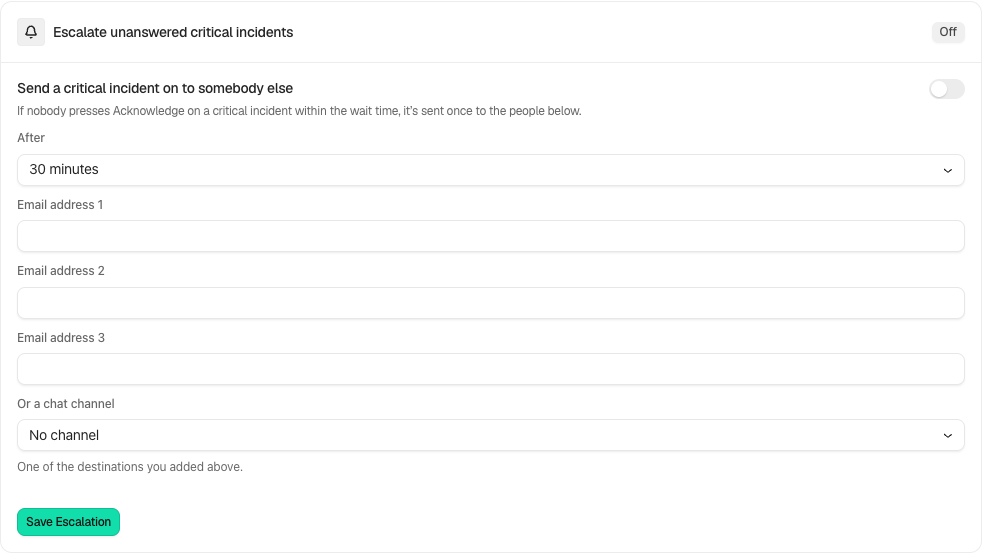
Open **BetterShield › Ultra › Alert channels**. **Escalate unanswered critical incidents** sends a critical incident on once when nobody has pressed **Acknowledge** before the deadline. This is separate from the original instant alert.
## Step 1: Open Forward unanswered critical incidents
Enable **Forward unanswered critical incidents**. It starts off.
Review the state and choices shown on your own site before applying a change.
## Step 2: Escalate unanswered critical incidents
- Under **After**, choose 15, 30 or 60 minutes.
- Add up to three email recipients, a saved chat destination, or both.
- Select **Save Escalation** and confirm someone monitors those destinations.
## Recommended settings
Our advice: choose a recipient who is different from the first responder and can act during the expected hours.
## What it can break and how to undo
This shares incident details with additional recipients. Correct recipients or turn the rule off and save to stop future escalation. Already delivered messages cannot be recalled.
## Final Outcome
On a controlled test incident, verify the first alert, acknowledgment state and escalation outcome. An incident acknowledged before the deadline should not create the unanswered-incident escalation.
Example Incident escalation view. Check the saved values and status on your own site.
## Related
- [Ultra overview](/docs/ultra-overview/)
- [Activity log](/docs/activity-log/)
- [Alert destinations](/docs/alert-destinations/)
- [Incident records](/docs/incident-records/)
This is how you can escalate unanswered critical incidents with BetterShield Ultra.
Getting Stuck? Feel free to contact our [Dedicated Support Team](/support/).