# How To Monitor BetterShield Scheduled Work?
See when BetterShield checks, reports and housekeeping tasks last ran, when they run next and whether WordPress scheduling is behind.
With **[BetterShield Ultra](/ultra/)**, see when BetterShield checks, reports and housekeeping tasks last ran, when they run next and whether WordPress scheduling is behind.
_**Note:** These controls require the paid [BetterShield Ultra](/ultra/) add-on alongside the free BetterShield plugin._
## What it does
**BetterShield › Ultra › Scheduled tasks** lists BetterShield and Ultra checks, reports and housekeeping tasks. It shows how often each runs, its last result and its next scheduled time.
## Step 1: Monitor BetterShield Scheduled Work
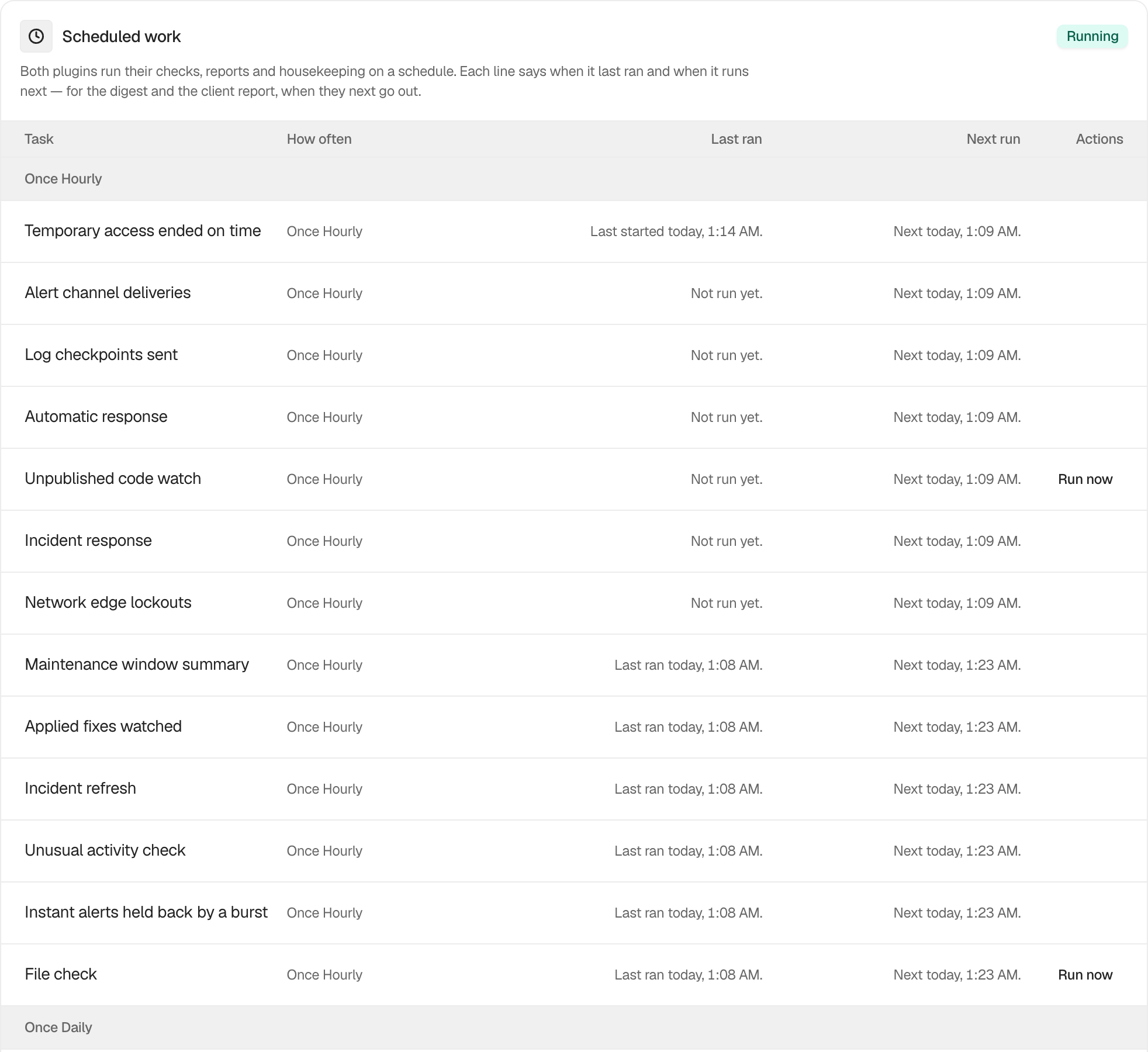
There are no settings. Open **BetterShield › Ultra › Scheduled tasks** and review the **Scheduled work** table.
| Column | What it shows |
|---|---|
| **Task** | The name of the check, report or housekeeping job. |
| **How often** | The recurrence WordPress uses. |
| **Last ran** | The last completion, a run in progress, an unfinished run, or **Not run yet.** |
| **Next run** | The next scheduled time, or **Not on the schedule.** |
The card badge reads **Running** or **Behind**. It changes no schedule on its own.
 ## Recommended settings
Check this screen after moving a site, changing its task runner or noticing a late report. A site should receive regular traffic or use a server task that calls WordPress scheduled events reliably.
## What it can break and how to undo
Opening this screen changes nothing. If scheduled work is behind, fix the site's WordPress cron or server task. Do not repeatedly run expensive checks while diagnosing the scheduler.
## Final Outcome
The badge reads **Running**, recent tasks show completed times, and each recurring task has a future time under **Next run**. A **Behind** warning means scheduled work has stopped running and includes a link to WordPress Site Health information.
A connected assistant that can read Ultra's settings can read this same table, 25 tasks at a time, with each task's last result and next due time. It cannot press **Run now**.
## On multisite
The table shows the scheduled work available for the current site or network context.
## Related
- [Schedules](/docs/schedules/)
- [Run an Ultra check early](/docs/run-ultra-checks-early/)
- [Scheduled audits](/docs/scheduled-audits/)
This is how you can monitor BetterShield scheduled work.
Getting Stuck? Feel free to contact our [Dedicated Support Team](/support/).