# How To Check Missing PHP Security Fixes With BetterShield?
Find the installed and fixed PHP versions, copy a request for your host, and recheck the finding after the server is updated.
Use **[BetterShield](/)** to see when your PHP release is missing a security fix and prepare the details your hosting provider needs. The finding names a fixed release within the same PHP version so you can ask for the right server update.
_**Note:** Update to BetterShield 1.1.10 or newer and use an account allowed to review Findings. Your hosting provider manages PHP; BetterShield does not update it._
## Step 1: Find the PHP Warning
Open **BetterShield › Findings**. Look for **This PHP version is missing a security fix** in the server findings. It appears when BetterShield identifies a missing fix for the installed PHP release.
Released BetterShield 1.1.10 on a local example site. The installed PHP release triggers this finding.
## Step 2: Read the Evidence
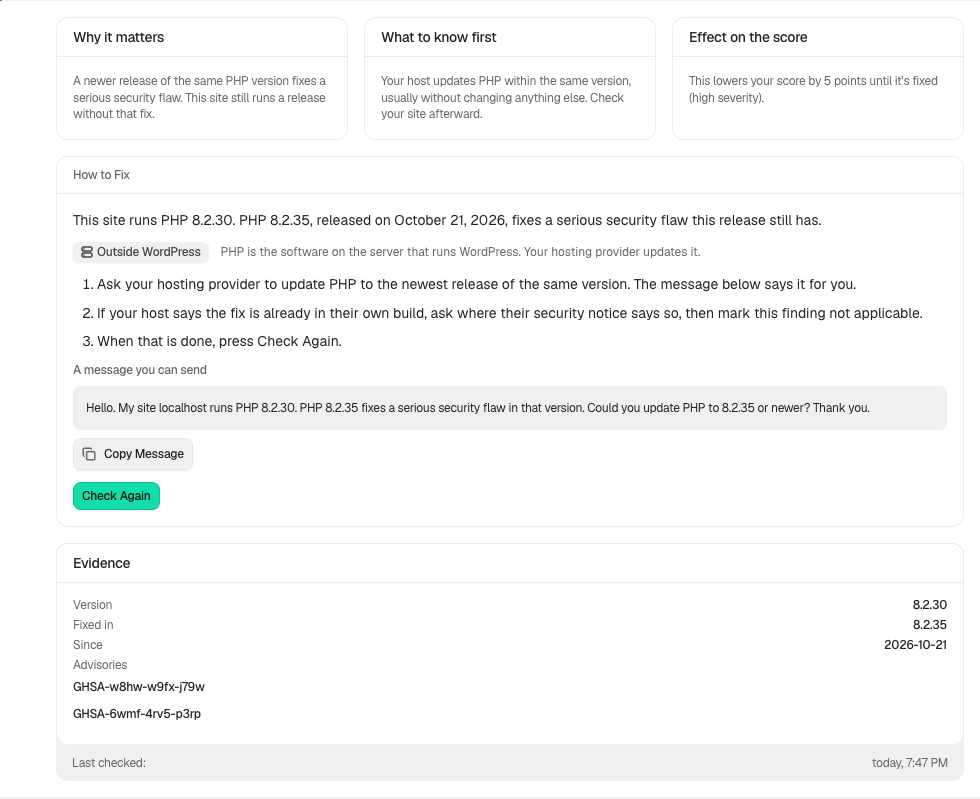
Select **Details**. Read the installed PHP version, the release that includes the fix and the recorded evidence. Supporting PHP 8.0 or newer does not mean every older patch release includes current security fixes.
Read the installed and fixed versions recorded by your site.
## Step 3: Ask Your Host
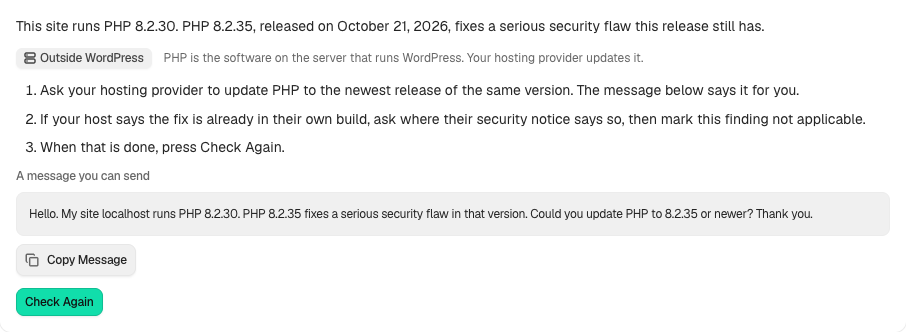
Select **How to Fix**, then **Copy Message**. Send the supplied request to your hosting provider and ask them to update PHP to the newest patched release of the same version.
- Ask your host to confirm the completed update, then test your site.
- If your host says its own build already contains the fix, ask for its security notice before marking the finding not applicable.
- Select **Check Again** after the host has finished. A copied message alone does not resolve the finding.
The released interface provides a host request. This capture does not show a completed PHP update.
## Final Outcome
You have the installed version, the required fixed release and a ready-to-send request for your host. After the server update, test the site and recheck the finding to confirm its current state.
The released interface provides a host request. This capture does not show a completed PHP update.
## Related
- [Server compatibility](/docs/server-compatibility/)
- [Read finding details](/docs/finding-details/)
- [Hub site findings](/docs/hub-site-findings/)
This is how, with the help of BetterShield’s PHP finding, you can identify a missing security fix and ask your host to update the server.
Getting Stuck? Feel free to contact our [Dedicated Support Team](/support/).