# How To Review Registered Abilities With BetterShield?
Inspect the live agent ability registry by plugin, read or write behavior, REST reachability, and caller role.
In **[BetterShield](/)**, open **BetterShield › Agents › Agent surface › Registered abilities**.
## What it does
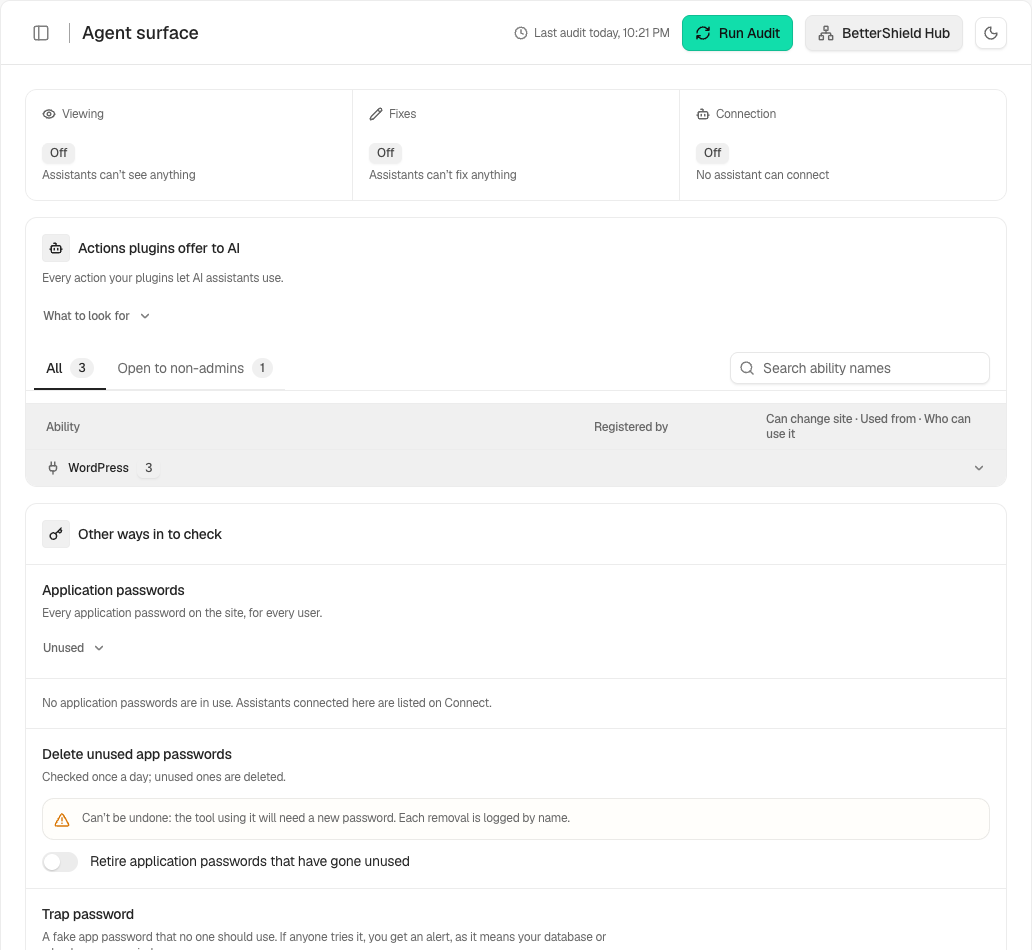
The table lists every ability registered by any plugin or WordPress, who registered it, whether it declares itself read-only or writing, whether it is reachable over REST, and which roles can call it.
**Which column matters** defaults to **All**. **Open to lower roles** narrows the list. An ability that writes, is REST-reachable, and is callable by a lower role can produce a BetterShield finding.
## Step 1: Review Registered Abilities
No setup is required. The list updates from the current registry. Turn on BetterShield read access if you want its own abilities to appear.
The Surface reads the live registry instead of relying on a fixed list.
## Recommended settings
Review the filtered lower-role view after installing or updating a plugin that exposes agent abilities. Confirm that writing abilities require an appropriate role.
## What it can break and how to undo
The Surface is read-only. Change the registering plugin's permissions or configuration if an ability is too widely reachable.
## Final Outcome
Compare the total with the grouped provider counts. Turning BetterShield read access off should remove BetterShield's registered abilities.
Example Registered abilities view. Check the saved values and status on your own site.
## Related
- [Let an AI assistant read security information](/docs/agent-read-access/)
- [Filter and review agent activity](/docs/review-agent-activity/)
- [See which plugins can read connector credentials](/docs/connector-credentials/)
This is how you can review registered abilities with BetterShield.
Getting Stuck? Feel free to contact our [Dedicated Support Team](/support/).