# How To Connect BetterShield Lockouts to Fail2Ban?
Write one line to the server's auth log when BetterShield pauses a connection, so a Fail2Ban jail can block that network. Off by default.
Write one line to the server's auth log when **[BetterShield](/)** pauses a connection, so a Fail2Ban jail can block that network. Off by default.
## What it does
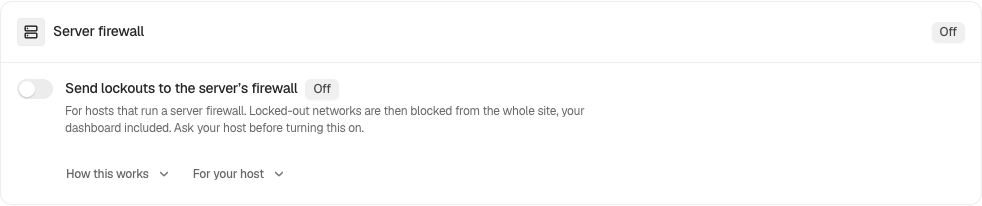
[BetterShield](/)'s own pauses run inside WordPress, so a paused connection is still answered, just refused. A server that runs a firewall jail such as Fail2Ban can do more: it reads the server's auth log and drops the network at the firewall, before WordPress is reached at all. **Send lockouts to the server’s firewall** writes the line that jail reads. It is off by default, on the **Server firewall** card of **BetterShield › Protection › Login & Access**, between **Allow and block lists** and **Sessions**.
When sign-in or a public form pauses a connection, one line goes to this server's auth log, the moment the pause starts. In the screen's words, "Nothing leaves this server." The line looks like this:
```
bettershield[4242]: lockout surface=signin network=203.0.113.0/24 minutes=15 site=example.com
```
| Part | What it says |
|---|---|
| `surface` | What paused the connection: `signin`, `reset` (the password reset form) or `register` (the sign-up form) |
| `network` | The connection's network: the /24 for IPv4, the /64 for IPv6. Never the full address, and never a username. |
| `minutes` | How long the pause lasts, a longer repeat pause included |
| `site` | This site's address without https://, so one auth log can serve several sites |
What writes a line:
- Every sign-in pause from [sign-in lockouts](/docs/sign-in-lockouts/), including one started by a name on **Never allowed to sign in**.
- A password reset or sign-up form closing to a connection, from [public form limits](/docs/form-limits/).
What writes nothing:
- A comment burst held for moderation, "because it turns nobody away."
- A pause on a network that holds an address on **Always allowed**, "because the recovery link cannot lift a ban at the firewall." See [Allow and block lists](/docs/allow-and-block-lists/).
- A connection BetterShield cannot verify, which is never paused in the first place. See [Proxies and Cloudflare](/docs/proxies-and-cloudflare/).
- Anything while safe mode is on, since no connection is paused then.
The switch is drawn as held, and cannot be changed on the card, in three cases:
| The card says | Why |
|---|---|
| **Set by your host** | Your host decided it for every site it runs, with the filter described below: "Your host has turned this on for every site it runs, so it is not changed here." The same is said when a host turns it off. |
| **Set from the main site** | On a multisite network: "On this network it is set from the main site, because the server’s firewall bans a network for every site on it. Lines from this site also respect the main site’s allowed list." |
| "Unavailable on this server" | "PHP’s system log functions are turned off here, so there is nothing to write the line with." |
## Step 1: Open BetterShield › Protection › Login & Access
Open **BetterShield › Protection › Login & Access** and find **Server firewall**.
Server firewall shows the export status and connection details for your host.
## Step 2: Connect BetterShield Lockouts to Fail2Ban
- Turn on **Send lockouts to the server’s firewall**.
- Press **Save** in the bar at the bottom. The card's badge reads **On**.
- Install the Fail2Ban filter and jail that come with the plugin (below), or ask your host whether their jail reads this line.
| Option | What it does | Default |
|---|---|---|
| **Send lockouts to the server’s firewall** | Writes one line to the server's auth log for each pause, for a firewall jail to read. | Off |
The switch is not counted under **Protections** at the top of the screen: it does nothing on a server without such a jail, so off is not a protection missing.
### The Fail2Ban filter and jail
The plugin's fail2ban folder holds a sample filter, `filter.d/bettershield.conf`, and a sample jail, `jail.d/bettershield.local`. The filter needs Fail2Ban 0.10.5 or later. From the WordPress folder:
```
sudo cp wp-content/plugins/bettershield/fail2ban/filter.d/bettershield.conf /etc/fail2ban/filter.d/
sudo cp wp-content/plugins/bettershield/fail2ban/jail.d/bettershield.local /etc/fail2ban/jail.d/
sudo fail2ban-client reload
```
Before you reload, read the jail and change what does not fit your server:
| Setting in the jail | As shipped | What to know |
|---|---|---|
| `logpath` | `/var/log/auth.log` | Where Debian and Ubuntu write the auth log. RHEL-family systems send it to `/var/log/messages` unless rsyslog is told otherwise. On a journald-only host, drop `logpath` and use `backend = systemd` with `journalmatch = SYSLOG_IDENTIFIER=bettershield`. |
| `maxretry` | `1` | One line is already a decision: BetterShield wrote it after its own limit was reached. |
| `findtime` | `60` | |
| `bantime` | `900` | 15 minutes, the length of BetterShield's default pause. Make it longer if you prefer. |
| `ignoreip` | commented out | Put the server's own addresses and any office ranges here: a ban at the firewall is one the site's recovery link cannot lift. |
| `port` | `http,https` | The ban covers web traffic to the whole server. |
### Many sites on one server
Each line names its site, so one jail can serve every site on the server. To have a jail act on one site only, edit the filter as its own comment says: replace `\S+` after `site=` with that site's address, for example `site=example\.com(?:/\S*)?`.
A host can turn the line on, or off, for every site it runs with the `bettershield_host_ban_line` filter, for example in a must-use plugin:
```php
add_filter( 'bettershield_host_ban_line', '__return_true' );
```
Each site's card then reads **Set by your host**. `__return_false` turns it off everywhere the same way.
## Recommended settings
We recommend it only where a jail on the same server reads the line. Without one, it writes lines nobody reads.
| Site | What we recommend |
|---|---|
| Your own server with Fail2Ban | On, with the shipped filter and jail, the server's own addresses in `ignoreip`, and your office's fixed address on **Always allowed**. |
| Shared or managed hosting | Ask your host first. If they run a jail for it, they may already have set it for you (**Set by your host**). |
| Behind Cloudflare or another proxy | Connections reach the server from the proxy, so a ban on the visitor's network at the server's firewall does not stop them. Leave it off unless your host says their setup handles this. |
| Agency or many sites on one server | One jail for all of them, or the host-wide filter above. Give each site's **Always allowed** list your team's fixed addresses. |
## What it can break, and how to undo
- **A ban covers a whole network.** In the screen's words, "A firewall ban on a /24 covers more than this site’s own pause, which counts each IPv4 address on its own." Everyone in that network (an office, a school, a mobile carrier) is shut out of every site on the server, browsing included, until the ban ends.
- **The recovery link cannot lift it,** and neither can **Release Now**: they end BetterShield's pause, not the firewall's ban. The ban ends when its `bantime` passes, or when you or your host lift it, for example with `sudo fail2ban-client set bettershield unbanip 203.0.113.0/24`.
- **Allowed networks write nothing.** A network holding an address on **Always allowed** is never sent to the firewall, so add your own fixed addresses there before you turn this on.
To turn it off, switch it off and press **Save**. With **Ask for my password before removing a protection** on, that asks for your password. The save is recorded as "Login protection changed", rated Medium. Bans already in place run until they end; remove the jail from `/etc/fail2ban/jail.d/` if you want none in future.
## Final Outcome
**The card.** The badge reads **On**.
- **A real pause.** After a pause appears under **Lockouts**, `sudo grep bettershield /var/log/auth.log` (or `journalctl -t bettershield`) shows its line.
- **The jail.** `sudo fail2ban-client status bettershield` lists the networks banned now.
To test the filter without waiting for a pause, write a test line and check that the filter matches it. The network below is one set aside for examples:
```
logger -p auth.warning -t bettershield "lockout surface=signin network=203.0.113.0/24 minutes=15 site=example.com"
sudo fail2ban-regex /var/log/auth.log /etc/fail2ban/filter.d/bettershield.conf
```
`fail2ban-regex` should report the line as matched. On a journald-only host, use `systemd-journal` in place of the log file's path. With the jail running, the test line also bans 203.0.113.0/24 for the `bantime`.
Server firewall shows the export status and connection details for your host.
## On multisite
The switch is the main site's, because the server's firewall bans a network for every site on it. On any other site the card reads **Set from the main site**, and its lines also respect the main site's **Always allowed** list.
## Related
- [Login & Access](/docs/login-and-access/)
- [Sign-in lockouts](/docs/sign-in-lockouts/)
- [Public form limits](/docs/form-limits/)
- [Allow and block lists](/docs/allow-and-block-lists/)
- [Proxies and Cloudflare](/docs/proxies-and-cloudflare/)
- [Multisite networks](/docs/multisite-network/)
This is how you can connect BetterShield lockouts to Fail2Ban.
Getting Stuck? Feel free to contact our [Dedicated Support Team](/support/).