# How To Sign People Out and Limit Sessions With BetterShield?
Set an idle sign-out and a per-account session limit, see who is signed in, and sign one account or everyone out with BetterShield.
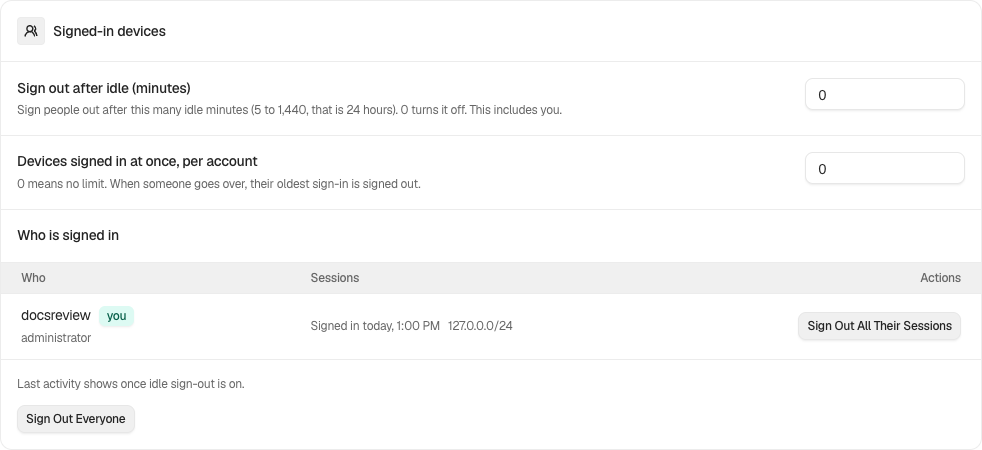
WordPress keeps a session for each sign-in on each device, for two days, or fourteen with Remember Me ticked. [BetterShield](/) adds an idle sign-out, a limit on sessions per account, a list of who is signed in, and two ways to sign people out. They are under **Signed-in devices** on **BetterShield › Protection › Login & Access**. Both limits are off by default.
## What it does
### Sign out after idle
Ends a session that has gone this many minutes without activity.
- It applies to every account's browser sessions, every role, store customers and members included. It cannot be set per role.
- Activity is opening a page, or anything a person does that saves something: a post save, an autosave, an upload, a settings change. The dashboard's background check-in does not count, so a tab left open is still signed out.
- Idle time is counted from the moment you switch it on, so nobody is signed out the instant you save, you included.
- On a WooCommerce store, nobody is signed out on the cart or checkout, and time a shopper spends there counts as activity.
- The signed-out person finds out on their next request: they are simply signed out, and a dashboard page sends them to sign in, or answers 404 while **Dashboard privacy for visitors** is on. A save made in the background is refused with "Your session ended after being idle. Sign in again to continue." No email is sent.
- Application passwords have no session, so they are not affected.
### Sessions per account
When an account signs in and then holds more sessions than the limit, its oldest sessions (by sign-in time) end. It applies to every role. Where another plugin has replaced how WordPress stores sessions, the field is unavailable and says so; signing people out still works.
### Who is signed in
Every account with a live session, of any role, with its roles and "you" beside your own. Each session shows when it signed in, when it was last seen and its network (a /24 or /64, never a full address). On a store this includes customers. It lists 50 accounts at a time: on a busier site it reads, for example, "Showing 50 of 120 signed-in accounts.", with **Show more** to list the next 50. With nobody signed in, it reads "Nobody is signed in right now."
### Signing people out
| Button | What it ends | What it leaves |
|---|---|---|
| **Sign out all their sessions** (beside an account) | Every session that account holds, on every device. On your own row, that includes the one you are using, and you land on the sign-in page. | The account and its password, and its application passwords. Needs permission to edit that account. |
| **Sign out everyone you can** (below the list) | Every session of every account you may edit, yours included. An administrator can edit everyone. One press reaches up to 500 accounts, network administrators and staff accounts first; on a larger site, press it again. | Accounts you cannot edit, which the confirmation counts for you. Passwords and application passwords. |
Both ask first: the confirmation says what will happen, naming you when your own session is included, with **Yes, do it** and **Cancel**.
### Each person's own sessions
Every user also sees **Where you are signed in** on their own profile, and store customers see it on My Account under **Sign-in security**. **This was not me** ends one session, and **Sign out everywhere except this device** ends the rest. See [Your profile](/docs/your-profile/).
### When a credential changes
When an account's password changes, BetterShield ends that account's other sessions. Someone changing their own password keeps the device they did it on; a password changed by an administrator or through a reset link ends every session. The same happens when a second factor or passkey is removed, or a role change gives or takes away a role that can manage settings or users.
## Step 1: Open BetterShield › Protection › Login & Access
Open **BetterShield › Protection › Login & Access** and find **Signed-in devices**.
Signed-in devices holds session limits and the controls to end sessions.
## Step 2: Sign people out and limit sessions
- Type a number into **Sign out after idle (minutes)** and **Sessions per account**, or leave 0.
- Press **Save**.
| Option | What it does | Default |
|---|---|---|
| **Sign out after idle (minutes)** | 0 keeps sessions open, as WordPress does by default. Otherwise 5 to 1440 (a day). Applies to your own session too. | 0 (no timeout) |
| **Sessions per account** | 0 means unlimited. Otherwise 1 to 100; above the limit, the oldest session signs out. | 0 (no cap) |
## Recommended settings
There is one timeout for everybody, so choose it for the people who sign in most.
| Site | What we recommend |
|---|---|
| Blog or brochure site | **Sign out after idle (minutes)** 120 when only staff sign in. Saves count as activity, but reading without saving does not, so do not go much shorter for writers. |
| Store (WooCommerce) | 0, or 1440 at most. Customers are included, and many expect to stay signed in between visits. |
| Membership or course site | 0, or longer than your longest lesson or video, since watching makes no requests. **Sessions per account** 2 or 3 discourages shared logins while leaving room for a phone and a laptop. |
| Agency or many sites | 60 to 120 on client sites where only staff sign in. |
Leave **Sessions per account** at 0 unless you have a reason; a limit of 1 signs people out of their phone every time they use their laptop.
## What it can break, and how to undo
- **Signed out mid-task.** Someone reading or reviewing without saving for longer than the timeout is signed out. They sign in again; nothing about the account changes.
- **Customers signed out.** The timeout reaches every role. Raise it or set it back to 0.
- **Devices pushing each other out.** With a low limit, each new sign-in ends the oldest session.
- **Signing yourself out.** Both buttons include your own session when they reach you; the confirmation says so.
Setting either number back to 0 and pressing **Save** turns it off. Ended sessions stay ended, and people sign in again with their usual password. With password confirmation on, loosening a limit and both buttons ask for your password.
## Final Outcome
**Who is signed in**, and the **Signed in** count in the summary strip.
- **The activity log:** "Sessions signed out" for an idle sign-out, a session over the limit or either button; "Signed out of a device" when someone uses their own list; "Sessions ended after a credential change".
- **WP-CLI:** `wp bettershield diagnostics` prints the idle timeout and session cap, and says when the cap cannot be applied on this site.
Signed-in devices holds session limits and the controls to end sessions.
## On multisite
A session belongs to the account, and the network shares accounts, so ending a session ends it on every site. On a site of a network, an administrator who does not manage the network reaches only their own sessions with **Sign out everyone you can**.
## Related
- [Login & Access](/docs/login-and-access/)
- [Your profile](/docs/your-profile/)
- [Hardening](/docs/hardening/)
- [Lock the site down](/docs/site-lockdown/)
- [Multisite networks](/docs/multisite-network/)
This is how you can sign people out and Limit sessions with BetterShield.
Getting Stuck? Feel free to contact our [Dedicated Support Team](/support/).