# How To See What Changed Since your Last Visit With BetterShield?
Review the important site changes recorded since you last opened BetterShield Overview.
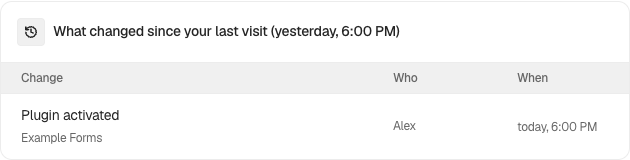
In **[BetterShield](/)**, **Since you last looked** appears on **BetterShield › Overview** when the activity log has relevant changes after your previous visit.
## What it does
The card lists important recorded changes with what changed, who or what made the change, and when it happened. It is a shortcut into the existing activity history, not a second log.
## Step 1: See What Changed Since your Last Visit
No setup is required. Keep activity recording available, then return to **BetterShield › Overview** after site changes have been recorded.
Released BetterShield controls shown with example site data. Read the current values on your own site.
## Recommended settings
Read this card before responding to a new finding. A recent plugin, account, or configuration change may explain why the audit result moved.
## What it can break and how to undo
Reviewing the card is read-only. Follow the linked activity row or feature guide before reversing a recorded change.
## Final Outcome
After a relevant activity event is recorded and you return later, the card should name the event and actor. **Open the log** should lead to the underlying history.
Released BetterShield controls shown with example site data. Read the current values on your own site.
## Related
- [Filter and search site activity](/docs/filter-activity-log/)
- [Compare audit results by day](/docs/compare-audits/)
- [Score and findings](/docs/score-and-findings/)
This is how you can see what changed since your last visit with BetterShield.
Getting Stuck? Feel free to contact our [Dedicated Support Team](/support/).