# How To Monitor Admin Sessions With BetterShield Ultra?
Watch a privileged sign-in move to a different browser and network, notify first, and choose when to end it.
With **[BetterShield Ultra](/ultra/)**, watch a privileged sign-in move to a different browser and network, notify first, and choose when to end it.
_**Note:** These controls require the paid [BetterShield Ultra](/ultra/) add-on alongside the free BetterShield plugin._
## What it does
Open **BetterShield › Ultra › Trusted browsers**. **Stolen session check** looks for a privileged session used from a new browser and network at the same time. A normal network change alone is not the same condition.
## Step 1: Open Watch for a stolen administrator sign-in
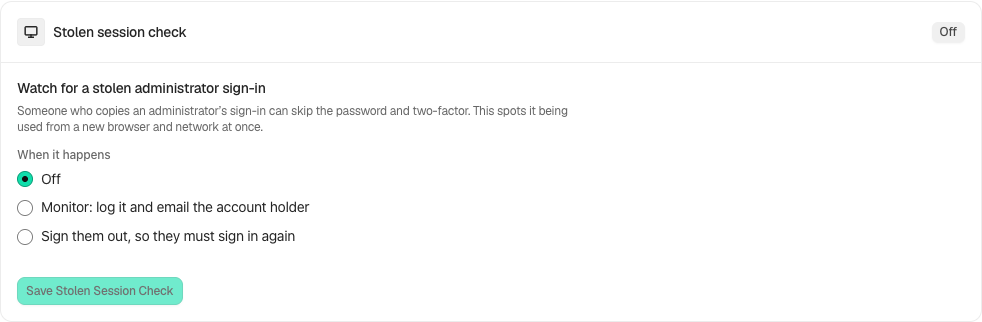
Find **Watch for a stolen administrator sign-in**.
Review the state and choices shown on your own site before applying a change.
## Step 2: Monitor changes to administrator sessions
- Under **When it happens**, choose **Off**, **Log it and email the account holder**, or **Sign them out, so they must sign in again**.
- The screen suggests Monitor for 14 days before choosing to sign people out. It is advice, not a guarantee against every copied session.
- Select **Save Stolen Session Check**.
## Recommended settings
Our advice: observe normal administrator travel and browser changes before enforcement, and ensure account alerts arrive.
## What it can break and how to undo
A legitimate changed session may be ended and need a fresh sign-in. Switch back to Monitor or Off and save to stop future automatic endings. A session already ended cannot be signed back in by undo.
## Final Outcome
Review the activity and account notification. Enforcement is checked on front-end pages, comments and REST requests as well as admin screens.
Example Stolen session check view. Check the saved values and status on your own site.
## Related
- [Ultra overview](/docs/ultra-overview/)
- [Activity log](/docs/activity-log/)
- [Sessions](/docs/sessions/)
- [Sign-in hours](/docs/sign-in-hours/)
This is how you can monitor admin sessions with BetterShield Ultra.
Getting Stuck? Feel free to contact our [Dedicated Support Team](/support/).