# How To Add Cloudflare Turnstile to your Forms With BetterShield Ultra?
Add Cloudflare Turnstile to WordPress and WooCommerce sign-in, sign-up and comment forms with BetterShield Ultra.
Add Cloudflare Turnstile to WordPress and WooCommerce sign-in, sign-up and comment forms with **[BetterShield Ultra](/ultra/)**.
_**Note:** These controls require the paid [BetterShield Ultra](/ultra/) add-on alongside the free BetterShield plugin._
## What it does
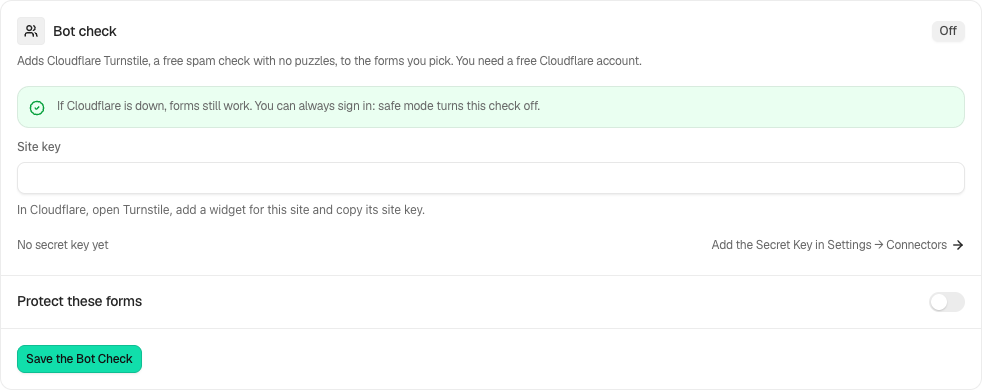
The **BetterShield › Ultra › Bot check** screen adds Cloudflare Turnstile to selected sign-in, sign-up and comment forms. It needs WordPress 7.0 or newer and works alongside BetterShield's free hidden bot check.
| Option | What it covers | Default |
|---|---|---|
| **The sign-in form** | WordPress sign-in and WooCommerce My Account sign-in. | Ticked when enabled |
| **The sign-up form** | WordPress registration, WooCommerce My Account registration and multisite sign-up. | Ticked when enabled |
| **The comment form** | The standard comment form. | Ticked when enabled |
A sign-in form without a solved check is refused before the password result is revealed. The two-factor code screen does not ask for a second Turnstile check.
## Step 1: Open the feature
Create a Turnstile widget in Cloudflare and include this site's hostname.
 ## Step 2: Add Cloudflare Turnstile to your forms
- Add its secret key under **Settings › Connectors › Cloudflare Turnstile**.
- Open **BetterShield › Ultra › Bot check** and enter the public **Site key**.
- Turn on **Check the forms below** and tick the forms you want.
- If the sign-in form is selected, solve the check shown on this screen so Ultra can test the two keys together.
- Press **Save the bot check**.
| Option | What it does | Default |
|---|---|---|
| **Site key** | The public key for the Turnstile widget. | Empty |
| **Check the forms below** | Enables Turnstile on the selected forms. | Off |
| **The sign-in form** | Checks supported sign-in forms. | Ticked |
| **The sign-up form** | Checks supported registration forms. | Ticked |
| **The comment form** | Checks the standard comment form. | Ticked |
The secret key can instead come from the `BETTERSHIELD_TURNSTILE_SECRET` environment variable or `wp-config.php` constant. An environment variable takes precedence over the constant, and either takes precedence over the stored key.
## Recommended settings
- **A blog with comments:** select **The comment form**.
- **A membership site or forum:** select **The sign-up form**.
- **A WooCommerce store:** select the sign-in and sign-up forms.
- **A private team site:** the sign-in form is optional when sign-in lockouts and two-factor already cover it.
Keep the free [hidden bot check](/docs/bot-check/) on as a separate local check.
## What it can break and how to undo
If the widget cannot load, selected forms refuse submissions until it becomes available. The sign-in test catches mismatched keys before saving the sign-in form, but registration and comment forms are not tested.
Turn off **Check the forms below**, untick one form, or remove the secret key under **Settings › Connectors**. Safe mode also pauses every Turnstile check so you can sign in with a recovery method.
When Cloudflare cannot answer the site's verification request within five seconds or returns an unexpected service error, the form goes through and the activity log records **Bot check could not be completed**.
## Final Outcome
The badge reads **On**. Open each selected form in a private window and confirm the Turnstile widget loads. The activity log records refused submissions as **Bot check not passed**.
## On multisite
**The sign-up form** includes the network sign-up page. Configure the feature from the context where the Ultra screen is available.
## Lost-password forms
The **Protect these forms** choices now include **The lost-password form** for WordPress and WooCommerce, alongside sign-in, sign-up and comments. Review this choice and save. Test a genuine reset request without ending your current administrator session. Safe mode pauses Turnstile, and the forms remain usable when Cloudflare is unavailable.
## Related
- [Hidden bot check](/docs/bot-check/)
- [Sign-in lockouts](/docs/sign-in-lockouts/)
- [Locked out](/docs/locked-out/)
- [What BetterShield contacts](/docs/what-bettershield-contacts/)
This is how you can add Cloudflare Turnstile to your forms with BetterShield Ultra.
Getting Stuck? Feel free to contact our [Dedicated Support Team](/support/).