# How To Manage Activity Retention With BetterShield Ultra?
Keep 90, 180 or 365 days, create sealed monthly downloads and understand what shortening retention removes.
With **[BetterShield Ultra](/ultra/)**, keep 90, 180 or 365 days, create sealed monthly downloads and understand what shortening retention removes.
_**Note:** These controls require the paid [BetterShield Ultra](/ultra/) add-on alongside the free BetterShield plugin._
## What it does
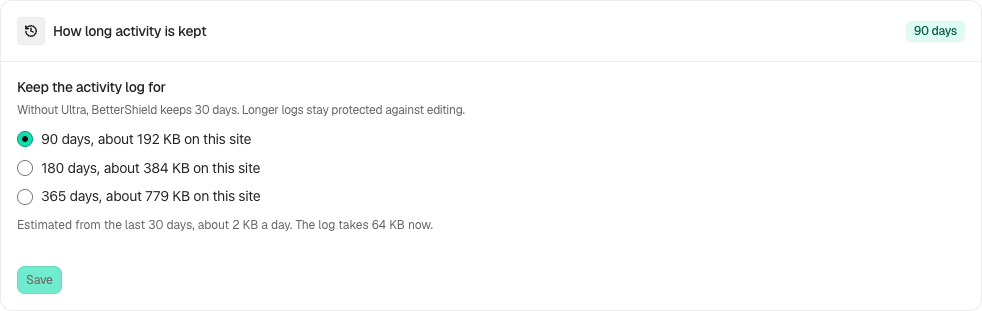
Open **BetterShield › Ultra › Activity history**. Ultra keeps 90 days by default. **Keep the activity log for** also offers 180 or 365 days with Free 1.1.2 or newer. The screen estimates storage use. Longer retention does not restore records already removed.
## Step 1: Open How long activity is kept
Choose 90, 180 or 365 days under **How long activity is kept** and select **Save**.
Review the state and choices shown on your own site before applying a change.
## Step 2: Choose Ultra activity retention and archives
- If you want monthly copies, enable **Save each month’s activity as a file you can download**. It starts off.
- Choose **JSON, one file** or **CSV (spreadsheet), plus a JSON proof file**; JSON is the default.
- Download an existing archive, or use **Create the… File Now** for a month with recorded activity.
## Recommended settings
Our advice: choose a retention period appropriate to your client agreement and available storage. Keep needed archives in private storage outside the site.
## What it can break and how to undo
Shortening retention allows older entries to be removed after an additional 30 days. Change it back within that period if needed; deleted history cannot be recovered by raising the setting. Monthly archives keep the last 12 months and contain sensitive activity.
## Final Outcome
Read archive verification: matching, changed or no verification data are different outcomes. Check that the saved retention is supported by the installed Free version.
Example Ultra activity history view. Check the saved values and status on your own site.
## Related
- [Ultra overview](/docs/ultra-overview/)
- [Activity log](/docs/activity-log/)
- [Evidence pack](/docs/evidence-pack/)
- [Activity log checkpoints](/docs/activity-log-checkpoints/)
This is how you can manage activity retention with BetterShield Ultra.
Getting Stuck? Feel free to contact our [Dedicated Support Team](/support/).