# How To Activate the BetterShield Ultra License?
Add or remove the BetterShield Ultra license key used to receive add-on updates on this site.
**BetterShield › Ultra › License** connects this site to its [BetterShield Ultra](/ultra/) license so the add-on receives updates.
_**Note:** These controls require the paid [BetterShield Ultra](/ultra/) add-on alongside the free BetterShield plugin._
## What it does
The key identifies this Ultra installation to the license service and brings plugin updates to the site.
## Step 1: Open BetterShield › Ultra › License
Open **BetterShield › Ultra › License**.
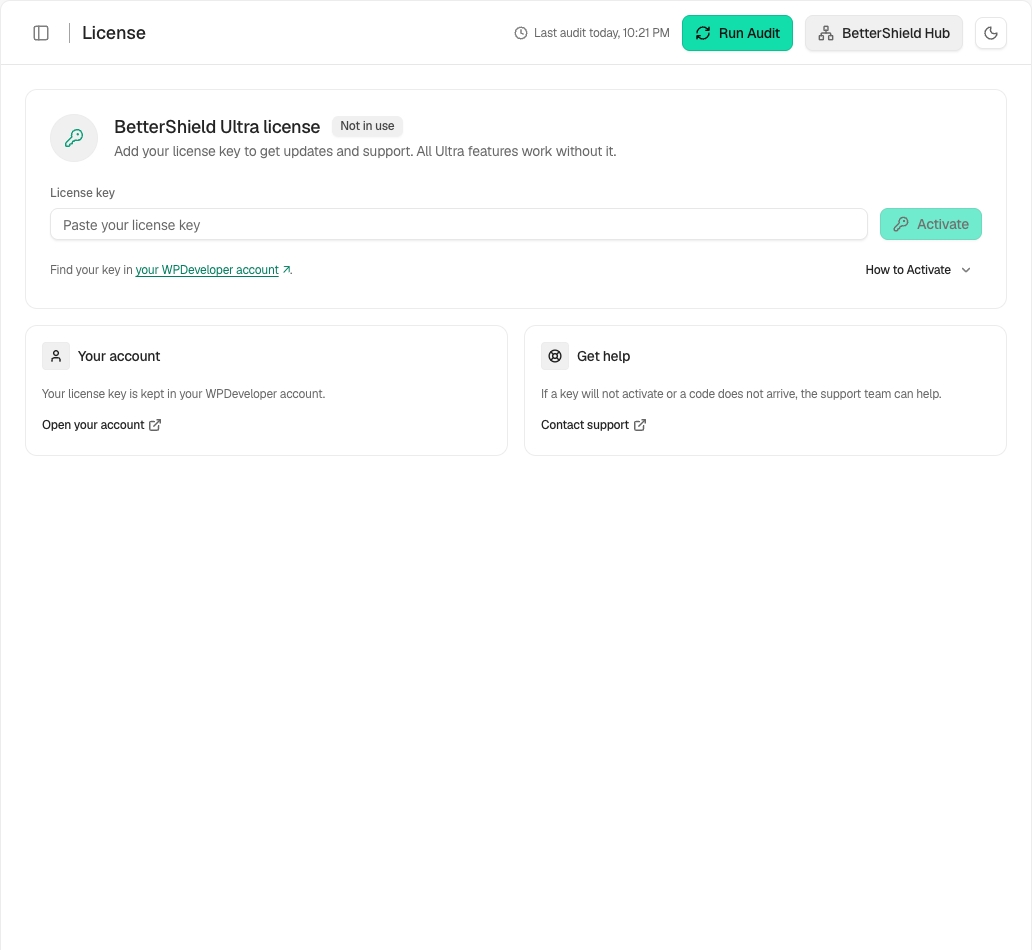
The license screen shows the update status for this site.
## Step 2: Activate the BetterShield Ultra license
- Paste the license key into the empty field.
- Select **Activate**.
- Use **View details** to review the saved status when offered.
The key field starts empty. Removing the key frees it for another site.
## Recommended settings
Our advice:
- Activate the key on the live site address that will receive updates.
- Keep the key outside tickets, screenshots and client reports.
- Review the license status before an Ultra update window.
## What it can break and how to undo
Activation changes only the site's update connection. A rejected key does not change Ultra settings.
Use the screen's deactivation action to remove the key from this site. Enter and activate it again if it was removed by mistake.
## Final Outcome
The card shows the license as active.
- The saved site details are shown without exposing the full key.
- WordPress can offer BetterShield Ultra updates.
Example Ultra license view. Check the saved values and status on your own site.
## Related
- [Install Ultra](/docs/install-ultra/)
- [BetterShield Ultra overview](/docs/bettershield-ultra/)
- [Scheduled audits](/docs/scheduled-audits/)
This is how you can activate the BetterShield Ultra license.
Getting Stuck? Feel free to contact our [Dedicated Support Team](/support/).