# How To Review Unused Admin Accounts With BetterShield Ultra?
Warn before blocking unused administrators, choose the inactivity period and restore sign-in without deleting content.
With **[BetterShield Ultra](/ultra/)**, warn before blocking unused administrators, choose the inactivity period and restore sign-in without deleting content.
_**Note:** These controls require the paid [BetterShield Ultra](/ultra/) add-on alongside the free BetterShield plugin._
## What it does
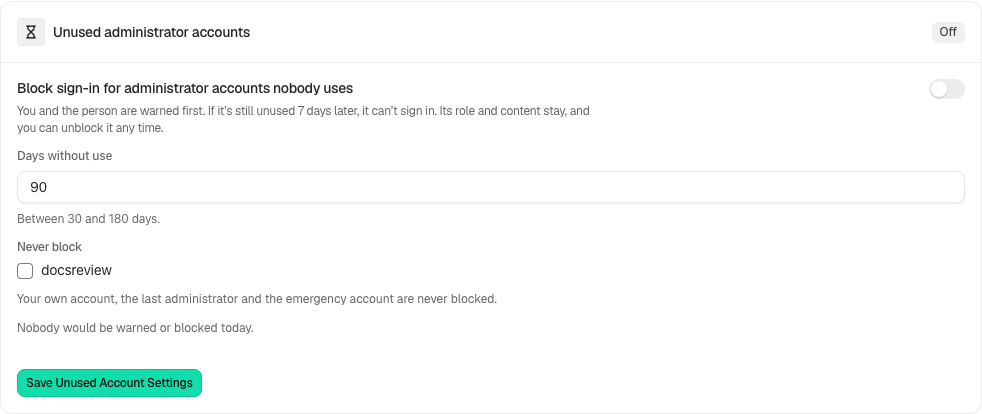
Open **BetterShield › Ultra › Administrator accounts**. **Unused administrator accounts** can warn an inactive administrator and the owner, then block sign-in if it stays unused. It starts off. The default inactivity period is 90 days, adjustable from 30 to 180 days. The warning period is shown before you save.
## Step 1: Open Would be warned today
Review **Would be warned today** and **Would be blocked today**.
Review the state and choices shown on your own site before applying a change.
## Step 2: Handle administrator accounts nobody uses
- Choose **Days without use**.
- Review the **Never block** exclusions: your own account, the last administrator and the emergency account are excluded.
- Turn on the rule and select **Save Unused Account Settings**.
## Recommended settings
Our advice: begin with a period that covers seasonal or occasional administrators, and tell the client before enabling automatic blocking.
## What it can break and how to undo
A person who still needs the account can lose sign-in access. Its role and content remain. Under **Blocked for not being used**, select **Allow Sign-In Again** to restore access. Turning the policy off prevents future policy actions; review accounts already blocked separately.
## Final Outcome
Confirm the saved threshold, preview counts and warning delivery. Review the blocked list rather than assuming an old account was deleted.
Example Unused administrators view. Check the saved values and status on your own site.
## Related
- [Ultra overview](/docs/ultra-overview/)
- [Activity log](/docs/activity-log/)
- [Emergency account](/docs/emergency-account/)
- [Access reviews](/docs/access-reviews/)
This is how you can review unused admin accounts with BetterShield Ultra.
Getting Stuck? Feel free to contact our [Dedicated Support Team](/support/).