# How To Review Activity That Is Unusual for This Site With BetterShield?
Use the Overview to spot failed sign-ins or task timing that differs sharply from this site's recent pattern.
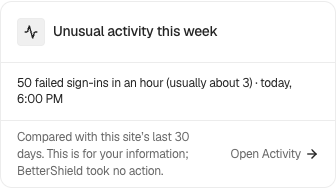
In **[BetterShield](/)**, **Unusual for this site** can appear on **BetterShield › Overview** when selected activity falls well outside the site's recent pattern.
## What it does
BetterShield compares failed sign-ins and scheduled-task timing with the preceding 30 days of this site's own observations. The result says that activity is unusual here. It does not establish intent or identify a cause.
## Step 1: Review Activity That Is Unusual for This Site
No separate switch is required. The site needs enough recent observations to form a baseline.
Released BetterShield controls shown with example site data. Read the current values on your own site.
## Recommended settings
Open the linked activity records and compare them with expected traffic, maintenance, and automation. Treat the signal as a prompt to investigate.
## What it can break and how to undo
The comparison is read-only. It does not block sign-ins or scheduled work. There is no protection to undo.
## Final Outcome
When a signal appears, its link should open the related activity. Normal activity should continue to be recorded whether or not the card is present.
Released BetterShield controls shown with example site data. Read the current values on your own site.
## Related
- [Filter and search site activity](/docs/filter-activity-log/)
- [Incidents](/docs/incidents/)
- [Troubleshooting](/docs/troubleshooting/)
This is how you can review activity that is unusual for this site with BetterShield.
Getting Stuck? Feel free to contact our [Dedicated Support Team](/support/).