How To Schedule and Complete Access Reviews With BetterShield Ultra?
Choose a reviewer, review privileged access and save a receipt of what was kept, suspended, ended or revoked.
With BetterShield Ultra, choose a reviewer, review privileged access and save a receipt of what was kept, suspended, ended or revoked.
Note: These controls require the paid BetterShield Ultra add-on alongside the free BetterShield plugin.
What it does
Open BetterShield › Ultra › Administrator accounts. Access review lists administrator accounts, application passwords, assistant connections and temporary grants for a named reviewer. Nothing changes until the review is completed. It starts off; the default schedule when configured is quarterly.
Step 1: Open How often
Choose How often: Monthly, Quarterly or Yearly.
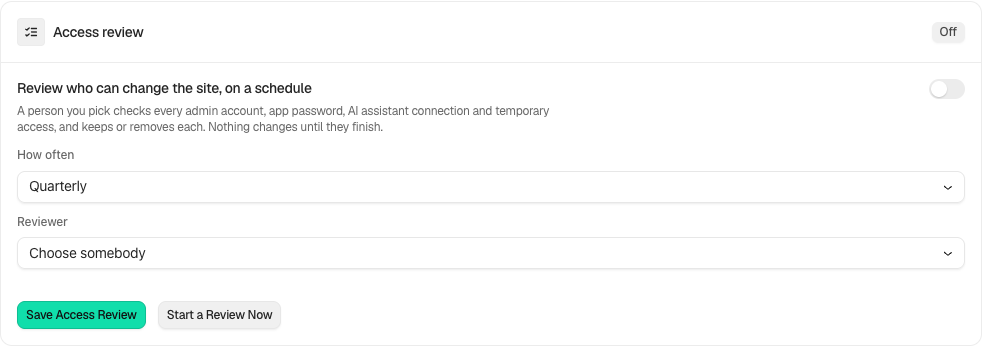
Step 2: Schedule and complete access reviews
- Choose a permanent administrator as reviewer and select Save Access Review. A temporary administrator cannot be the reviewer.
- Use Start a Review Now, or open the scheduled review.
- Decide Keep or Remove for every listed item. Read the effects, then choose Complete the Review.
- Save a JSON, CSV or printed receipt from Past reviews.
Recommended settings
Our advice: confirm each access item with its owner before taking it away. Keep the receipt with your client records.
What it can break and how to undo
Removing an account blocks its sign-in and can be reversed through Allow Sign-In Again. Revoking an application password or assistant connection, or ending a grant, cannot recover that credential or grant. A receipt reports partial failures; do not assume every requested removal succeeded.
Final Outcome
The completed receipt names decisions and outcomes, including anything that could not be taken away. Accounts suspended by the review have a separate way to allow sign-in again.
In the activity log, a review row says what the review held instead of showing an id. An opened review reads like 3 accounts and ways in to review. A completed one reads like 2 kept, 1 taken away, with could not be taken away added when something failed.
Related
This is how you can schedule and complete access reviews with BetterShield Ultra.
Getting Stuck? Feel free to contact our Dedicated Support Team.