How To Add Cloudflare Turnstile to your Forms With BetterShield Ultra?
Add Cloudflare Turnstile to WordPress and WooCommerce sign-in, sign-up and comment forms with BetterShield Ultra.
Add Cloudflare Turnstile to WordPress and WooCommerce sign-in, sign-up and comment forms with BetterShield Ultra.
Note: These controls require the paid BetterShield Ultra add-on alongside the free BetterShield plugin.
What it does
The BetterShield › Ultra › Bot check screen adds Cloudflare Turnstile to selected sign-in, sign-up and comment forms. It needs WordPress 7.0 or newer and works alongside BetterShield’s free hidden bot check.
| Option | What it covers | Default |
|---|---|---|
| The sign-in form | WordPress sign-in and WooCommerce My Account sign-in. | Ticked when enabled |
| The sign-up form | WordPress registration, WooCommerce My Account registration and multisite sign-up. | Ticked when enabled |
| The comment form | The standard comment form. | Ticked when enabled |
A sign-in form without a solved check is refused before the password result is revealed. The two-factor code screen does not ask for a second Turnstile check.
Step 1: Open the feature
Create a Turnstile widget in Cloudflare and include this site’s hostname.
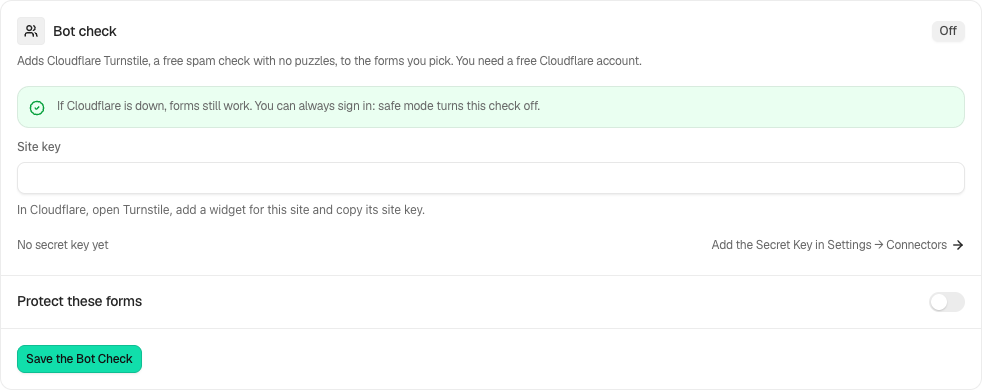
Step 2: Add Cloudflare Turnstile to your forms
- Add its secret key under Settings › Connectors › Cloudflare Turnstile.
- Open BetterShield › Ultra › Bot check and enter the public Site key.
- Turn on Check the forms below and tick the forms you want.
- If the sign-in form is selected, solve the check shown on this screen so Ultra can test the two keys together.
- Press Save the bot check.
| Option | What it does | Default |
|---|---|---|
| Site key | The public key for the Turnstile widget. | Empty |
| Check the forms below | Enables Turnstile on the selected forms. | Off |
| The sign-in form | Checks supported sign-in forms. | Ticked |
| The sign-up form | Checks supported registration forms. | Ticked |
| The comment form | Checks the standard comment form. | Ticked |
The secret key can instead come from the BETTERSHIELD_TURNSTILE_SECRET environment variable or wp-config.php constant. An environment variable takes precedence over the constant, and either takes precedence over the stored key.
Recommended settings
- A blog with comments: select The comment form.
- A membership site or forum: select The sign-up form.
- A WooCommerce store: select the sign-in and sign-up forms.
- A private team site: the sign-in form is optional when sign-in lockouts and two-factor already cover it.
Keep the free hidden bot check on as a separate local check.
What it can break and how to undo
If the widget cannot load, selected forms refuse submissions until it becomes available. The sign-in test catches mismatched keys before saving the sign-in form, but registration and comment forms are not tested.
Turn off Check the forms below, untick one form, or remove the secret key under Settings › Connectors. Safe mode also pauses every Turnstile check so you can sign in with a recovery method.
When Cloudflare cannot answer the site’s verification request within five seconds or returns an unexpected service error, the form goes through and the activity log records Bot check could not be completed.
Final Outcome
The badge reads On. Open each selected form in a private window and confirm the Turnstile widget loads. The activity log records refused submissions as Bot check not passed.
On multisite
The sign-up form includes the network sign-up page. Configure the feature from the context where the Ultra screen is available.
Lost-password forms
The Protect these forms choices now include The lost-password form for WordPress and WooCommerce, alongside sign-in, sign-up and comments. Review this choice and save. Test a genuine reset request without ending your current administrator session. Safe mode pauses Turnstile, and the forms remain usable when Cloudflare is unavailable.
Related
This is how you can add Cloudflare Turnstile to your forms with BetterShield Ultra.
Getting Stuck? Feel free to contact our Dedicated Support Team.