How To Carry Sign-in Lockouts to Cloudflare With BetterShield Ultra?
Apply BetterShield sign-in lockouts as Cloudflare challenges so requests from locked networks stop at the edge.
With BetterShield Ultra, apply BetterShield sign-in lockouts as Cloudflare challenges so requests from locked networks stop at the edge.
Note: These controls require the paid BetterShield Ultra add-on alongside the free BetterShield plugin.
What it does
Carry sign-in lockouts out to the edge adds a Cloudflare challenge for each network BetterShield locks out. Requests from that network stop at Cloudflare before reaching the site.
Step 1: Open the feature
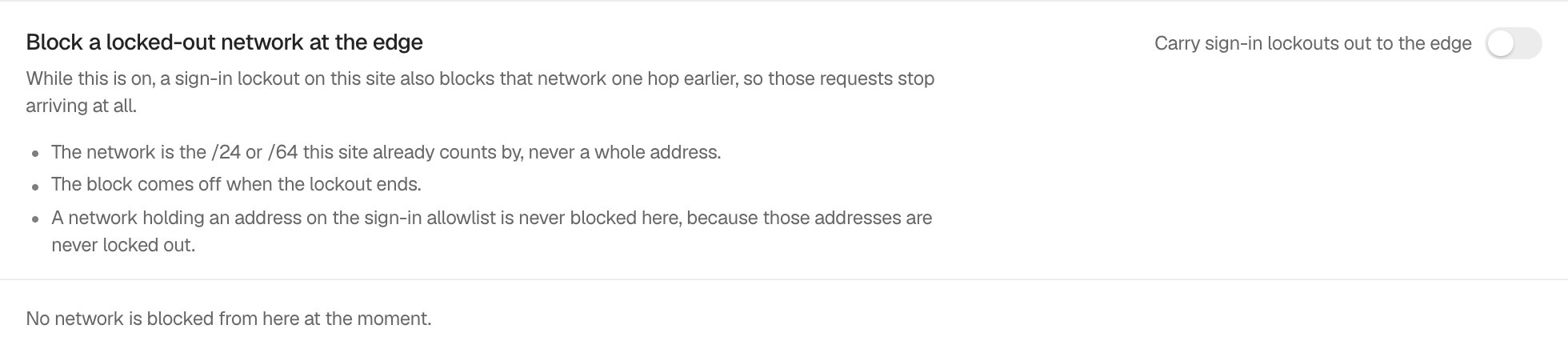
Step 2: Carry sign-in lockouts to Cloudflare
- Keep Sign-in attempt limits on under BetterShield › Protection › Login & Access.
- Open BetterShield › Ultra › Cloudflare and turn on Carry sign-in lockouts out to the edge.
The switch is off by default. Ultra sends a browser challenge for the locked /24 or /64 network. A rule comes off when the lockout ends. Remove this block takes one off early, and turning the switch off removes rules created by this control.
Recommended settings
Use this on a public site already served through Cloudflare. Keep the local sign-in lockout enabled because it remains the source of each edge rule.
What it can break and how to undo
People sharing a locked network may see a Cloudflare challenge even if they did not cause the failures. They can still pass the challenge in a browser. Use Remove this block for one network, or turn off Carry sign-in lockouts out to the edge to remove all rules made by this control.
An administrator’s recent network, an allowlisted address and the network making the change are not sent to Cloudflare. The local lockout still applies.
Final Outcome
The card lists networks carried to Cloudflare. New rules are sent from a dashboard request, WP-CLI run or hourly task. The activity log records applied, removed and refused edge changes.
On multisite
Only a network administrator can use this control. Each site’s lockout rules remain separate, even when sites share a zone.
Related
This is how you can carry sign-in lockouts to Cloudflare with BetterShield Ultra.
Getting Stuck? Feel free to contact our Dedicated Support Team.