How To Restrict Cross-site Admin-ajax Access With BetterShield?
Stops other websites reading data meant for your signed-in visitors.
With BetterShield, stops other websites reading data meant for your signed-in visitors.
What it does
Cross-site data protection is under BetterShield › Protection › Hardening. Stops other websites reading data meant for your signed-in visitors. It is off by default.
Step 1: Open Protection › Hardening
Open Protection › Hardening and find Cross-site data protection.
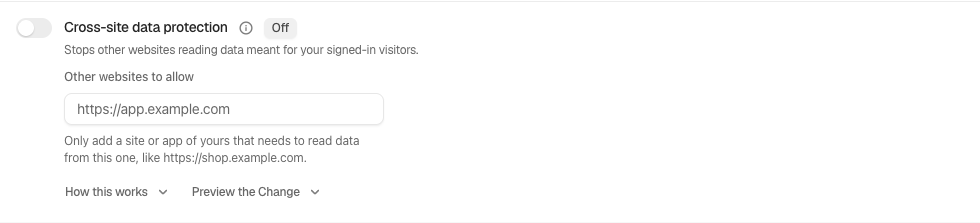
Step 2: Restrict cross-site admin-ajax access
- Open its preview and read what will change. The preview changes nothing.
- Review the allowed-origin field before applying. Add only external sites you deliberately allow to read signed-in responses. Leave it empty when no external origin needs access.
- Turn on the fix. If the screen asks you to confirm recovery or your password, complete that before continuing.
Recommended settings
Our advice is to test this on staging, then apply it when the behavior fits the site. Keep a working recovery method before changes affecting sign-in or the site address.
What it can break and how to undo
A legitimate front end hosted on another origin may lose access until its origin is allowed. This does not switch off admin-ajax itself. Turn the fix off to use its undo, then check the original workflow. A change is recorded in the activity log; an undo does not erase that record.
Final Outcome
The row should show the fix is on. Test the affected operation with an appropriate account, then check the finding. The score and Findings update on their own after the change. If the finding stays open, press Check Again to see what the check still sees. A server or another plugin can enforce a setting independently, so switching BetterShield off does not necessarily remove that other protection.
Related
This is how you can restrict cross-site admin-ajax access with BetterShield.
Getting Stuck? Feel free to contact our Dedicated Support Team.