How To Configure Proxy Addresses With BetterShield?
Make sure BetterShield can tell visitors apart behind a proxy, a load balancer or Cloudflare, so sign-in lockouts run and never catch everyone at once.
Make sure BetterShield can tell visitors apart behind a proxy, a load balancer or Cloudflare, so sign-in lockouts run and never catch everyone at once.
What it does
Sign-in pauses, the puzzle and address entries on the block list act only on an address BetterShield can verify. Behind a reverse proxy, a load balancer or a CDN, every request can arrive from the same address, so BetterShield has to be told who to believe. You do that on BetterShield › Protection › Login & Access: the How this site sees you card under Your connection and lockouts shows what it sees, and Addresses of your CDN or proxy under Allow and block lists is where you name your proxy.
BetterShield reads each request one of these ways:
| How the request arrives | Whose address is used | Pauses |
|---|---|---|
| Straight from a public address | The connecting address. Any forwarding header is ignored, so nobody can choose the address they appear to come from. | Run |
| From Cloudflare’s published address ranges, carrying Cloudflare’s visitor header | The visitor address Cloudflare names. Until you confirm the site is behind Cloudflare, a pause counts that address and the Cloudflare address together. | Run |
| From a proxy named under Addresses of your CDN or proxy, with an X-Forwarded-For header | The first address in X-Forwarded-For, read from the right, that is not private, not a named proxy and not Cloudflare. | Run |
| From a named proxy that sends no X-Forwarded-For | Nothing names the visitor. | Stopped |
| From a private address that nothing names, with or without headers | Nothing it can trust. | Stopped |
A proxy or CDN that reaches the site from a public address, and is not named, falls in the first row: its address is taken as the visitor’s, so one pause would shut out everyone behind it. Name it under Addresses of your CDN or proxy and have it send X-Forwarded-For.
When pauses are stopped, failed sign-ins are still recorded, but nobody is paused, nobody gets the puzzle, address entries on Never allowed to sign in stand down, and public forms never close. Counting the proxy’s address would put every visitor, you included, under one pause, and believing an unvouched header would let anyone dodge one.
An X-Forwarded-For entry that names no address (such as “unknown”) ends the reading, and that request is treated as unverified. Entries written with a port are read correctly.
Cloudflare is recognized by its published address ranges, which ship with the plugin and are never fetched. It needs no Addresses of your CDN or proxy entry, only the Cloudflare confirmation described below.
Step 1: Open BetterShield › Protection › Login & Access
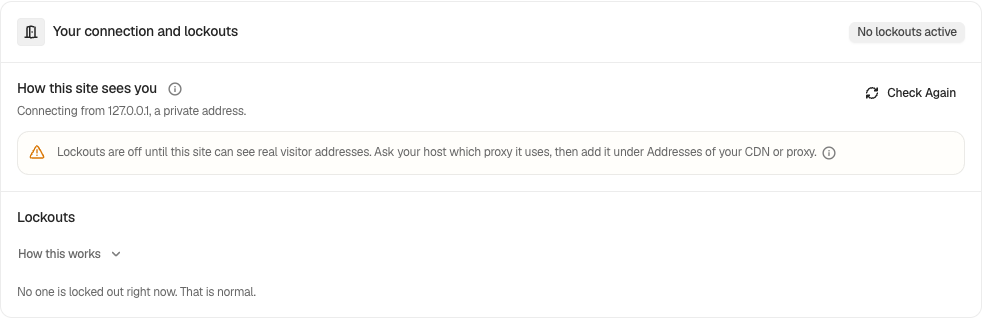
Open BetterShield › Protection › Login & Access and read How this site sees you. It shows the address you connect from, and what Cloudflare says when it is in front.
Step 2: Configure Trusted Proxies
- If it says “automatic lockouts are active” and asks nothing else, there is nothing to do.
- If it asks whether the site is behind Cloudflare and it is, press Yes, this site is behind Cloudflare. Each pause then follows one visitor. This saves at once.
- If it says lockouts are not running and you have a reverse proxy or load balancer, type its address or range under Addresses of your CDN or proxy, in Your proxy’s IP addresses, separated by commas (for example 192.0.2.10, 192.0.2.0/24), then press Save. A mistyped entry is named before you save.
- Press Check again. If it now says your named proxy sends no forwarding header, set the proxy to send X-Forwarded-For with the visitor’s address.
| Option | What it does | Default |
|---|---|---|
| Addresses of your CDN or proxy | Your own proxies or load balancers, separated by commas. Up to 500 entries, each no wider than /8 (IPv4) or /32 (IPv6). | Empty |
| Yes, this site is behind Cloudflare | Lets Cloudflare’s visitor header name the visitor on its own. | Not confirmed |
| Turn that off | Withdraws the Cloudflare confirmation. Shown when a request did not arrive through Cloudflare although the site trusts it. | Not shown |
| Check again | Reads your request again. Neither address is stored. |
Quick Setup also asks whether the site is behind Cloudflare and sets the same answer.
Recommended settings
- Hosted directly: nothing to set.
- Behind Cloudflare: press Yes, this site is behind Cloudflare when the card asks, and only if it is true.
- Behind a load balancer or a host’s proxy: name only that proxy’s own addresses, as narrowly as you can, and make sure it sends X-Forwarded-For. Your host can tell you both.
- Cloudflare in front of a load balancer: name the load balancer. The Cloudflare hop is recognized on its own; then press Yes, this site is behind Cloudflare so each pause follows one visitor.
- Agency or many sites: read this card first on every new site. It takes a minute and decides whether pauses work at all.
What it can break, and how to undo
- A range you do not control. Any machine inside a trusted range can say who it is carrying, and so dodge pauses. Name only your own infrastructure. Remove the entry and Save.
- Confirming Cloudflare when the site is not behind it. Anything inside Cloudflare’s ranges could then name any visitor. The card warns when a request did not come through Cloudflare; press Turn that off.
- Naming a proxy that sends no header. Pauses stay stopped until it sends X-Forwarded-For.
Adding a proxy and confirming Cloudflare give something away, so with password confirmation on they ask for your password. Each change is recorded as “Login protection changed”.
Final Outcome
The summary strip. Visitor addresses reads Readable (“Lockouts work” or “Lockouts work (via your proxy)”), or Not visible (“Lockouts are off.” or “Behind a proxy. Lockouts are off.”, with a See why link).
- The card. It says connections are identified directly, through Cloudflare, or through the proxy you named, and that automatic lockouts are active.
- Findings. Failed sign-ins are not being counted, so password guessing is not stopped (High) appears when your own dashboard visits could not be told apart, with Open Login & Access to fix it. It keeps the worst it has seen, and starts over when you change Addresses of your CDN or proxy or the Cloudflare answer. After a fix, open any BetterShield screen, then run the audit again.
- Networks elsewhere. Sessions, the activity log and the new-network email use the same reading, so once it is right they show your visitors’ networks rather than your proxy’s.
Good to know
- Nothing about your address is stored by the card: it reads the request you just made and shows it to you.
- With Ultra, BetterShield › Ultra › Cloudflare can also put a challenge on the network of a sign-in lockout at Cloudflare’s edge. See Cloudflare.
Related
This is how you can configure proxy addresses with BetterShield.
Getting Stuck? Feel free to contact our Dedicated Support Team.