How To Limit Public Form Requests With BetterShield?
Set how many comments, password reset requests and sign-ups one connection may send before BetterShield holds or slows them, and preview new numbers.
In BetterShield, request protection puts a limit on the three forms anyone can reach without signing in: comments, password reset requests and sign-ups. They are counted apart from sign-in, so activity on a public form can never lock you out of your own dashboard. All three are on by default, under Request protection on BetterShield › Protection › Login & Access.
What it does
Every submission from a connection counts, whether it succeeds or not, including a comment WordPress refuses because its post is missing, closed to comments, in the trash, a draft or password-protected. When the count within Counted within (minutes) reaches Limit per visitor, that submission and the ones after it are answered as below until Block lasts (minutes) has passed.
| Form | What happens while closed | Never counted |
|---|---|---|
| Comments | The comment goes to the moderation queue as pending instead of publishing. Nothing is discarded, and a comment already marked as spam stays spam. | People who can moderate comments |
| Password resets | No reset email is sent. On WordPress’s own reset form, the request gets the same confirmation page a successful one gets, and on the WooCommerce My Account form it lands on the store’s own confirmation, so the form never reveals whether an account exists. Accounts are never affected: the person can still reset from any other connection. | Reset links sent from the dashboard by people who can edit users |
| Sign-ups | The sign-up is refused with “Too many sign-ups have come from your connection recently. Please try again a little later.” Only where registration is open. Covers the WordPress registration form and the WooCommerce My Account registration form. | Accounts created at the WooCommerce checkout, and accounts created by people who can create or list users, such as a store integration |
Rules shared by all three:
- Only a verified connection is ever closed. One BetterShield cannot verify (several people sharing one address behind a proxy, for instance) is recorded and never closed. See Proxies and Cloudflare.
- Addresses on Always allowed are not counted.
- A closure lasts exactly Block lasts (minutes). It does not grow with repeats, and nobody is emailed.
- Reset requests and sign-ups sent while closed still count, so a connection that keeps going is closed again as soon as a closure ends. Comments held while closed are not counted.
- Safe mode stands all three down.
- With Send lockouts to the server’s firewall on, a reset or sign-up form closing to a connection writes one line for the server’s firewall; a comment burst held for moderation writes nothing. See Server firewall.
Step 1: Open BetterShield › Protection › Login & Access
Open BetterShield › Protection › Login & Access and find Request protection.
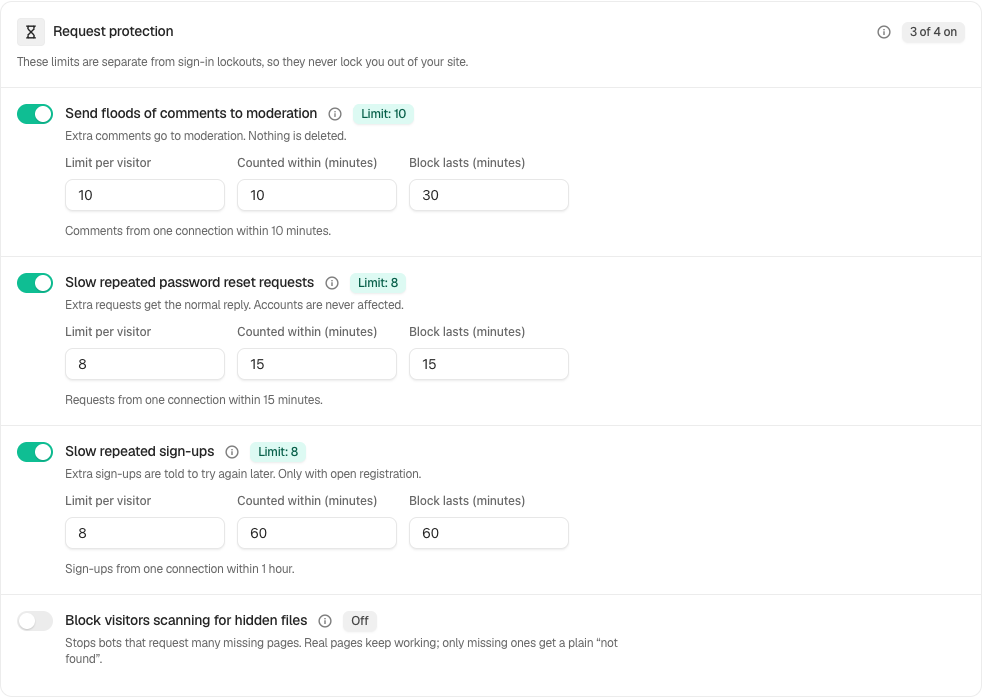
Step 2: Limit comments, password resets and sign-ups
- Turn each form on or off, and change its numbers if you need to.
- Read the replay sentence under any number you changed (below), then press Save.
| Option | What it does | Default |
|---|---|---|
| Send floods of comments to moderation | Holds comments from a connection once it reaches the limit, that one included. | On: 10 within 10 minutes, closed for 30 minutes |
| Slow repeated password reset requests | Answers reset requests once the limit is reached, that one included, without sending anything. | On: 8 within 15 minutes, closed for 15 minutes |
| Slow repeated sign-ups | Refuses sign-ups once the limit is reached, that one included. | On: 8 within 60 minutes, closed for 60 minutes |
| Limit per visitor | The submission from one connection that closes the form to it: 3 to 100. | As above |
| Counted within (minutes) | How far back submissions are counted: 1 to 1440. | As above |
| Block lasts (minutes) | How long the form stays closed to that connection: 1 to 1440. | As above |
Preview new numbers before you save
As soon as a form’s numbers differ from the saved ones, a sentence under them replays the new numbers against that form’s attempts from the last two days, beside what the saved numbers did. For example: “Against the 120 attempts recorded since (a date), these numbers would have held 14, from 2 connections. The saved numbers held 0, from 0.”
- It treats every connection as verified, so it shows the most the numbers could have done.
- Attempts are only recorded while the form’s switch is on. With nothing recorded, it says there is nothing to replay the numbers against.
- Comments held while the form was closed were never recorded, so they are not in the replay.
- On a very busy form it reads only the most recent attempts, and says so.
Recommended settings
We recommend the defaults. They are set so that a person doing a normal thing quickly does not reach them. Use the replay before raising or lowering anything.
| Site | What we recommend |
|---|---|
| Blog or brochure site | Defaults. If readers often comment together from one school or office network, raise Limit per visitor for comments; held comments are never lost. |
| Store (WooCommerce) | Defaults. Checkout account creation is never counted, so first-time orders are not affected. |
| Membership or course site | If a class or team signs up together from one network, raise Limit per visitor for sign-ups (for example to 30), or add that network’s fixed address to Always allowed. |
What it can break, and how to undo
- A shared network. Everyone behind one public address (a school, an office, some mobile networks) shares one count. Their comments wait in moderation, their sign-ups are refused for a while, or their reset email does not arrive. Press Release Now on the row under Lockouts, raise the number, or add the address to Always allowed.
- “My reset email never came.” If the person asked many times from one connection, the request that reached the limit and those after it are answered without an email. They can wait for Block lasts (minutes) to pass, or ask from another network.
- Turning a form off. Switch it off and press Save. With password confirmation on, a looser limit or a form switched off asks for your password.
Final Outcome
The Lockouts list. A closure shows as a row naming Comments, Password resets or Registration, with the network, the number of attempts and how long it lasts. Release Now reopens the form for that connection.
- The activity log. “Form closed to a network” when a form closes, then “Comment held for moderation”, “Password reset requests slowed” or “Sign-up refused” for what it held or refused.
- The comments screen. Held comments wait under Pending.
On multisite
Each site keeps its own counts and closures, so a connection closed out of one site’s forms can start again on another’s. An account is the same on every site, which matters most for password resets. The screen says so above the forms.
Related
This is how you can limit public form requests with BetterShield.
Getting Stuck? Feel free to contact our Dedicated Support Team.