How To Delete your BetterShield Hub Account?
Delete your BetterShield Hub account after leaving or handing over workspaces and confirming the permanent effects.
In BetterShield Hub, Delete your account on Settings › Account permanently removes the Hub account after its workspace responsibilities are resolved.
Note: Sign in to your free BetterShield Hub account. Your workspace role and site permissions determine which information and actions you can use.
What it does
The deletion flow explains what happens to memberships, personal security methods and account data. Hub can require a recent sign-in, passkey, authenticator code or emailed code before completing it.
Step 1: Open the feature
Transfer any workspace you own or delete it deliberately.
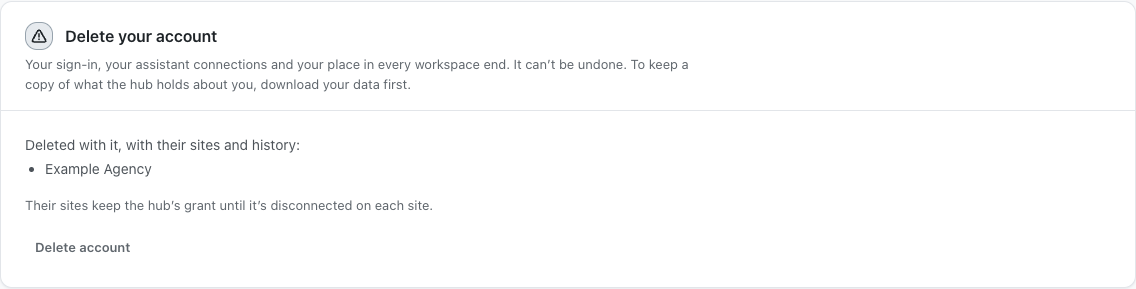
Step 2: Delete your BetterShield Hub account
- Leave workspaces you no longer need.
- Export data you are authorized to keep.
- Open Settings › Account and select Delete your account.
- Read the confirmation, provide the requested proof and confirm deletion.
Account deletion is off until you start and confirm it.
Recommended settings
Our advice:
- Use Leave this workspace when only one membership should end.
- Confirm another owner has ongoing work before deletion.
- Disconnect personal assistant connections first.
What it can break and how to undo
Deletion ends your Hub access and cannot be undone. A new account does not restore the deleted account’s memberships, passkeys or history.
Stop before the final confirmation if any workspace ownership or record is unresolved.
Final Outcome
Hub refuses deletion while an ownership requirement remains.
- Successful deletion signs the account out.
- The deleted sign-in no longer opens the old account.
Related
This is how you can delete your BetterShield Hub account.
Getting Stuck? Feel free to contact our Dedicated Support Team.