How To Monitor Unpublished Code With BetterShield Ultra?
Use BetterShield Ultra's hourly watch for drop-ins, must-use plugins, the active theme, wp-config.php and other unpublished code.
In BetterShield Ultra, Unpublished code, checked hourly re-reads code that has no published checksum to compare with.
Note: These controls require the paid BetterShield Ultra add-on alongside the free BetterShield plugin.
What it does
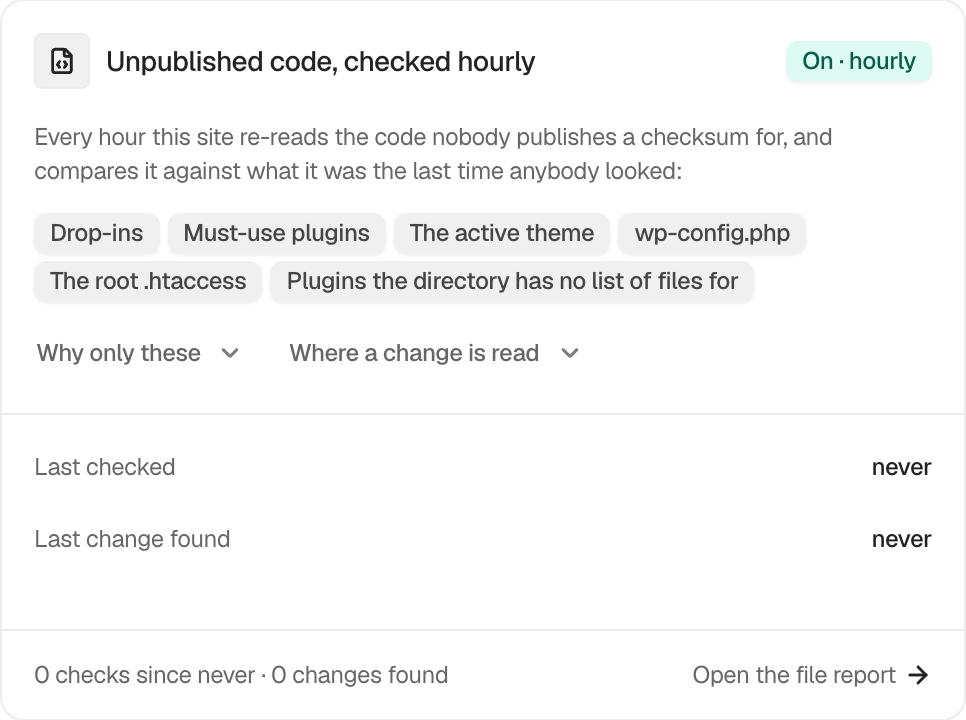
Every hour, Ultra compares drop-ins, must-use plugins, the active theme, wp-config.php, the root .htaccess and plugins without a published file list with their earlier state.
Changes appear in Activity › File changes and follow the site’s alert choices.
Step 1: Monitor Unpublished Code
There is no switch or schedule field. Activate BetterShield Ultra and keep WordPress scheduled tasks running. The card shows Last checked, Last change found, run counts and Open the file report.
Recommended settings
Our advice:
- Check the card after host or deployment changes.
- Review unexpected changes before marking them expected.
- Keep a separate backup of local custom code.
What it can break and how to undo
The watch reads files and writes its report. It does not change the files it checks, so there is no protection to undo.
Safe mode pauses the watch, and it resumes when safe mode ends.
Final Outcome
Last checked advances about once an hour while scheduled tasks run.
- A detected change appears in the file report.
- Open the file report opens Activity › File changes.
Related
This is how you can monitor unpublished code with BetterShield Ultra.
Getting Stuck? Feel free to contact our Dedicated Support Team.