How To Schedule a Client Security Report With BetterShield Ultra?
Choose when BetterShield Ultra emails a client security report, who receives it and which sign-in figures it includes.
Choose when BetterShield Ultra emails a client security report, who receives it and which sign-in figures it includes.
Note: These controls require the paid BetterShield Ultra add-on alongside the free BetterShield plugin.
What it does
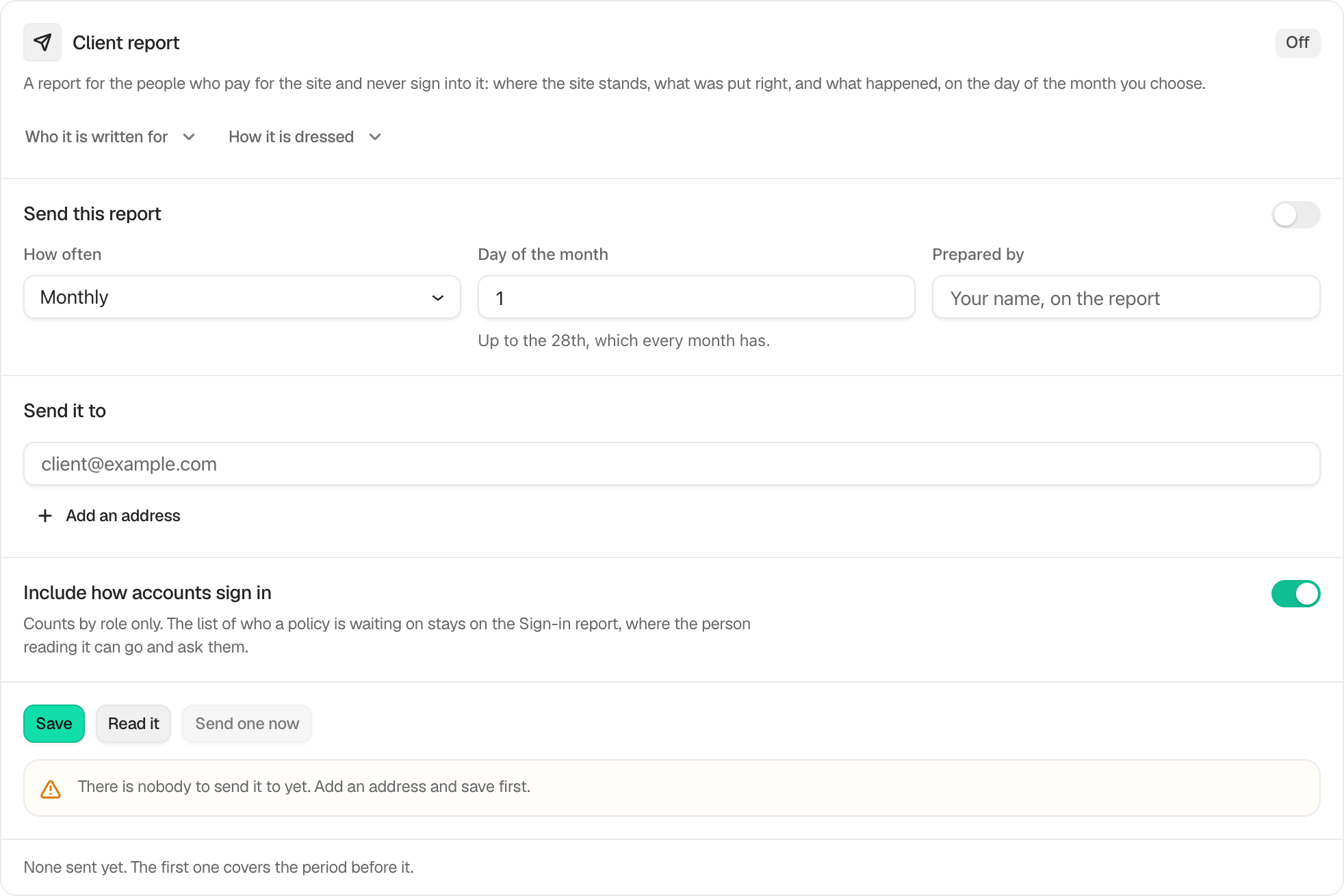
BetterShield › Ultra › Client report can email a weekly or monthly security report to a site’s client. It uses the site’s time zone and the site’s own mail setup. For a report about what one person or role did, see Activity report for one person or role.
Step 1: Schedule a Client Security Report
| Option | What it does | Default |
|---|---|---|
| Send this report | Turns scheduled delivery on. | Off |
| How often | Sends the report Monthly or Weekly. | Monthly |
| Day of the month | Chooses a day from 1 to 28 for a monthly report. | 1 |
| Day of the week | Chooses Sunday through Saturday for a weekly report. | Monday |
| Prepared by | Adds your name or agency name to the report. | Empty |
| Send it to | Adds up to five email addresses. If empty, the report uses the contacts saved for this site’s client. | Empty |
| Include how accounts sign in | Adds two-factor and passkey counts by role. | On |
Press Save. Read it opens the report as it will arrive. Send Now asks for confirmation and sends to the saved recipients. A manual send on or after the scheduled due day counts as that period’s report, so the scheduled run does not send it again. Sending early leaves the scheduled report due.
Recommended settings
- A managed business site: send monthly and add the person who owns the website.
- A site with frequent security work: send weekly while changes are active, then return to monthly.
- A site with role-based sign-in policies: leave Include how accounts sign in on so the client can see adoption by role.
What it can break and how to undo
The report can go to the wrong person if an address is mistyped or an old client remains on file. Use Read it before the first send, check the recipient list, and send a test with Send Now. To stop future reports, turn off Send this report and press Save.
A staging copy does not send client reports.
Final Outcome
The badge reads On after the schedule is saved. The card shows when the last report was sent. Each delivery is also recorded as Alert sent in the activity log without storing recipient addresses there.
On multisite
Each site has its own report and recipient list. Client records are shared across the network.
Related
This is how you can schedule a client Security report with BetterShield Ultra.
Getting Stuck? Feel free to contact our Dedicated Support Team.