How To Check Site Recovery Readiness in BetterShield Hub?
See whether a connected site has recovery methods ready and ask it to run a recovery check from BetterShield Hub.
The site’s Recovery card shows the recovery methods its BetterShield installation reports and whether they are ready.
Note: Sign in to your free BetterShield Hub account. Your workspace role and site permissions determine which information and actions you can use.
What it does
Hub summarizes the site’s recovery link, printed recovery codes and other reported recovery checks. It does not display a recovery secret.
Check readiness now asks the site to test its current readiness again when the connection offers that check.
Step 1: Open the feature
Set up recovery on the WordPress site under BetterShield.
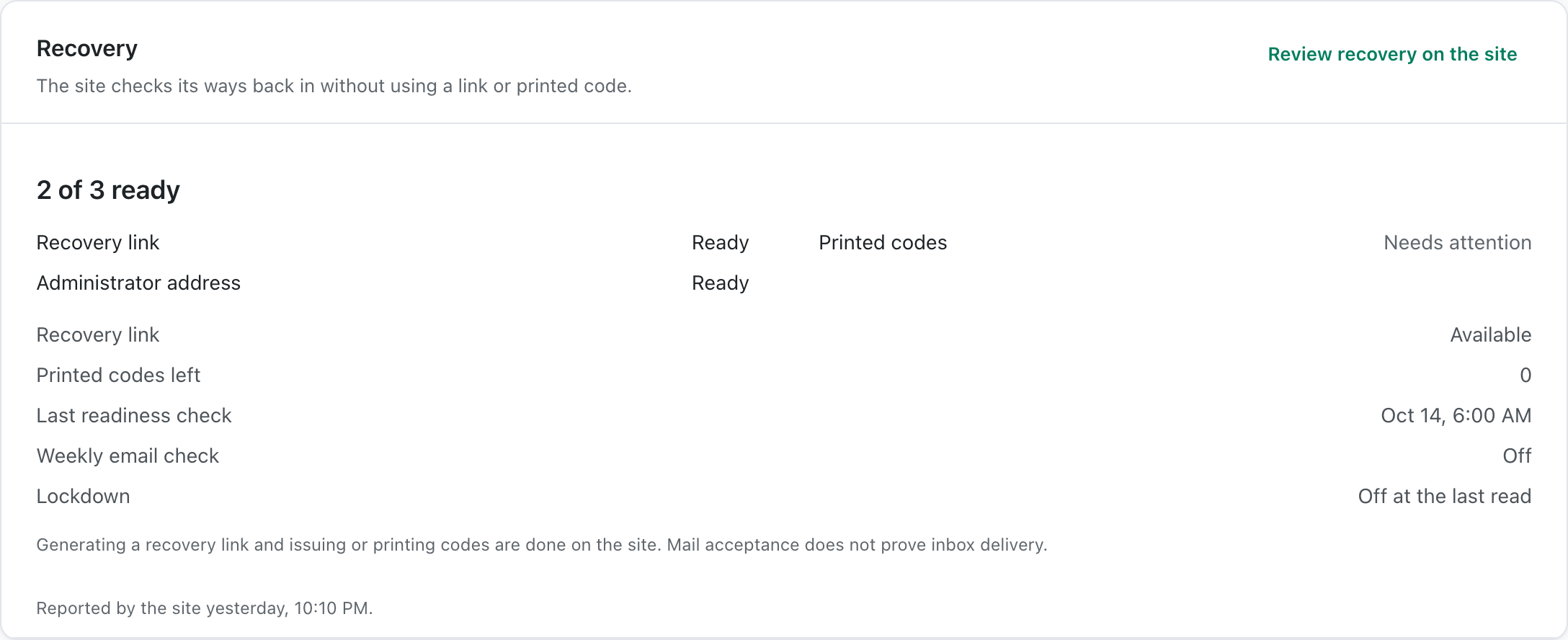
Step 2: Check site recovery readiness
- Connect the site to Hub.
- Open the site and find Recovery.
- Select Check readiness now when you need fresh results.
There is no Hub default. The card reflects what the site has configured.
Recommended settings
Our advice:
- Keep at least one recovery method somewhere outside the WordPress site.
- Recheck after moving the site or changing its domain.
- Test recovery before applying access restrictions.
What it can break and how to undo
Reading or running the check changes no recovery setting. A failed result means the recovery method should be corrected on the site.
Do not copy recovery links or codes into Hub notes.
Final Outcome
The card shows a ready count and the individual methods.
- A new check updates the result and time.
- No recovery secret appears in Hub.
Related
This is how you can check site recovery readiness in BetterShield Hub.
Getting Stuck? Feel free to contact our Dedicated Support Team.