How To Activate the BetterShield Ultra License?
Add or remove the BetterShield Ultra license key used to receive add-on updates on this site.
BetterShield › Ultra › License connects this site to its BetterShield Ultra license so the add-on receives updates.
Note: These controls require the paid BetterShield Ultra add-on alongside the free BetterShield plugin.
What it does
The key identifies this Ultra installation to the license service and brings plugin updates to the site.
Step 1: Open BetterShield › Ultra › License
Open BetterShield › Ultra › License.
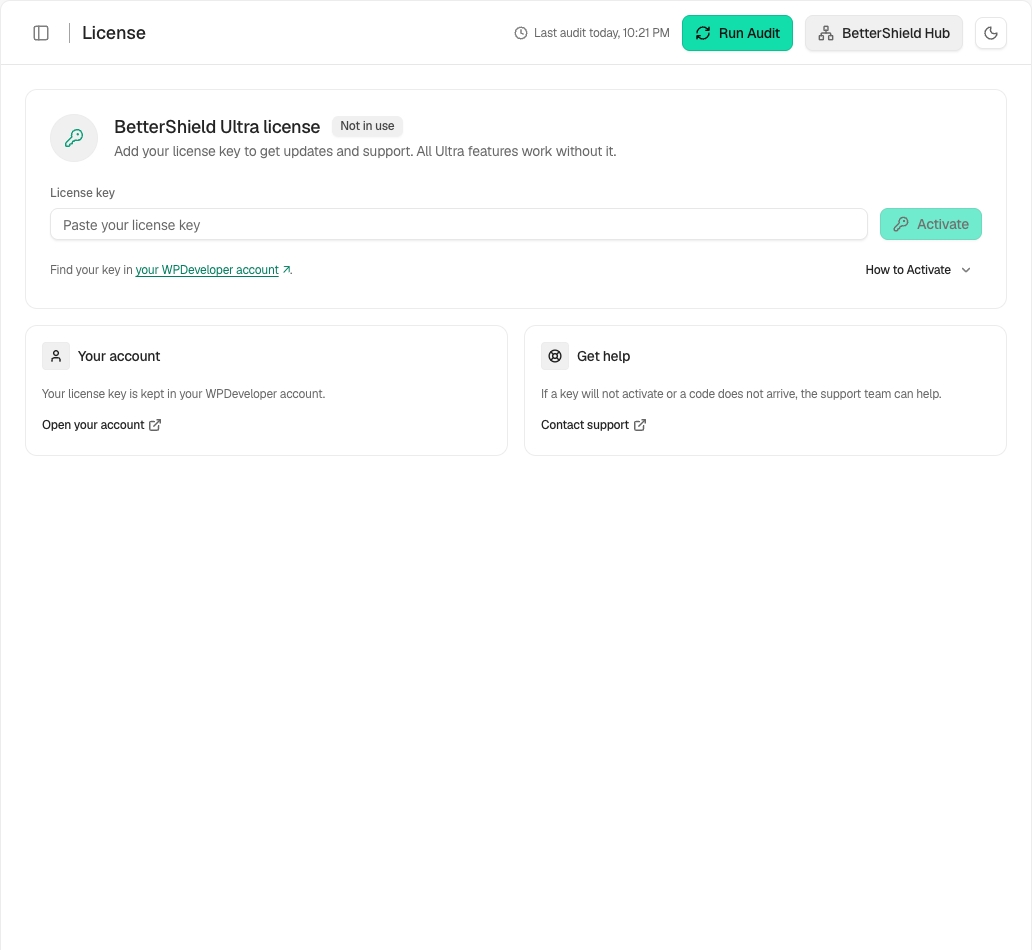
Step 2: Activate the BetterShield Ultra license
- Paste the license key into the empty field.
- Select Activate.
- Use View details to review the saved status when offered.
The key field starts empty. Removing the key frees it for another site.
Recommended settings
Our advice:
- Activate the key on the live site address that will receive updates.
- Keep the key outside tickets, screenshots and client reports.
- Review the license status before an Ultra update window.
What it can break and how to undo
Activation changes only the site’s update connection. A rejected key does not change Ultra settings.
Use the screen’s deactivation action to remove the key from this site. Enter and activate it again if it was removed by mistake.
Final Outcome
The card shows the license as active.
- The saved site details are shown without exposing the full key.
- WordPress can offer BetterShield Ultra updates.
Related
This is how you can activate the BetterShield Ultra license.
Getting Stuck? Feel free to contact our Dedicated Support Team.