How To Change the Sign-in Address With BetterShield?
Move sign-in away from wp-login.php, trial the move with Monitor first, and know how to get back in if the new address is lost.
With BetterShield, move sign-in away from wp-login.php, trial the move with Monitor first, and know how to get back in if the new address is lost.
What it does
In BetterShield, Custom sign-in address moves the WordPress sign-in page from wp-login.php to an address you choose. In the screen’s own words, it makes the logs quieter, not the door stronger: scripts that ask for wp-login.php by name stop reaching the form, while anyone who learns the new address meets the same form, accounts and passwords. It is under Signing in on BetterShield › Protection › Login & Access, and it starts off.
- Serves the sign-in page at your address. Signing in, signing out and password resets all work there, and so do two-factor, the hidden bot check and the sign-in puzzle.
- wp-login.php answers 404, with a page titled “Not found” that says “This page is not available.” Only signing out, for someone signed in, and the password form of a password-protected post still work there. On a single site, wp-signup.php and wp-register.php answer 404 too.
- Every sign-in link WordPress builds is rewritten, including the ones in its emails.
- /login, /login.php, /admin and /dashboard stop redirecting to the sign-in page or dashboard, so those guesses do not hand out the new address.
- No files and no rewrite rules are written, so undo is instant.
With plain permalinks the address is a query, such as example.com/?side-door rather than example.com/side-door/. The preview shows which you get.
It moves only the WordPress sign-in page: a store’s My Account form, XML-RPC, the REST API and application passwords are untouched. Safe mode pauses it, and it stops while BetterShield is deactivated.
Step 1: Open BetterShield › Protection › Login & Access
Open BetterShield › Protection › Login & Access and find Custom sign-in address under Signing in.
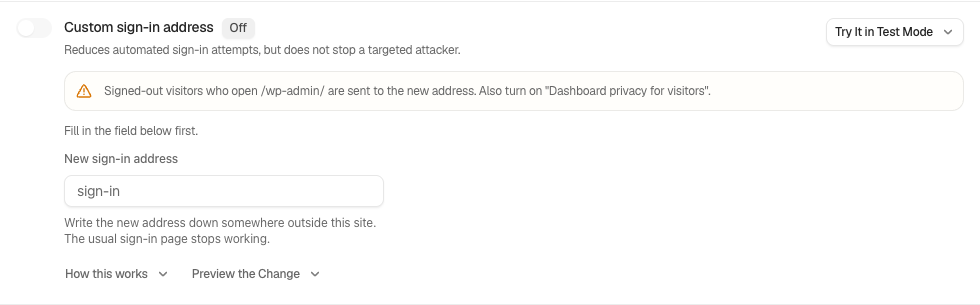
Step 2: Change the Sign-in Address
- Type a New sign-in address.
- Press Preview the change. Its first line names the exact address, as “Serve the sign-in page at https://example.com/side-door/.” Nothing changes.
- Turn the switch on. The row shows the address with Copy, and reads On since and Undo never expires.
- Store the address off the site, such as in a password manager, and tell everyone who signs in.
| Option | What it does | Default |
|---|---|---|
| New sign-in address | Where sign-in moves to: 2 to 40 lowercase letters, numbers and dashes. | Empty (the placeholder reads sign-in) |
The preview and the switch refuse an address that will not work:
| The address | What you see |
|---|---|
| Breaks the character rule | “The address needs two to forty characters: letters, numbers and dashes.” The switch waits with “Correct the field below first.” |
| Is a name WordPress already uses, such as wp-admin, wp-login, admin, feed, search or page | “That address is already part of WordPress. Choose another.” |
| Already holds a page, post, category or tag | “Something already lives at that address. Choose another.” |
| Is your decoy URL | “That address is your decoy URL. Choose another, or turn the decoy URL off first.” |
The field is hidden while the fix is on. To change the address, turn the fix off, type the new one and turn it on again.
Before it applies
Like every Signing in fix, applying it first checks your way back in: a working recovery link or unused recovery code, checked within the last day. If that fails, Check the way back in first offers Check now (or Open Recovery) and Go ahead anyway, which is logged. See Set up recovery. Applying needs a signed-in browser, not an application password.
Monitor first
Monitor first, at the end of the row, counts real requests without blocking any: requests to wp-login.php, and how many the move would have answered with 404.
- Type the address, choose a New observation window (1 hour, 24 hours, which is preselected, or 7 days) and press Start monitoring with the fields above.
- The panel reads, for example, “40 requests observed; 39 matched this rule.” End monitoring now stops early.
- When the window ends, press Enforce reviewed settings. It applies the address saved with the window, needs a usable recovery link or recovery codes and safe mode off, and leaves the usual undo. Like the switch, it first checks your way back in: if that check fails, Check the way back in first opens, and Go ahead anyway is logged.
Scripts and people both count, and requests answered before WordPress are not seen, so zero proves nothing. Counts are kept for at least a week after the window ends.
From WP-CLI
wp bettershield harden login_url --dry-run
wp bettershield harden login_url --slug=side-door --user=admin
If the recovery check fails, the command stops; --force goes ahead anyway and is logged. A connected AI assistant can only propose this fix, as a plan you agree to. See WP-CLI commands.
Recommended settings
We recommend this as an extra, after the protections that stop password guessing: keep Sign-in attempt limits on and set up two-factor or passkeys first. When you move the address, apply Hide the dashboard from visitors too, or /wp-admin/ hands the new address to anyone who asks.
| Site | What we recommend |
|---|---|
| Store (WooCommerce) | Customers sign in on My Account, which does not move, so this mostly affects staff. Exclude the new address from your page cache. |
| Membership or course site | Links WordPress builds follow the move, but members’ bookmarks and links typed into menus or pages by hand do not. Update those first, or leave this off. |
| Agency or many sites | Use a different address on each site, and keep it beside that site’s recovery link. |
What it can break, and how to undo
- Losing the address. Your recovery link, a recovery code or
wp bettershield recoverturns on safe mode for an hour, and wp-login.php answers again. Once in, the row shows the address with Copy. See Locked out. - /wp-admin/ gives it away. Until Dashboard privacy for visitors is on, /wp-admin/ redirects signed-out visitors to the new address, and the row warns about it.
- Old links. Bookmarks, hand-typed links and emails sent before the move point at wp-login.php and now get a 404. An unfinished password reset needs a new email.
- A page cache. With WP Rocket, W3 Total Cache, WP Super Cache or LiteSpeed Cache active, the row asks you to exclude the new address from its cache, or the form may be served stale.
- Another plugin that moves sign-in. When another active plugin moves or hides the sign-in page (such as WPS Hide Login, Rename wp-login.php or Defender, or Solid Security, All-In-One Security or a licensed Patchstack with that feature on), the row names it and says the two do not combine predictably: keep only one.
To undo, turn the switch off, and wp-login.php answers again at once. Undo needs a signed-in browser, and your password if Ask for my password before removing a protection is on. From the terminal: wp bettershield harden login_url --undo --user=admin.
Final Outcome
The old address. In a private window, open yoursite.com/wp-login.php: “Not found”, with a 404. The new address shows the sign-in form.
- The row. On since, the address with Copy, and “This one has no effect a page view can check, so it is reported from your settings.”
- The activity log. “Hardening applied” and “Hardening undone” name the fix; Monitor first changes are “Setting changed”.
- Findings. No finding opens while it is off. While it is on, Some protections that are switched on are not working (Medium) names it if it reads as on but is no longer in force, for example because another plugin took it off. Your sign-in page is being cached (Medium) checks whichever sign-in address is current, the moved one included.
On multisite
The address changes for that site only, and the row says so.
Related
This is how you can change the sign-in address with BetterShield.
Getting Stuck? Feel free to contact our Dedicated Support Team.