How To Switch from Limit Login Attempts Reloaded to BetterShield?
Import supported Limit Login Attempts Reloaded settings, check proxy handling, and switch sign-in limits with recovery ready.
With BetterShield, import supported Limit Login Attempts Reloaded settings, check proxy handling, and switch sign-in limits with recovery ready.
What it does
BetterShield can import supported login limits and allowed IPs from Limit Login Attempts Reloaded. The preview names what it can carry and anything it cannot. Importing settings and deactivating a plugin are separate actions.
Step 1: Keep Recovery Ready
Install BetterShield and store a recovery link or recovery codes outside the site.
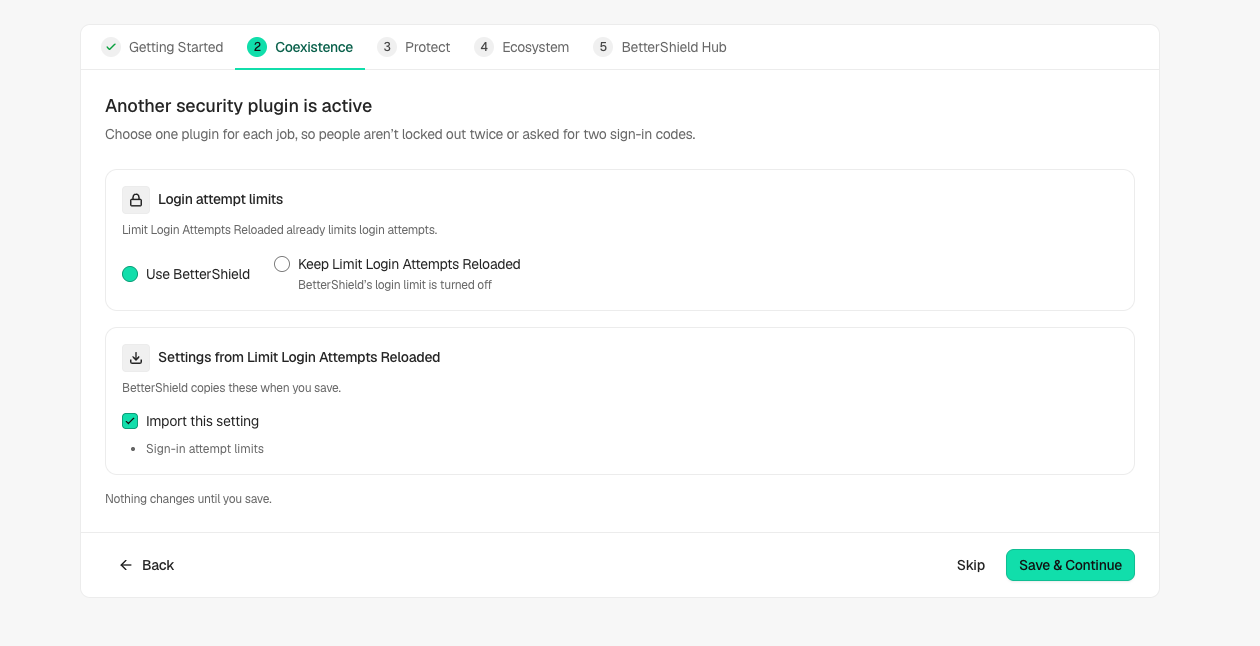
Step 2: Switch from Limit Login Attempts Reloaded to BetterShield
- In Quick Setup’s Coexistence step, read the recognized settings and choose which plugin handles sign-in limits. Or use the import preview under Settings › General.
- Review the proposed limits and allowed IPs before saving. Check how the site identifies visitors behind a proxy.
- Choose the offered Deactivate action only when you are ready to stop every feature of Limit Login Attempts Reloaded. If the wizard cannot deactivate it, use the Plugins screen with an authorized account.
- Test a normal sign-in and read the BetterShield lockout settings while your existing administrator session remains open.
Recommended settings
Use one sign-in limiter at a time and start with the preview rather than copying settings blindly. Keep the previous plugin’s settings until the new setup is verified.
What it can break and how to undo
Two active limiters can pause the same person independently. A wrong proxy setup can make visitors share one apparent address. Use BetterShield’s recorded settings undo for imported changes, and reactivate the previous plugin through Plugins if you need to restore its own behavior. Do not assume a settings undo also reactivates a plugin.
Final Outcome
Review imported and skipped rows, then confirm the saved limit and allowed-IP list. Test from a safe connection with recovery available.
Related
This is how you can switch from Limit Login Attempts Reloaded to BetterShield.
Getting Stuck? Feel free to contact our Dedicated Support Team.