How To Enable New-Network Sign-in Emails With BetterShield?
Tell each account holder by email when their account signs in from a network it has not used before. Nothing is blocked, and it sends at most one a day.
With BetterShield, tell each account holder by email when their account signs in from a network it has not used before. Nothing is blocked, and it sends at most one a day.
What it does
In BetterShield, Tell account holders about sign-ins from a new network emails the person whose account it is, not the site’s alert list, the first time their account signs in from a network it has not used before. They are the one person who knows whether it was them. Nothing is blocked. It is off by default, under Sign-in protection on BetterShield › Protection › Login & Access.
- On each successful sign-in, BetterShield compares the network it came from (the /24 for IPv4, the /64 for IPv6) with the networks the account signed in from before. It looks at the account’s “Signed in” records that the activity log still holds (30 days, or 90 with Ultra), up to its 50 most recent networks.
- A new network sends an email to the account’s own email address, with the subject “A new sign-in to [site name]”. It says when, names the network, says there is nothing to do if it was them, and otherwise asks them to change their password and check the devices signed in to the account. The link goes to their profile, where Where you are signed in lists their devices, or to Sign-in security on My Account for a store customer who cannot reach the dashboard.
- At most one email per account per day, however many new networks it signs in from. The activity log records “Signed in from a new network” every time, including the days the email is skipped.
- No email for an account’s first sign-in on record, for example on the day you install BetterShield, because there is nothing to compare it with.
- Every role receives it: administrators, writers, store customers and members alike.
- Safe mode sends none.
- A connection BetterShield cannot verify sends nothing and records nothing, the way lockouts stand down there.
Step 1: Open BetterShield › Protection › Login & Access
Open BetterShield › Protection › Login & Access.
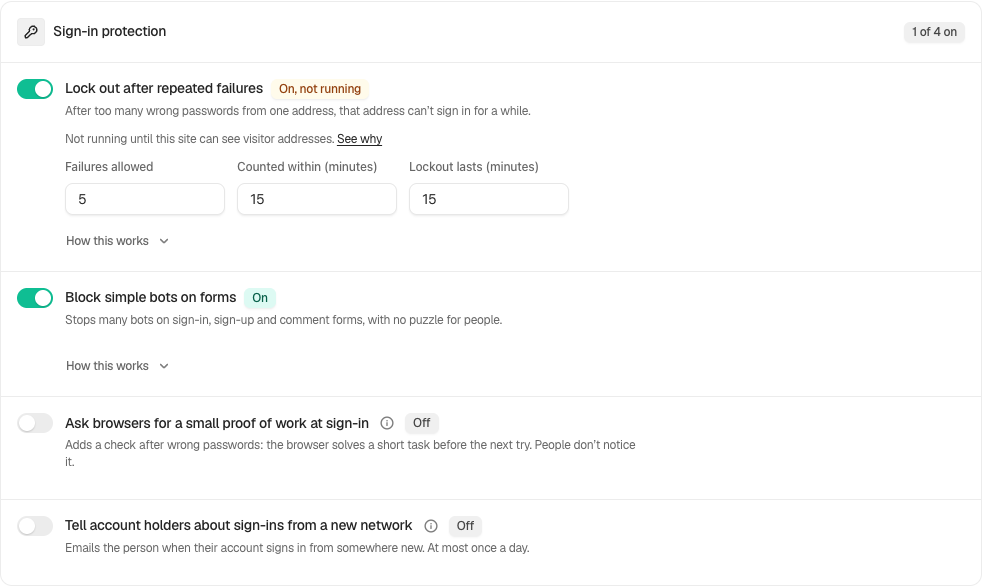
Step 2: Enable New-Network Sign-in Emails
- Under Sign-in protection, turn on Tell account holders about sign-ins from a new network.
- Press Save.
| Option | What it does | Default |
|---|---|---|
| Tell account holders about sign-ins from a new network | Emails the account holder the first time their account signs in from a network it has not used before, at most once a day. Blocks nothing. | Off |
Recommended settings
We recommend turning it on where the people who sign in are staff. Each person hears about their own account, and a sign-in they did not make is the one email they will act on.
| Site | What we recommend |
|---|---|
| Blog or brochure site | On. |
| Store (WooCommerce) | Leave it off unless you want every customer to receive these emails too. If you turn it on, tell customers first. |
| Membership or course site | The same as a store: members are emailed as well. |
| Agency or many sites | On for client sites where only staff sign in. |
Before you turn it on, check that How this site sees you reads that automatic lockouts are active. Like the lockouts, it needs connections BetterShield can verify: behind a proxy it cannot see through, it sends nothing. See Proxies and Cloudflare.
What it can break, and how to undo
- More email to more people. It writes to people who are not the site’s administrator, which is why it is off by default. Someone who travels or moves between mobile networks may hear from it most days, never more than once a day.
- Questions. A person who gets one may ask you what it means. The email itself says that a new office, phone or trip needs nothing from them.
- It depends on your site’s email. If the site cannot send mail, nobody hears anything. See Email alerts for checking delivery.
To stop it, turn the switch off and press Save. With password confirmation on, that asks for your password.
Final Outcome
The activity log records “Signed in from a new network” for each new network, rated Medium.
- A test. With the switch on, sign in once as a test account from your usual connection, then sign in again from a phone on mobile data. The test account’s inbox receives “A new sign-in to [site name]”.
Related
This is how you can enable new-network sign-in emails with BetterShield.
Getting Stuck? Feel free to contact our Dedicated Support Team.