How To Choose an Emergency Administrator Account With BetterShield Ultra?
Mark a spare administrator, receive urgent alerts when it is used, and prepare it safely for the next emergency.
With BetterShield Ultra, mark a spare administrator, receive urgent alerts when it is used, and prepare it safely for the next emergency.
Note: These controls require the paid BetterShield Ultra add-on alongside the free BetterShield plugin.
What it does
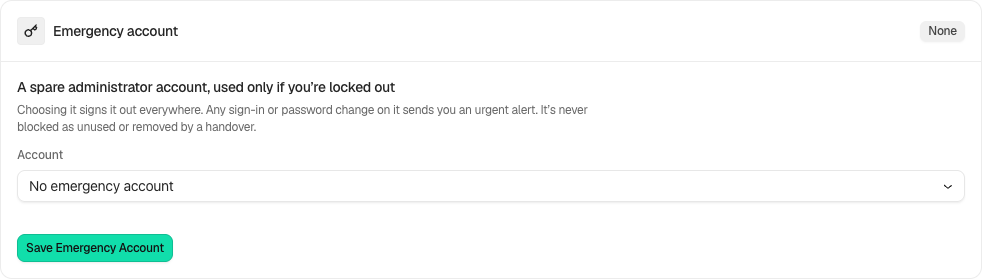
Open BetterShield › Ultra › Administrator accounts. Emergency account marks a spare administrator for emergency use. No account is chosen by default. It is excluded from unused-account blocking, access reviews and handover. Its use creates an urgent record and a reminder to change its password.
Step 1: Open the feature
Create and secure a permanent administrator through WordPress’s Users screen if needed.
Step 2: Choose an emergency administrator account
- Choose it under Account and select Save Emergency Account. Choosing it signs its sessions out.
- Keep its credentials outside the site. A temporary administrator cannot be the emergency account.
- After emergency use, change its password, then confirm I Changed the Password. You cannot mark your own account as the emergency account.
With BetterShield 1.1.6 and Ultra 1.0.7 or newer, Emergency account used emails even when instant alerts are off. Mute all alerts still silences it. Check the card’s delivery warning and configure an email recipient before relying on it.
Recommended settings
Our advice: use a spare account owned by the client or site owner and verify that the alert recipients can be reached.
What it can break and how to undo
This is oversight, not a bypass for two-factor or another new way in. A blocked or demoted account cannot provide emergency administrator access. Change or clear the selected account if it no longer qualifies; keep recovery available throughout.
Final Outcome
The card identifies the selected account and whether it is still an administrator and permitted to sign in. After legitimate use, check the incident and password-change reminder.
Related
This is how you can choose an emergency administrator account with BetterShield Ultra.
Getting Stuck? Feel free to contact our Dedicated Support Team.