How To Require Two-factor Across the Network With BetterShield?
Set a network-wide minimum two-factor role policy and grace period without weakening stricter site choices.
In BetterShield, use Network Admin › BetterShield › Network › Set once, for every site › Require two-factor across the network.
What it does
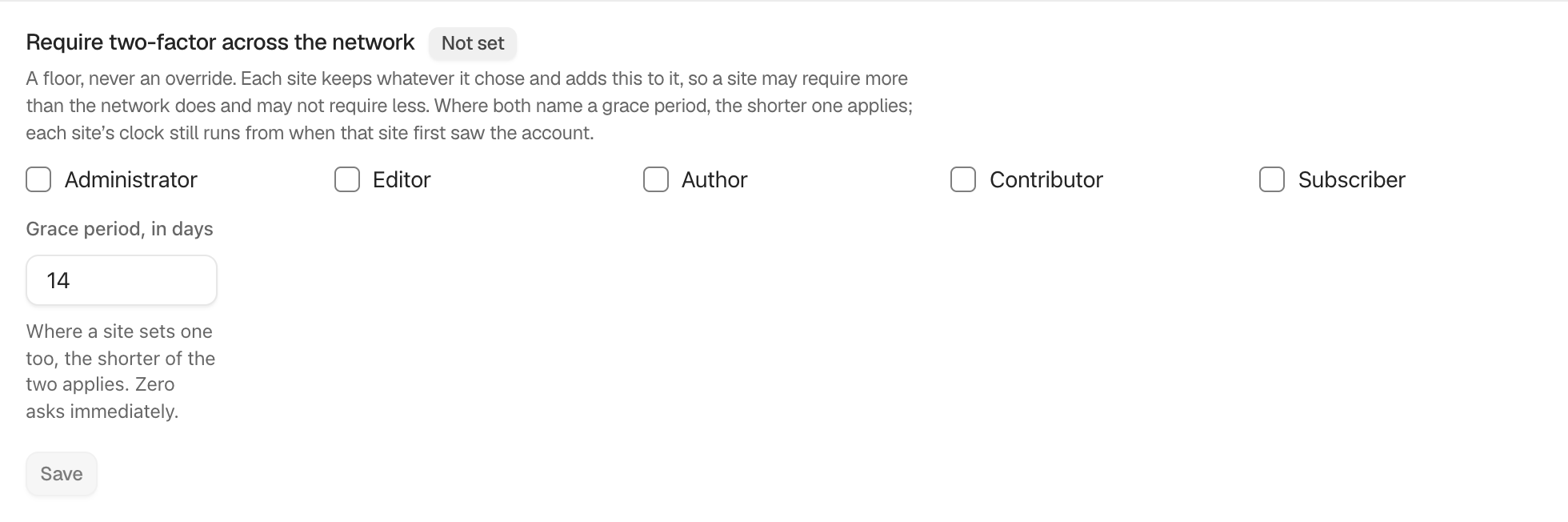
The policy offers Administrator, Editor, Author, Contributor, and Subscriber. No role is selected by default. Grace period, in days accepts 0 to 90 and shows 14 initially. Zero asks immediately.
This is a floor. Each site can require more roles but cannot remove a network-required role. When both levels set a grace period, the shorter applies. Each site’s clock still begins when that site first sees the account.
Step 1: Require Two-factor Across the Network
Tick the required roles, enter the grace period, and select Save. Confirm recovery is ready on affected sites before choosing a short period.
Recommended settings
Start with Administrator and a measured grace period. Expand to other roles after communication and enrollment support are ready.
What it can break and how to undo
Affected users can be blocked after the grace period if they have not enrolled. Use network settings history to restore the previous policy, or select fewer roles and save. A site may still keep a stricter local rule.
Final Outcome
Open a site’s Login & Access screen. Network-required roles should be locked into its effective policy.
Related
This is how you can require two-factor across the network with BetterShield.
Getting Stuck? Feel free to contact our Dedicated Support Team.