How To Connect BetterShield Lockouts to Fail2Ban?
Write one line to the server's auth log when BetterShield pauses a connection, so a Fail2Ban jail can block that network. Off by default.
Write one line to the server’s auth log when BetterShield pauses a connection, so a Fail2Ban jail can block that network. Off by default.
What it does
BetterShield’s own pauses run inside WordPress, so a paused connection is still answered, just refused. A server that runs a firewall jail such as Fail2Ban can do more: it reads the server’s auth log and drops the network at the firewall, before WordPress is reached at all. Send lockouts to the server’s firewall writes the line that jail reads. It is off by default, on the Server firewall card of BetterShield › Protection › Login & Access, between Allow and block lists and Sessions.
When sign-in or a public form pauses a connection, one line goes to this server’s auth log, the moment the pause starts. In the screen’s words, “Nothing leaves this server.” The line looks like this:
bettershield[4242]: lockout surface=signin network=203.0.113.0/24 minutes=15 site=example.com
| Part | What it says |
|---|---|
surface | What paused the connection: signin, reset (the password reset form) or register (the sign-up form) |
network | The connection’s network: the /24 for IPv4, the /64 for IPv6. Never the full address, and never a username. |
minutes | How long the pause lasts, a longer repeat pause included |
site | This site’s address without https://, so one auth log can serve several sites |
What writes a line:
- Every sign-in pause from sign-in lockouts, including one started by a name on Never allowed to sign in.
- A password reset or sign-up form closing to a connection, from public form limits.
What writes nothing:
- A comment burst held for moderation, “because it turns nobody away.”
- A pause on a network that holds an address on Always allowed, “because the recovery link cannot lift a ban at the firewall.” See Allow and block lists.
- A connection BetterShield cannot verify, which is never paused in the first place. See Proxies and Cloudflare.
- Anything while safe mode is on, since no connection is paused then.
The switch is drawn as held, and cannot be changed on the card, in three cases:
| The card says | Why |
|---|---|
| Set by your host | Your host decided it for every site it runs, with the filter described below: “Your host has turned this on for every site it runs, so it is not changed here.” The same is said when a host turns it off. |
| Set from the main site | On a multisite network: “On this network it is set from the main site, because the server’s firewall bans a network for every site on it. Lines from this site also respect the main site’s allowed list.” |
| “Unavailable on this server” | “PHP’s system log functions are turned off here, so there is nothing to write the line with.” |
Step 1: Open BetterShield › Protection › Login & Access
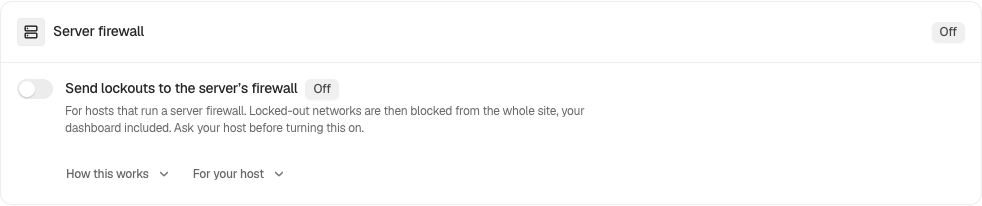
Open BetterShield › Protection › Login & Access and find Server firewall.
Step 2: Connect BetterShield Lockouts to Fail2Ban
- Turn on Send lockouts to the server’s firewall.
- Press Save in the bar at the bottom. The card’s badge reads On.
- Install the Fail2Ban filter and jail that come with the plugin (below), or ask your host whether their jail reads this line.
| Option | What it does | Default |
|---|---|---|
| Send lockouts to the server’s firewall | Writes one line to the server’s auth log for each pause, for a firewall jail to read. | Off |
The switch is not counted under Protections at the top of the screen: it does nothing on a server without such a jail, so off is not a protection missing.
The Fail2Ban filter and jail
The plugin’s fail2ban folder holds a sample filter, filter.d/, and a sample jail, jail.d/. The filter needs Fail2Ban 0.10.5 or later. From the WordPress folder:
sudo cp wp-content/plugins/bettershield/fail2ban/filter.d/bettershield.conf /etc/fail2ban/filter.d/
sudo cp wp-content/plugins/bettershield/fail2ban/jail.d/bettershield.local /etc/fail2ban/jail.d/
sudo fail2ban-client reload
Before you reload, read the jail and change what does not fit your server:
| Setting in the jail | As shipped | What to know |
|---|---|---|
logpath | /var/log/auth.log | Where Debian and Ubuntu write the auth log. RHEL-family systems send it to /var/log/messages unless rsyslog is told otherwise. On a journald-only host, drop logpath and use backend = systemd with journalmatch = SYSLOG_IDENTIFIER=bettershield. |
maxretry | 1 | One line is already a decision: BetterShield wrote it after its own limit was reached. |
findtime | 60 | |
bantime | 900 | 15 minutes, the length of BetterShield’s default pause. Make it longer if you prefer. |
ignoreip | commented out | Put the server’s own addresses and any office ranges here: a ban at the firewall is one the site’s recovery link cannot lift. |
port | http,https | The ban covers web traffic to the whole server. |
Many sites on one server
Each line names its site, so one jail can serve every site on the server. To have a jail act on one site only, edit the filter as its own comment says: replace \S+ after site= with that site’s address, for example site=example\.com(?:/.
A host can turn the line on, or off, for every site it runs with the bettershield_host_ban_line filter, for example in a must-use plugin:
add_filter( 'bettershield_host_ban_line', '__return_true' );
Each site’s card then reads Set by your host. __return_false turns it off everywhere the same way.
Recommended settings
We recommend it only where a jail on the same server reads the line. Without one, it writes lines nobody reads.
| Site | What we recommend |
|---|---|
| Your own server with Fail2Ban | On, with the shipped filter and jail, the server’s own addresses in ignoreip, and your office’s fixed address on Always allowed. |
| Shared or managed hosting | Ask your host first. If they run a jail for it, they may already have set it for you (Set by your host). |
| Behind Cloudflare or another proxy | Connections reach the server from the proxy, so a ban on the visitor’s network at the server’s firewall does not stop them. Leave it off unless your host says their setup handles this. |
| Agency or many sites on one server | One jail for all of them, or the host-wide filter above. Give each site’s Always allowed list your team’s fixed addresses. |
What it can break, and how to undo
- A ban covers a whole network. In the screen’s words, “A firewall ban on a /24 covers more than this site’s own pause, which counts each IPv4 address on its own.” Everyone in that network (an office, a school, a mobile carrier) is shut out of every site on the server, browsing included, until the ban ends.
- The recovery link cannot lift it, and neither can Release Now: they end BetterShield’s pause, not the firewall’s ban. The ban ends when its
bantimepasses, or when you or your host lift it, for example withsudo fail2ban-client set bettershield unbanip 203.0.113.0/24. - Allowed networks write nothing. A network holding an address on Always allowed is never sent to the firewall, so add your own fixed addresses there before you turn this on.
To turn it off, switch it off and press Save. With Ask for my password before removing a protection on, that asks for your password. The save is recorded as “Login protection changed”, rated Medium. Bans already in place run until they end; remove the jail from /etc/fail2ban/jail.d/ if you want none in future.
Final Outcome
The card. The badge reads On.
- A real pause. After a pause appears under Lockouts,
sudo grep bettershield /var/log/auth.log(orjournalctl -t bettershield) shows its line. - The jail.
sudo fail2ban-client status bettershieldlists the networks banned now.
To test the filter without waiting for a pause, write a test line and check that the filter matches it. The network below is one set aside for examples:
logger -p auth.warning -t bettershield "lockout surface=signin network=203.0.113.0/24 minutes=15 site=example.com"
sudo fail2ban-regex /var/log/auth.log /etc/fail2ban/filter.d/bettershield.conf
fail2ban-regex should report the line as matched. On a journald-only host, use systemd-journal in place of the log file’s path. With the jail running, the test line also bans 203.0.113.0/24 for the bantime.
On multisite
The switch is the main site’s, because the server’s firewall bans a network for every site on it. On any other site the card reads Set from the main site, and its lines also respect the main site’s Always allowed list.
Related
- Login & Access
- Sign-in lockouts
- Public form limits
- Allow and block lists
- Proxies and Cloudflare
- Multisite networks
This is how you can connect BetterShield lockouts to Fail2Ban.
Getting Stuck? Feel free to contact our Dedicated Support Team.