How To See What Changed Since your Last Visit With BetterShield?
Review the important site changes recorded since you last opened BetterShield Overview.
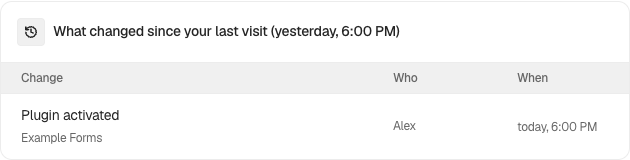
In BetterShield, Since you last looked appears on BetterShield › Overview when the activity log has relevant changes after your previous visit.
What it does
The card lists important recorded changes with what changed, who or what made the change, and when it happened. It is a shortcut into the existing activity history, not a second log.
Step 1: See What Changed Since your Last Visit
No setup is required. Keep activity recording available, then return to BetterShield › Overview after site changes have been recorded.
Recommended settings
Read this card before responding to a new finding. A recent plugin, account, or configuration change may explain why the audit result moved.
What it can break and how to undo
Reviewing the card is read-only. Follow the linked activity row or feature guide before reversing a recorded change.
Final Outcome
After a relevant activity event is recorded and you return later, the card should name the event and actor. Open the log should lead to the underlying history.
Related
This is how you can see what changed since your last visit with BetterShield.
Getting Stuck? Feel free to contact our Dedicated Support Team.