How To Check for Known Vulnerabilities With BetterShield?
Enable optional vulnerability checks, understand consent and refresh results, and distinguish stale or unavailable data from a clean result.
With BetterShield, enable optional vulnerability checks, understand consent and refresh results, and distinguish stale or unavailable data from a clean result.
What it does
With consent, BetterShield asks BetterShield Hub for published vulnerability advisories and matches installed versions locally. No Hub account or paid license is required. WordPress, themes, plugins and must-use plugins can be included in the inventory.
Step 1: Open BetterShield › Settings › General
Open BetterShield › Settings › General and find Vulnerability checks. The same opt-in is offered in Quick Setup’s Protect step.
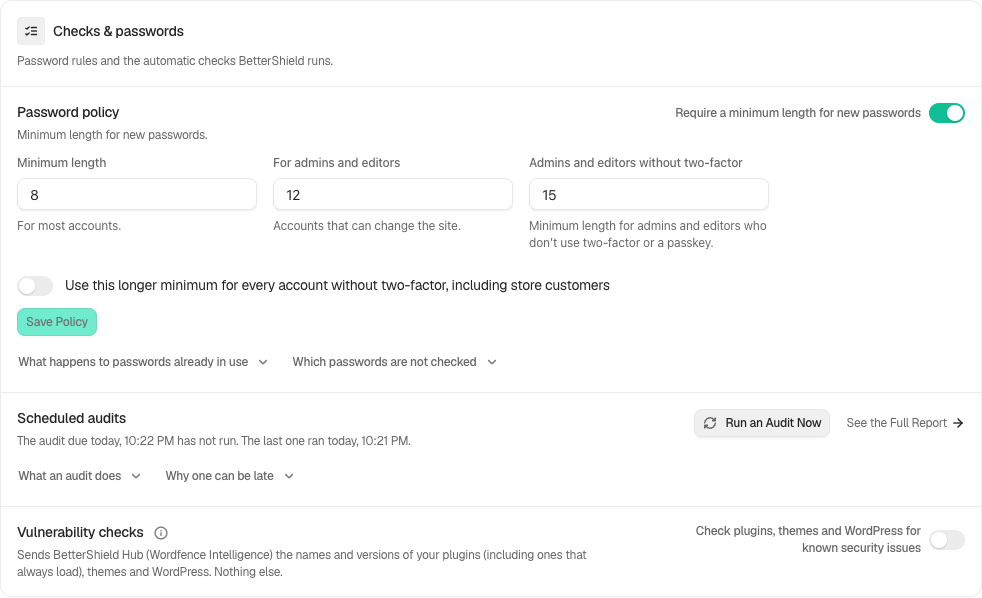
Step 2: Check for Known Vulnerabilities
- Read Check plugins, themes and WordPress for known security issues. It is off by default.
- Turn it on only after reviewing what leaves the site: component names and versions, not the site address, email, username or a key.
- Review the refresh state and timestamp. Checks run daily and after relevant component changes.
Read the result
A finding identifies affected components and available fixes. An unknown version or severity is not evidence of safety. If a refresh fails, the previous good result is kept with a warning. Without a successful result, the site has not been checked against current advisories. Directory closure and abandoned-plugin checks are separate local findings.
Recommended settings
Our advice is to enable the check when this data exchange fits your site, then review serious findings and update on staging where practical. A vulnerability result does not replace a backup or a file check.
What it can break and how to undo
The check reads; it does not install updates or deactivate components. Turn consent off to stop future feed requests. Previously recorded results and activity do not become proof of a current clean result.
Final Outcome
Check the source, last successful refresh, result age and any warning. A service refusal or unavailable feed must remain visibly unavailable; do not interpret an empty list alone as a pass.
Related
This is how you can check for known vulnerabilities with BetterShield.
Getting Stuck? Feel free to contact our Dedicated Support Team.