How To See Which Security Plugin Does Each Job With BetterShield?
Use the Overview to see when another active security plugin already covers a job BetterShield recognizes.
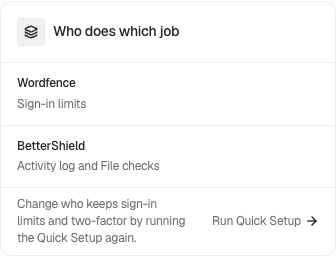
In BetterShield, Who does which job can appear on BetterShield › Overview when another active security plugin is recognized.
What it does
The card identifies selected jobs already handled by another active plugin. It helps explain why overlapping controls may be unnecessary. It does not certify the other plugin or prove that every part of a feature is configured correctly.
Step 1: See Which Security Plugin Does Each Job
No setup is required. Activate a supported security plugin and return to the Overview.
Recommended settings
Keep one clear owner for each overlapping job. Before disabling either control, compare what each plugin actually covers and how it is configured.
What it can break and how to undo
The card itself is read-only. Disabling an overlapping feature can remove protection if the other plugin does not cover the same behavior. Turn the original feature back on if testing shows a gap.
Final Outcome
The card should name the recognized plugin and the jobs attributed to it. Deactivating that plugin should remove its coverage from the next view.
Related
This is how you can see which Security plugin does each job with BetterShield.
Getting Stuck? Feel free to contact our Dedicated Support Team.